
8 Best Midjourney Alternatives (2026), With Real Test Results
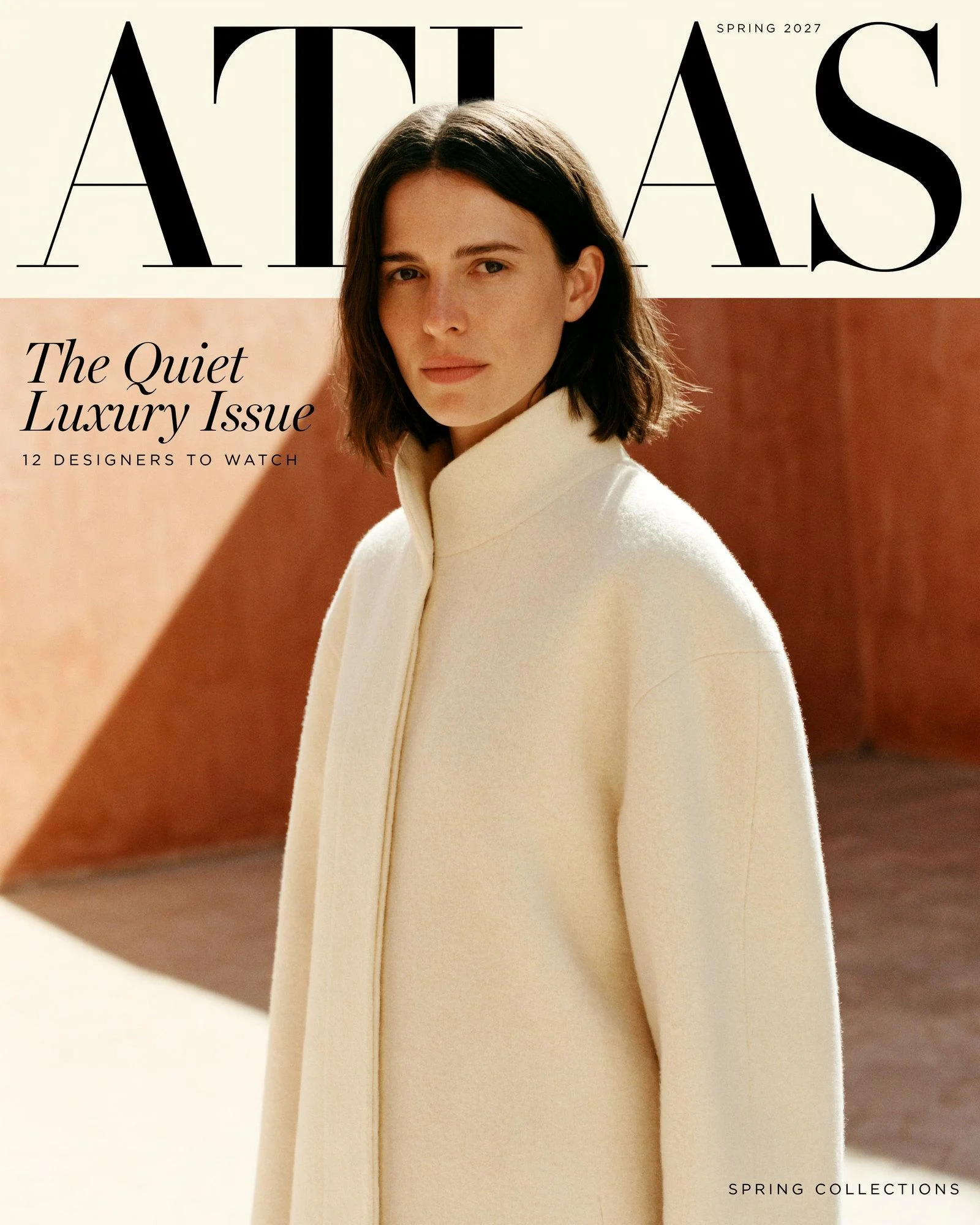
We gave Midjourney V8.2 and four alternatives the same magazine cover, book cover, and car ad, then asked Midjourney and Ideogram to change one line on the finished cover. Midjourney redrew about a third of the image, and in three of its four edits a line we never touched came back misspelled. Ideogram 4.6 changed the line and left every pixel outside it identical.
That's why Ideogram is our pick if you're leaving Midjourney for client work: it follows the brief, delivers 4K files, and edits one line without breaking the rest of the design. Below are eight alternatives, what each free plan gives you, and how to move your prompts over. Our roundup of the best AI image generators covers the wider field.
Overview : Why are you leaving Midjourney? Pick by reason
| If you're leaving because… | Pick | Why, from our test or the vendor's own page |
|---|---|---|
| You need to change one word without redrawing the design | Ideogram | One instruction changed one line; every pixel outside it stayed identical |
| You need print-size files | Ideogram | 3584 × 4480 at 4K, against 960 × 1200 from Midjourney before upscaling |
| The layout has to match the brief | Ideogram or Leonardo AI | Both followed every type instruction on our magazine cover; only Ideogram also returned 4K files |
| There's no free plan | Ideogram, Leonardo AI, or Gemini | Ideogram gives eligible accounts free weekly credits, Leonardo 150 tokens a day, and Gemini a free daily allowance |
| Your images are public unless you pay $60 | Ideogram | New images stay private on Plus, at $20 a month |
| Your company earns over $1 million and Midjourney requires Pro or Mega | Ideogram | Its terms set no revenue threshold for commercial use |
| You need an API | Ideogram, OpenAI, or Black Forest Labs (FLUX) | All three sell API access; Midjourney publishes no API |
| You also make short videos | Ideogram | Its Video app makes clips from text, a start and end frame, or reference images, video, and audio |
| You want a strong free option | Leonardo AI | Its free plan (GPT Image 2 via Auto) came closest to Ideogram in our test |
| You want vector files | Ideogram or Recraft | Ideogram's Vector model and Recraft both export SVG files |
| You'd rather edit by chatting | ChatGPT or Gemini | Edits happen in the same conversation |
Overview : Is Midjourney free? What it costs and what you give up by leaving
No. Midjourney has no free plan, and its help center says no free trial is available on Discord or midjourney.com. The only trial is in its separate niji·journey mobile app.
- Prices: Basic is $10 a month, Standard $30, Pro $60, and Mega $120. Yearly billing takes 20% off.
- What you buy: GPU time, not images. Basic includes 3.3 hours of Fast time and no Relax mode.
- Privacy: Stealth mode, which keeps your images out of Midjourney's public gallery, is only on Pro and Mega.
- Companies: A company with more than $1 million a year in revenue must be on Pro or Mega.
- Automation: Midjourney publishes no API, and its terms bar automated tools from accessing the service.
Midjourney's images look great, and our test shows it. Its default compositions and lighting are polished, and it spelled every word in our two covers. Our side-by-side of Ideogram and Midjourney compares the two feature by feature.
Overview : Midjourney V8.2 vs. Ideogram 4.6 and three free tools: our test
We wrote three briefs of the kind a brand or agency would hand a designer, and ran each one word for word in five tools:
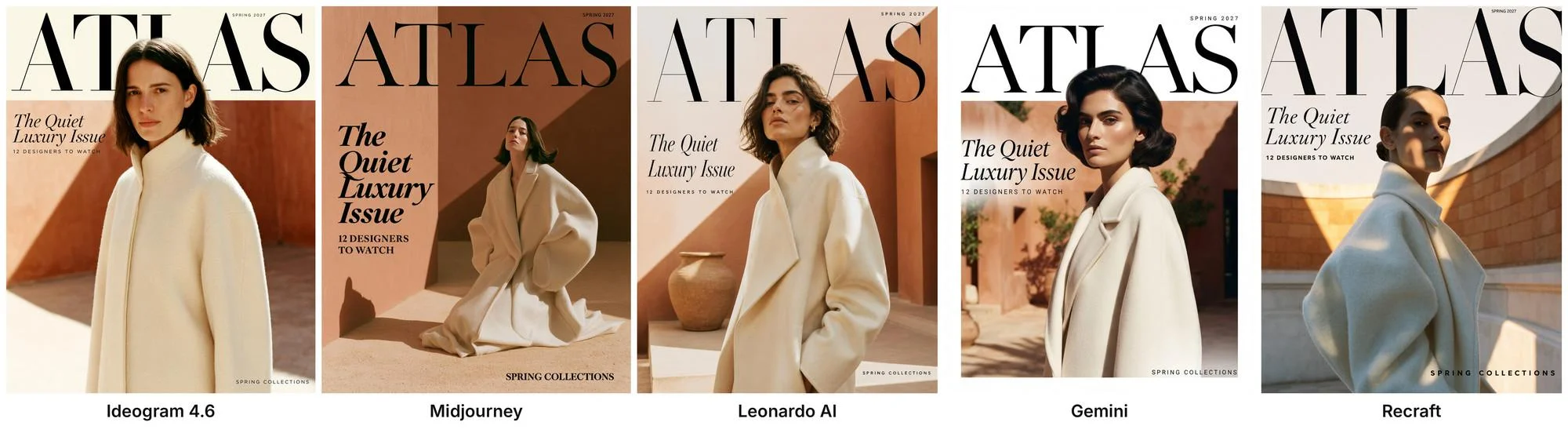
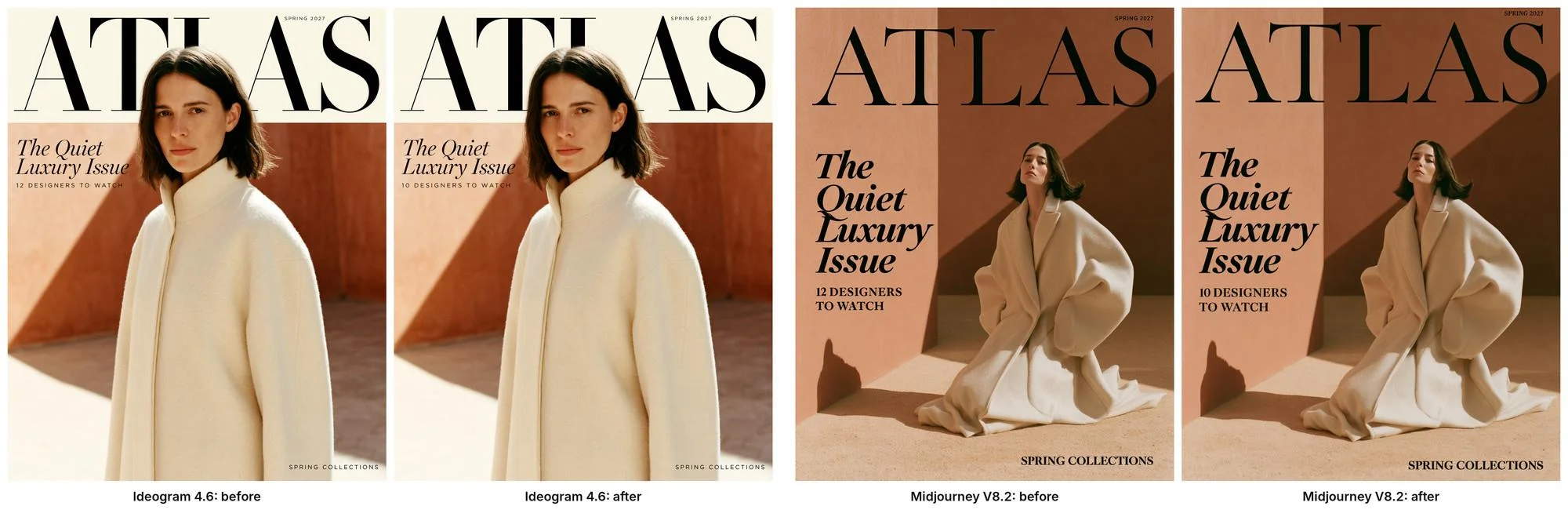
- Luxury magazine cover: masthead "ATLAS" in a tall Didone serif, with the model's head in front of the letters; "SPRING 2027" in small spaced capitals; the cover line "The Quiet Luxury Issue" in a graceful italic; "12 DESIGNERS TO WATCH" and "SPRING COLLECTIONS" in small spaced sans-serif capitals.
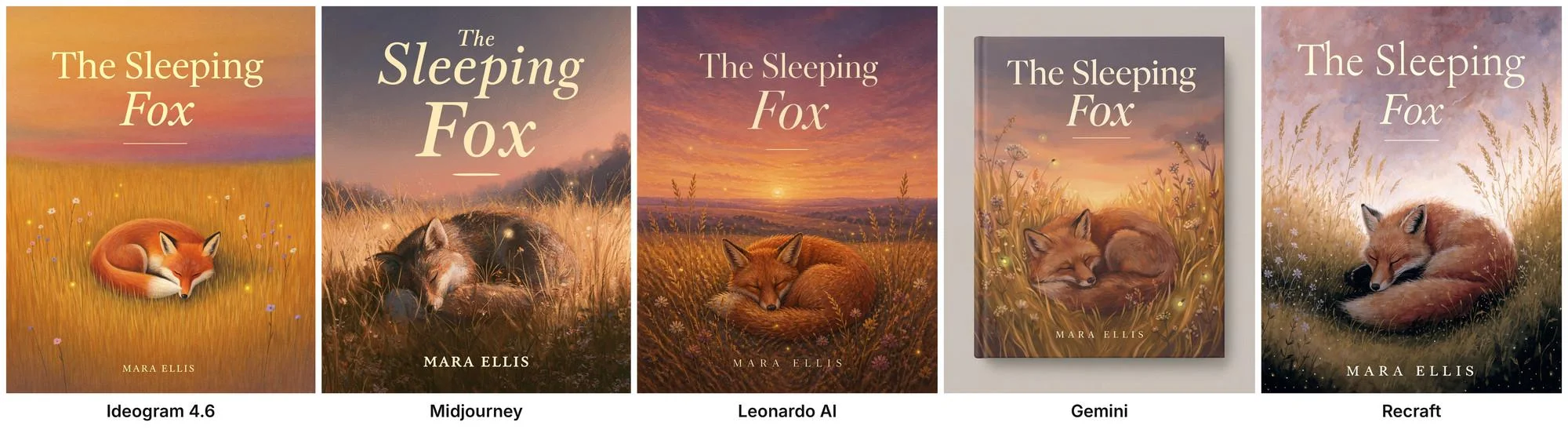
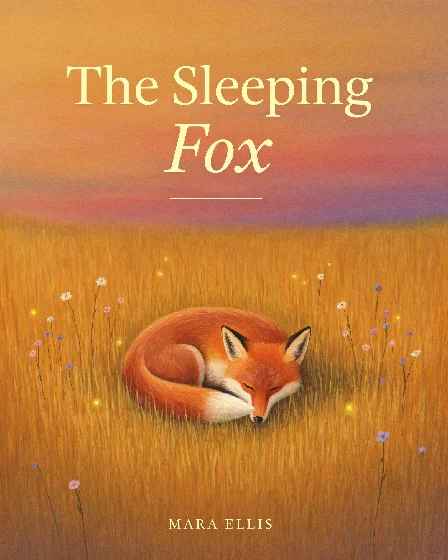
- Literary book cover: a gouache fox asleep in golden grass, the title "The Sleeping Fox" with "Fox" in italic, a thin rule, and the author name "MARA ELLIS" in spaced capitals.
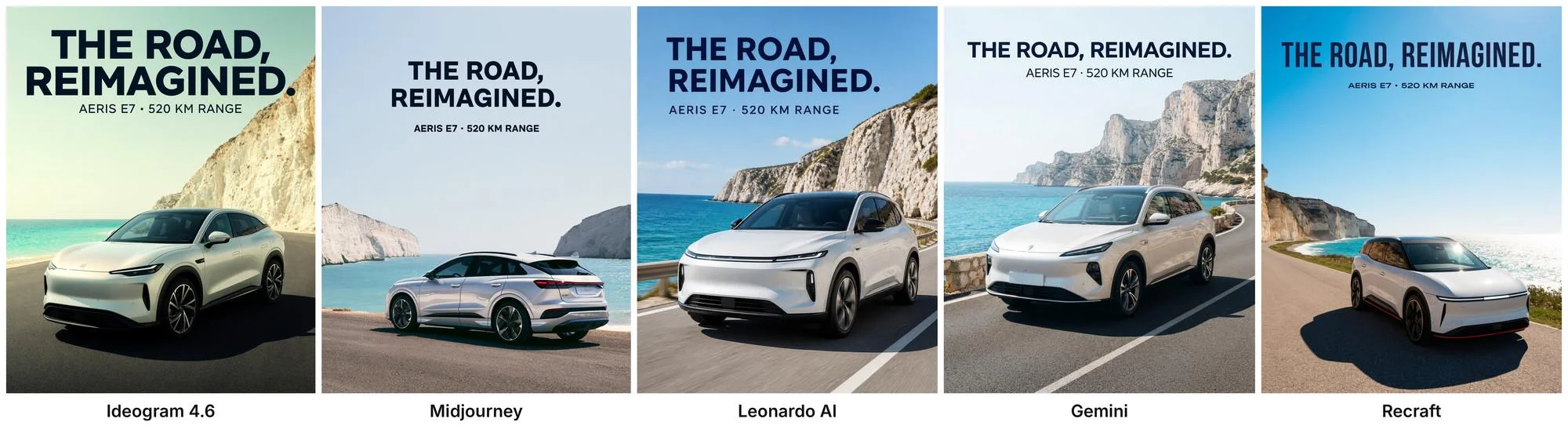
- Car launch ad: a white electric SUV on a coastal road, the headline "THE ROAD, REIMAGINED." and the line "AERIS E7 · 520 KM RANGE".
- One-line edit on the magazine cover: Change "12 DESIGNERS TO WATCH" to "10 DESIGNERS TO WATCH". Keep everything else exactly the same.
How we ran it:
- Midjourney V8.2 ran on a paid Basic plan with default settings and --ar 4:5. It returns four images per prompt, and we kept the best of the four. For the edit, we used Midjourney's Quick Edit with the same instruction.
- Ideogram 4.6 ran on a paid plan at High quality and 4K, with Magic Prompt off. We kept the best of up to four tries, the same best-of-four approach Midjourney got. The edit ran in Precise Edit and cost 60 credits at High quality.
- Leonardo AI, Gemini, and Recraft ran on free accounts, one image per prompt. Leonardo's free plan uses its Auto model, which picked OpenAI's GPT Image 2 for all three briefs, at 896 × 1152. Gemini and Recraft got "Create an image, vertical 4:5 portrait format" before the prompt.
- ChatGPT, Adobe Firefly, Krea, FLUX, and Stable Diffusion are covered from their own product, pricing, and help pages.
We checked every word at full size and measured the edits by comparing the before and after files pixel by pixel.
Results
| What we checked | Ideogram 4.6 | Midjourney V8.2 |
|---|---|---|
| Words spelled right, 3 briefs | All | All on both covers; 1 of 4 car ads read "520 IKM RANGE" |
| Head in front of the masthead | Yes | No, in 0 of 4 images |
| Cover lines in the type styles asked for | Yes | Bold display italic, and "12 DESIGNERS TO WATCH" in a bold serif |
| Book cover delivered as flat cover artwork | Yes | Yes, but darker; the fox is hard to see in 2 of 4 |
| Image size | 3584 × 4480 | 960 × 1200 before upscaling (its HD mode renders at 2K) |
| One-line edit: pixels outside the edited line | 100% identical | About 31% to 35% changed by more than 8 levels, in all 4 edits |
| One-line edit: other text after the edit | Unchanged | "SPRING 2027" misspelled in 3 of 4 edits |
| What we checked | Leonardo AI | Gemini | Recraft |
|---|---|---|---|
| Words spelled right, 3 briefs | All | All | All |
| Head in front of the masthead | Yes | Yes, but the photo sits inside a white frame | Partly; the masthead is cut off at both edges |
| Cover lines in the type styles asked for | Yes | Yes | Yes |
| Book cover delivered as flat cover artwork | Yes | No: a photo of a hardcover book on a gray backdrop | Yes |
| Image size | 896 × 1152 | 928 × 1152 | 896 × 1152 |
The edit: one line changed, nothing else touched
Both tools got the new line right. The difference is what happened to everything around it.
In Ideogram, the edited file is identical to the original at every pixel outside the changed line. In Midjourney, each of the four edits redrew the cover. The pose and coat stayed close, but about a third of the pixels shifted, and the small "SPRING 2027" line in the top corner came back garbled in three of the four, with letters swapped or broken ("SARRIG 2027" in one).

What the test showed:
- Spelling is close to a tie. All five tools spelled both covers correctly. Midjourney made the only typo, in one of its four car ads. If a review tells you only one AI can spell, it's out of date.
- Following the brief is not. Ideogram and Leonardo (running GPT Image 2) got both the layered masthead and every requested type style, and Gemini came close but boxed the photo in a white frame. Midjourney set its own heavier type and kept the masthead clear of the model in every try.
- Edits are where Midjourney costs you time. If a client changes one word, Ideogram changes one word, the same way you'd fix a misspelled word without recreating the image. Midjourney gives you a new image, and you check the whole thing again.
- File size matters for print. Ideogram's 4K output had about 14 times as many pixels as Midjourney's standard output in our test (3584 × 4480 vs. 960 × 1200). Midjourney's HD mode and upscalers close part of that gap, at extra GPU time, and Ideogram Upscale can take a finished image larger still.
Tool 1 : Ideogram: the Midjourney alternative for brand and print work
On all three briefs, Ideogram returned every word as typed, in the type styles we described, at 3584 × 4480. Then it changed one cover line without touching anything else, the step that cost the most time in Midjourney. Department stores use the same workflow for editorial retail campaigns, and media teams use it to adapt key art across markets.
Change one word with Precise Edit
Open the image in Precise Edit, choose Ideogram 4.6, and describe the change in plain words. If you want to limit the change to one area yourself, masks in Precise Edit mark exactly which pixels may move. In our test, the new line came back in the same typeface, size, and spacing as the old one. Ideogram 4.6, the precise editing model, is built for this kind of step-by-step change, and it generates images in native 4K.
Covers, ads, and posters with exact text
Put every word in quotation marks and say where it goes and how it should look ("small spaced capitals," "large italic serif"). The guide to writing prompts for text in images covers longer copy, and Ideogram's text rendering handles headlines, lists, and body copy. When a word needs to change after the fact, editable text layers let you retype it without generating again. Our comparison of AI tools for editing text in images covers the other options.
Tip: end the prompt with "No other text" when you want only your own copy on the image, and zoom in on small details such as badges before you publish.
Keep a look across a campaign
Attach a past image as a reference or save the look with Ideogram Styles, so a series of ads or covers stays consistent. Our guide to AI image generators for brand consistency goes deeper on keeping campaigns on-brand. The same reference approach keeps a character consistent from image to image, and Ad Resizer turns one finished ad into every placement size.
Vectors and video in the same app
The Vector model turns a prompt or an existing image into an SVG file you can scale and edit, for logos and print. When a campaign needs motion, Ideogram's Video app can create videos from a text prompt, a start and end frame, or reference images, video, and audio you upload, so a finished ad can become a short clip without switching tools.
Private images without paying $60
On every paid Ideogram plan, new images stay private until you publish them. Midjourney keeps that for Pro and Mega. Our explainer on who can see your Ideogram images covers sharing and deletion.
For developers
Midjourney offers no official API. Ideogram has a public API billed per image, and Ideogram API pricing lists the rate for each model and quality level. If you're choosing an API for a team, our roundup of image generation APIs for enterprise compares the main providers.
Free plan, prices, and commercial use
- Free: weekly credits for eligible accounts that sign in with Google, Apple, or Microsoft; Ideogram says the amount may vary. Free images are public.
- Plus: $20 a month, or $15 a month billed yearly, with 2,400 priority credits and private images.
- Pro: $60 a month, or $42 a month billed yearly, with 7,500 priority credits.
- Team: $30 per user a month, or $20 per user billed yearly, with 3,600 priority credits per user.
- Commercial use: allowed on every plan, including Free, with no revenue threshold in Ideogram's terms. Ideogram doesn't claim ownership of your images.
Ideogram plans and credits has the full credit table, and our post on who owns the images you make in Ideogram explains the rights.

Tool 2 : Leonardo AI: the strongest free result in our test
On the free plan, Leonardo's Auto mode sent all three briefs to OpenAI's GPT Image 2, and the results were close to Ideogram's: every word right, the model's head in front of the masthead, and a flat, clean book cover. The gaps were file size (896 × 1152) and the free plan's limits: free images are public, and you can't pick the model.
Leonardo works like a creative studio in the browser, with 80+ models on paid plans, personal models you train on your own images, and a canvas for editing. If you liked exploring a look over many variations in Midjourney, it's the most familiar layout on this list.
- Free: 150 tokens a day, the Auto model only, and public images. Leonardo's help center says free users can use their images commercially.
- Paid: Essential is $12 a month, with 8,500 fast tokens, 80+ models, and private images.
- API: pay-as-you-go API credits, separate from app tokens.
Tool 3 : Recraft: clean free results, plus vector files
Recraft's free account spelled all three briefs correctly and made a clean, bright book cover. Its magazine cover cut the masthead off at both edges, and its files came out at 896 × 1152. Recraft is built for design assets and exports SVG and PDF as well as PNG and JPG.
- Free plan catches: images are public, and Recraft says they aren't licensed for commercial use.
- Paid: Basic is $12 a month, or $10 a month billed yearly, with 1,000 credits and commercial rights.
If vectors are the main job, our list of AI vector generators compares Recraft with other SVG tools.
Tool 4 : Google Gemini: the easiest free start
Gemini spelled every word in our three briefs and, like Ideogram and Leonardo, put the model's head in front of the masthead. It also made choices we didn't ask for: it framed the cover photo in a white border, and it turned the book cover into a photo of a hardcover book on a gray backdrop. Its files came out at 928 × 1152.
- Free: image generation under daily limits Google doesn't give as an image count.
- Paid: Google AI Pro is $19.99 a month in the US, with higher limits.
- Watermarks: every image carries Google's invisible SynthID watermark.
Tool 5 : ChatGPT Images: best if you'd rather edit by chatting
ChatGPT handles images inside a conversation, so you can ask for changes in plain words and keep going. In an earlier round of our testing, it spelled every line of two text-heavy posters correctly but painted both in full color when we asked for flat colors and two-color ink. OpenAI's GPT Image 2 model also ran in this round through Leonardo's free plan, and it followed our briefs closely.
- Free: image creation with a limit OpenAI doesn't publish as a number.
- Paid: ChatGPT Go is $8 a month in the US, and Plus is $20.
- API: OpenAI's image models are available through its API, priced per token.
Tool 6 : Adobe Firefly: for Adobe workflows and commercially safe training
Firefly fits teams already working in Photoshop and Adobe Express. If Firefly is what you're comparing against, our list of Adobe Firefly alternatives covers that switch in detail. Adobe says its own Firefly models are trained on licensed and public-domain content, and their outputs are safe for commercial use. Partner models offered inside Firefly don't carry that statement, so check which model you pick. Adobe also attaches Content Credentials to what you make.
Adobe describes the free plan only as "limited" daily generations.
- Paid: Firefly Standard is $9.99 a month for 2,000 generative credits.
Tool 7 : FLUX and Stable Diffusion: free if you run them yourself
These are open-weight models you can run on your own GPU through tools such as ComfyUI. Check the license before you use them for work:
- FLUX.1 [schnell]: Apache 2.0, so commercial use is allowed.
- FLUX [dev] models, including FLUX.2 [dev]: a non-commercial license for the model, although the license lets you use the images commercially.
- Stable Diffusion 3.5: free under Stability AI's Community License for businesses under $1 million in annual revenue. Above that, you need an Enterprise license.
Hosted versions are available through Black Forest Labs' API, Stability AI's platform, and third-party sites.
Tool 8 : Krea: real-time generation across many models
Krea's real-time canvas updates the image as you draw, type, or move a webcam, with no render button. The free plan gives 100 units a day with access to the real-time models. Krea's paid tiers are listed on its pricing page, which currently shows promotional prices.
Reference : Free Midjourney alternatives compared
| Tool | What's free | Free images public? | Commercial use on free | First paid plan |
|---|---|---|---|---|
| Ideogram | Weekly credits (amount varies) | Yes (private from Plus) | Yes | $20/mo, or $15/mo yearly |
| Leonardo AI | 150 tokens a day | Yes (private from Essential) | Yes, per its help center | $12/mo |
| Recraft | Limited credits | Yes | No | $12/mo, or $10/mo yearly |
| Gemini | Limited daily images | See Google's terms | See Google's terms | Google AI Pro, $19.99/mo |
| ChatGPT | Limited images | See OpenAI's terms | See OpenAI's terms | Go, $8/mo |
| Adobe Firefly | "Limited" daily generations | See Adobe's terms | Yes, for Firefly models | $9.99/mo |
| FLUX / Stable Diffusion | Open weights | Runs on your machine | Set by each model's license | Hosting varies |
| Krea | 100 units a day | See Krea's terms | Unclear on its pricing page | See its pricing page |
| Midjourney, for reference | None | Yes, below Pro | No free plan | $10/mo |
Check the "commercial use on free" column before you post anything for a client. Our guide to AI image generators for commercial use explains how each tool's license reads. A free plan that keeps your images public or bars commercial use costs you more later than a $10 subscription does now.
Reference : Moving your Midjourney prompts to Ideogram
Midjourney rewards short keyword prompts with parameters at the end. Ideogram follows full sentences, so describe the image the way you'd brief a designer, and put any words you want in the image in quotation marks.
| In Midjourney | In Ideogram |
|---|---|
| --ar 4:5 | The aspect ratio menu next to the prompt box |
| --sref or an image prompt | Reference images (up to five) or a saved Style |
| --seed | The seed number shown with each image, set again in generation settings |
| --no text | End the prompt with "No other text" |
| Vary Region or Quick Edit | Precise Edit, with the change described in one sentence |
| Keeping your exact wording | Turn Magic Prompt off, so the prompt is used as typed |
| /describe | Describe, which writes a prompt from an image |
Ideogram's docs on how to structure an Ideogram prompt show which details to put first.
Reference : Midjourney alternatives FAQ
What is the best alternative to Midjourney?
Ideogram, for images that carry words or need edits after the first try. That covers most brand and marketing work, and our guide to AI image generators for business compares the wider field. In our test against Midjourney V8.2, it followed every type instruction on a magazine cover, returned 4K files, and changed one cover line while leaving every other pixel identical.
What is the best free alternative to Midjourney?
Ideogram gives eligible free accounts weekly credits, and commercial use is allowed on every plan. Our test images ran on a paid plan at 4K and High quality, which costs 20 credits an image, so free credits go further at lower settings. Leonardo AI's free plan (150 tokens a day) came closest in our test, and Gemini and Recraft also spelled all three briefs correctly. Recraft's free images aren't licensed for commercial use.
Is Midjourney better than Ideogram?
Midjourney's images are polished, and it spelled both of our covers correctly. Ideogram followed the layout and type instructions more closely and edited one line without redrawing the cover. Ideogram's 4K output had about 14 times as many pixels as Midjourney's standard output in our test (3584 × 4480 vs. 960 × 1200). Midjourney redrew about a third of the image and misspelled an untouched line in three of four edits.
Can I use images from a free AI image generator commercially?
Only on some tools. Ideogram and Leonardo allow commercial use on their free plans. Recraft's free images aren't licensed for commercial use, and open-weight models depend on their license. Check the terms before you use an image for a client.
Does Midjourney have an API?
No. Midjourney publishes no API, and its terms bar automated tools from accessing the service. Ideogram, OpenAI, and Black Forest Labs all offer APIs for image generation.
Try your own brief
Paste a Midjourney prompt you already use into Ideogram, put the words in quotes, and fix any line with one edit.