Comparison guide
Best AI Image Vectorizers (2026): 7 Tools Tested on Logos and Small Text
Ideogram’s SVGs came out 2.4x smaller than Vectorizer.AI’s on the same 10 brand images. You have a logo as a PNG and need a clean vector, not thousands of points to tidy up. Ideogram is the best AI image vectorizer for that job: 2.8x fewer anchor points than Vectorizer.AI, the only real gradients in our test, and no 3-megapixel cap.
We compared the tools on the five things designers check: steps, file size, anchor points, color, and image size. You’ll also find a pick for each kind of file, the free options, and what to do with cut files.
Overview: Which image vectorizer should you use?
For brand logos, labels, and gradient artwork, use Ideogram: its SVGs were smaller, with fewer anchor points, than Vectorizer.AI’s on every image we ran. For DXF cut files, use Vectorizer.AI. Here’s the pick for each kind of file.
- Brand logo or label, small lettering included: use Ideogram. Its SVG was smaller, with fewer anchor points, than Vectorizer.AI’s on every image we ran.
- Artwork with gradients: use Ideogram. It was the only one of the 7 tools that kept gradients as real, editable gradients.
- Large or print-size files: use Ideogram. Our 2048 px images came back at 2048 px, and a 16.8-megapixel poster went in with no crop step.
- Dozens of files at once: use Ideogram. The Vectorizer takes up to 100 images in one run.
- Cut files in DXF for a laser or plotter: use Vectorizer.AI, which exports DXF and has cut and engrave presets.
- One quick free trace: use Adobe Express or VTracer, both free to download.
How the 7 vectorizers compare at a glance
The seven tools we tested, what each is best for, and what an SVG download costs:
| Tool | Best for | To download an SVG |
|---|---|---|
| Ideogram | brand logos, labels, gradient art | 10 credits per image on our plan; API $0.10 per image |
| Vectorizer.AI | DXF, EPS, and PDF for print and cutting | $9.99 a month |
| Adobe Express | a free one-off conversion | free with an Adobe account |
| Kittl | merch designs inside Kittl | free |
| Recraft | tracing, then designing in Recraft | free plan, limited uploads |
| Vector Magic | fixing a trace by hand | $9.95 a month, or $295 for desktop |
| VTracer | free, open-source tracing | free |
Which tools keep gradients, and how large a file each one takes:
| Tool | Real gradients in the SVG | Largest input |
|---|---|---|
| Ideogram | yes | 50 MB (API); 16.8 MP worked in the app |
| Vectorizer.AI | no, flat bands | 3 MP and 30 MB |
| Adobe Express | no | 40 MB |
| Kittl | no | any size in; 1,024 px out |
| Recraft | no | 5 MB |
| Vector Magic | no, flat bands | large images get resized |
| VTracer | no | 16 MP on the web demo |
Overview: What did we run through each vectorizer?
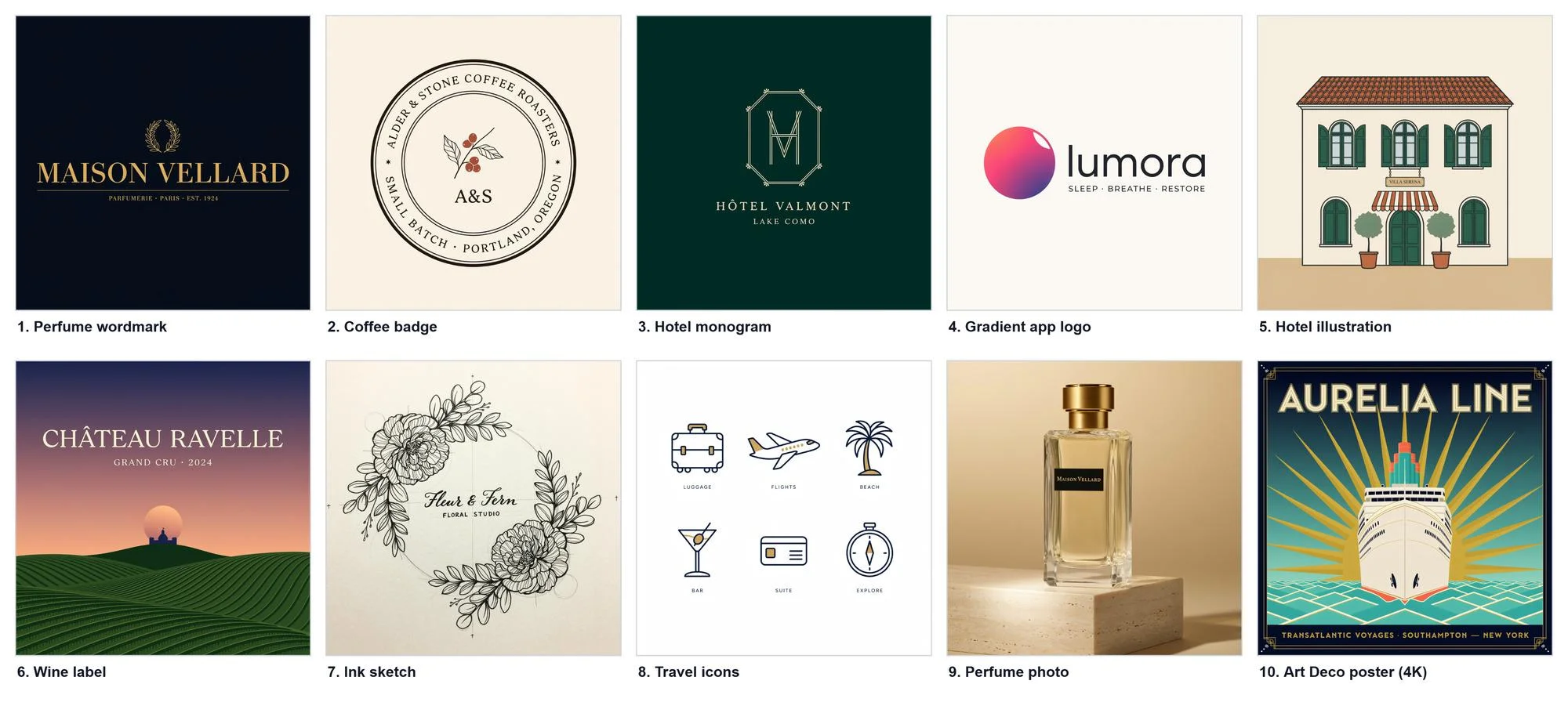
We made 10 images in Ideogram 4.6 for invented premium brands, then put the same files through 7 vectorizers and measured every SVG the same way.
| Test image | What it checks |
|---|---|
| Maison Vellard perfume wordmark | a 6 pt tagline, a fine laurel crest |
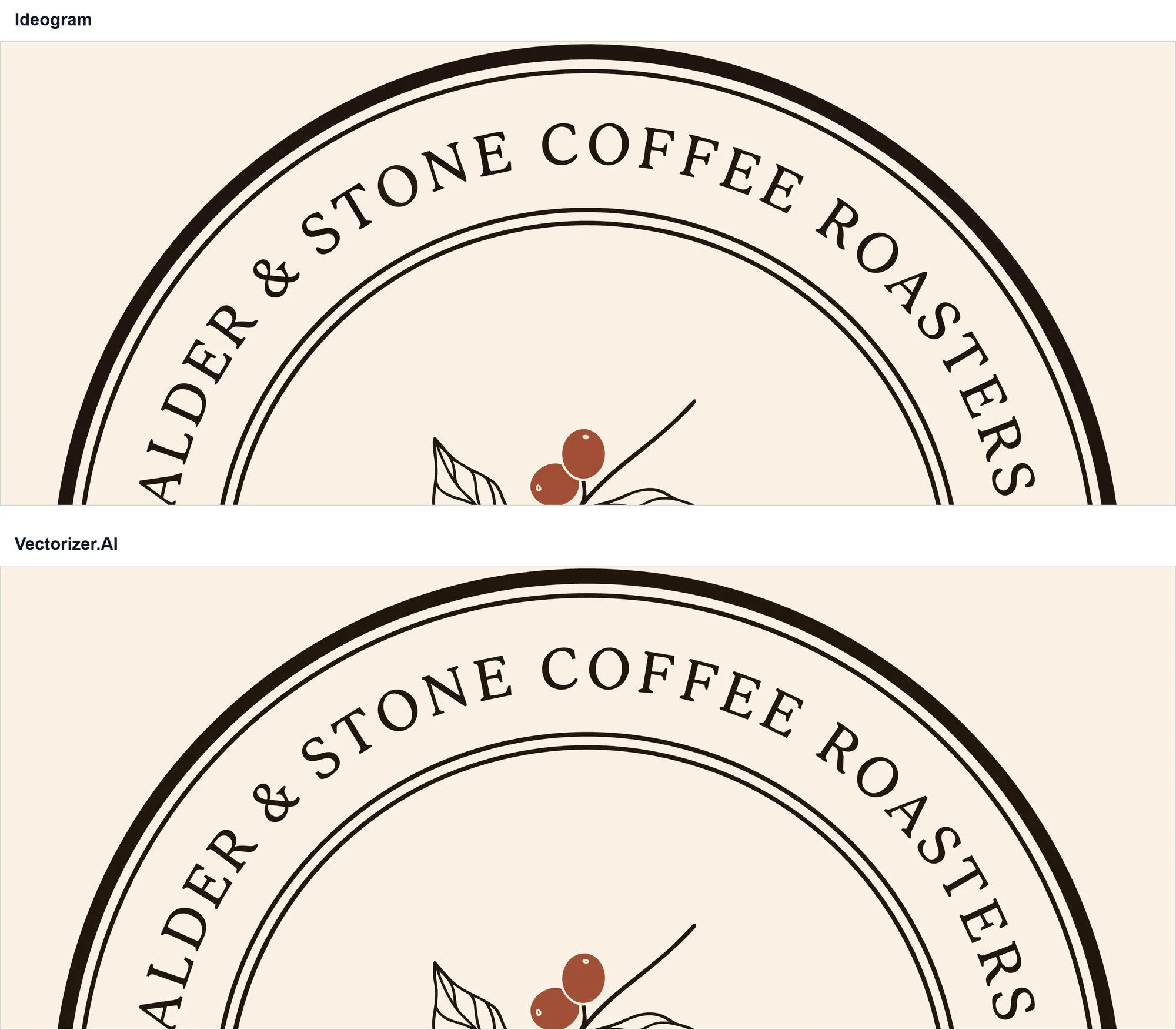
| Alder & Stone coffee badge | small text curved around a ring |
| Hôtel Valmont monogram | hairline strokes |
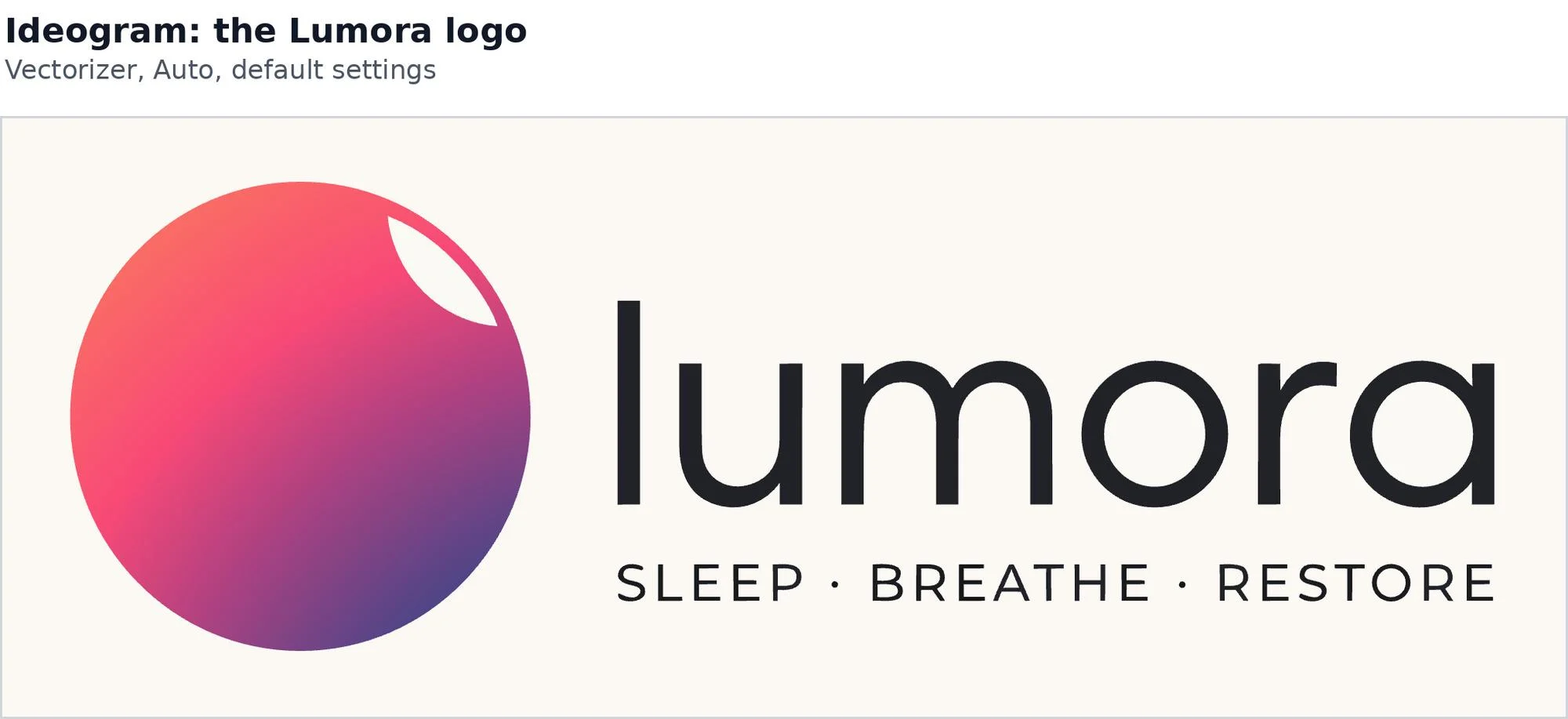
| Lumora wellness app logo | a gradient orb |
| Villa Serena hotel facade | a six-color flat illustration |
| Château Ravelle wine label | a sunset sky gradient |
| Fleur & Fern ink sketch | scanned line art on paper |
| Luxury travel icon set | thin lines and tiny labels |
| Maison Vellard bottle photo | a studio photograph |
| Aurelia Line Art Deco poster | a 4096 px, 16.8 MP file |
The prompts: each test image came from one prompt, so you can make your own copies and rerun the test. Two of them:
A luxury perfume house logo, flat vector-style brand mark on a solid deep navy background (#0F1B2D). Centered, a refined high-contrast Didone serif wordmark reading “MAISON VELLARD” in warm metallic-free flat gold (#C9A45C), generous letter spacing. Above it a small, delicate thin-line laurel crest. Below the wordmark, a thin gold rule and a tiny letter-spaced small-caps tagline reading “PARFUMERIE · PARIS · EST. 1924”. Clean, minimal, elegant, premium, solid flat colors only, no texture, no shadows, no gradients, crisp edges.
A modern premium logo for an invented wellness app, flat vector-style on a solid off-white background (#FAF7F2). On the left, a smooth circular orb symbol filled with a soft linear gradient from coral (#FF7A59) through rose (#E8467C) to deep violet (#5B2A86), with a thin crescent cut-out. On the right, a clean geometric sans-serif wordmark reading “lumora” in charcoal (#1E1E24), and beneath it a small letter-spaced tagline reading “SLEEP · BREATHE · RESTORE”. Minimal, elegant, smooth gradient only in the orb, crisp edges, no texture, no shadows.
The other eight prompts follow the same pattern: an invented brand, exact hex colors, the exact words in quotes, and “flat colors only” wherever the art had no gradient.
What we measured:
- File size: the SVG in KB, as downloaded.
- Anchor points and handles: the points and curve handles you drag when you edit a path in Illustrator or Figma.
- Gradients: whether a blend stays an editable gradient or turns into flat bands.
- Color accuracy: ΔE00 between the SVG and the original. Under 1 is invisible to most eyes; over 5 is a shift you can see.
- Output size: the pixel size of the SVG you get back.
- Steps: the clicks from a file on your desktop to a saved SVG.
Settings and plans: every tool ran on its default settings. Ideogram ran on a Pro plan, at 10 credits per image, and Vectorizer.AI on its paid web plan. Adobe Express, Kittl, Recraft, and VTracer ran on their free plans. Recraft’s free plan covered two logos, and Vector Magic ran in its free preview. Canva, Adobe Illustrator, Inkscape, Figma, and PerfectVector are covered from their official pages.
Results: Which AI vectorizer is the simplest to use?
Ideogram is the simplest: three clicks from file to saved SVG, all on one screen. Vectorizer.AI took four clicks across three pages, with a resize dialog it shows every time an image is over its size limit.
| Step count | Ideogram | Vectorizer.AI |
|---|---|---|
| Clicks to a saved SVG | 3 | 4 |
| Screens | 1 | 3 |
| Dialogs you must answer | 0 | 1 |
| Processing time | 17 s | about 26 s |
| Clicks for 10 files | 12 | 40 |
In Ideogram you add the files, select Vectorize, and select Download on each result. Vectorizer.AI takes one image per upload, so 10 logos means 10 rounds of upload, resize dialog, Download, and a second Download on the options page.
Kittl and Recraft also work on a single page. VTracer shows sliders for detail, speckle filtering, and path precision on the same screen, so you can retrace without leaving the page.
Results: Which vectorizer makes the smallest SVG files?
Across the 10 images, Ideogram’s SVGs added up to 2,244 KB, against 5,331 KB from Vectorizer.AI: 2.4x smaller, and smaller on every image. The only tools that beat it on any image did so by cutting the art to one color or to 1,024 px.
| Image | Ideogram | Vectorizer.AI |
|---|---|---|
| Maison Vellard wordmark | 32 KB | 115 KB |
| Alder & Stone badge | 48 KB | 173 KB |
| Hôtel Valmont monogram | 24 KB | 75 KB |
| Lumora gradient logo | 12 KB | 54 KB |
| Villa Serena illustration | 152 KB | 609 KB |
| Château Ravelle label | 524 KB | 835 KB |
| Fleur & Fern sketch | 691 KB | 1,464 KB |
| Travel icon set | 32 KB | 131 KB |
| Perfume photo | 463 KB | 1,161 KB |
| Aurelia poster | 267 KB | 715 KB |
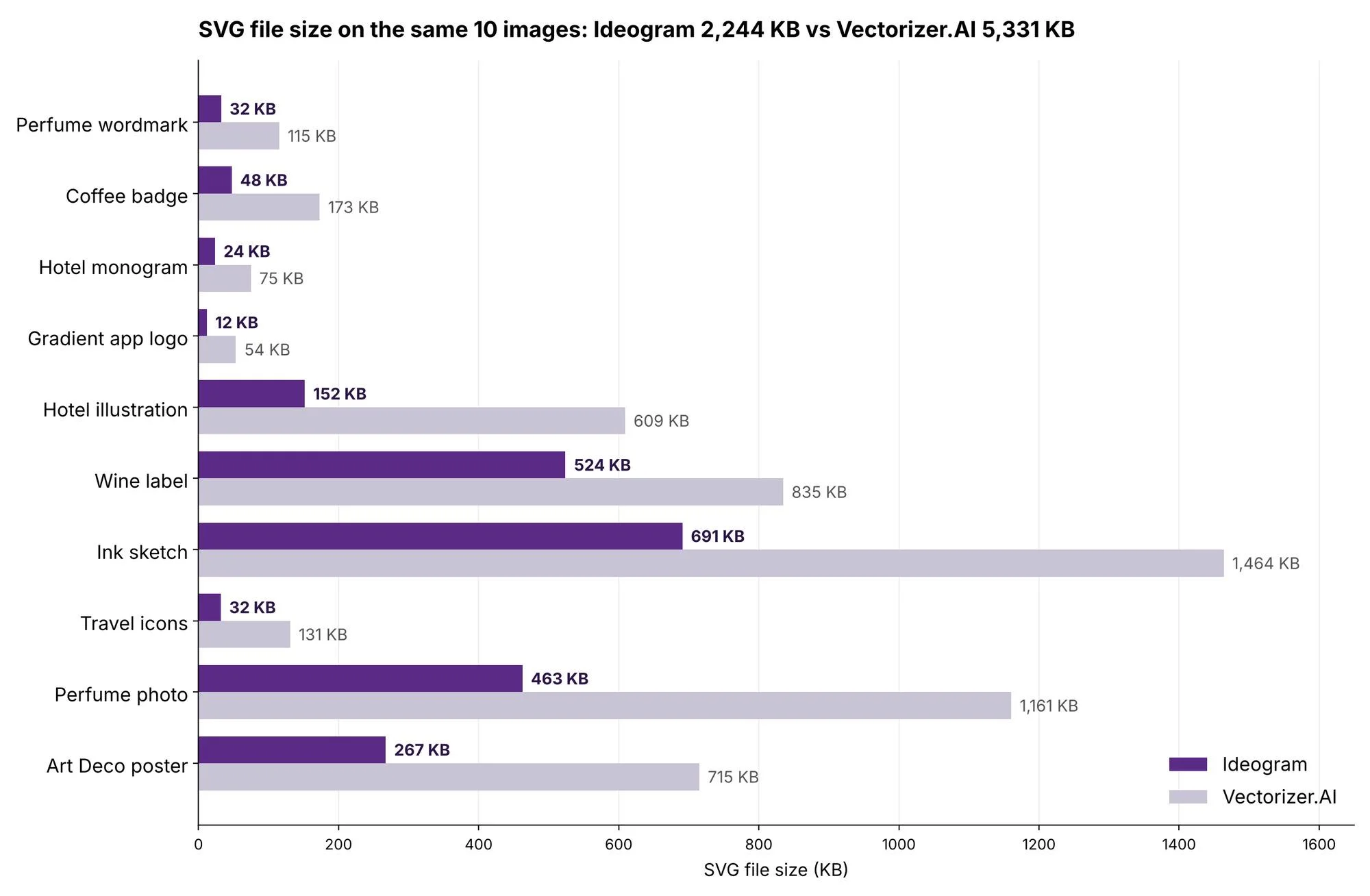
On a web page, that’s the difference between a 32 KB logo and a 115 KB one: the same mark at less than a third of the weight.
Against the other tools, Ideogram’s file was smaller on:
| Tool | Images where Ideogram’s SVG was smaller |
|---|---|
| Vectorizer.AI | 10 of 10 |
| VTracer | 9 of 9 |
| Adobe Express | 9 of 10 |
| Kittl | 7 of 10 |
| Recraft | 2 of 2 |
Kittl’s three smaller files came at 1,024 px with four colors. On two of them, the wine label and the photo, its colors were the furthest from the original of any tool but VTracer. Adobe Express’s one smaller file was the sketch, which it turned into a single black color with the paper removed.
Results: Which vectorizer gives the fewest anchor points and handles?
Ideogram gives fewer than Vectorizer.AI on every image, and the fewest of the tools that kept the original colors and size. Across the 10 images it made 53,374 anchor points against Vectorizer.AI’s 148,826, which is 2.8x fewer. It also made 58,337 curve handles against 101,939, which is 1.7x fewer. It had fewer of both on every image.
| Image | Ideogram anchors | Vectorizer.AI anchors |
|---|---|---|
| Maison Vellard wordmark | 808 | 3,611 |
| Alder & Stone badge | 1,156 | 4,942 |
| Hôtel Valmont monogram | 521 | 2,185 |
| Lumora gradient logo | 325 | 1,613 |
| Villa Serena illustration | 3,881 | 17,177 |
| Château Ravelle label | 13,069 | 23,955 |
| Fleur & Fern sketch | 15,247 | 39,539 |
| Travel icon set | 856 | 3,762 |
| Perfume photo | 10,168 | 31,078 |
| Aurelia poster | 7,343 | 20,964 |
Every anchor point is one more thing to drag when you adjust a curve, and one more node a plotter or laser follows. On the perfume logo, that’s 808 points to check in Ideogram’s file against 3,611 in Vectorizer.AI’s.
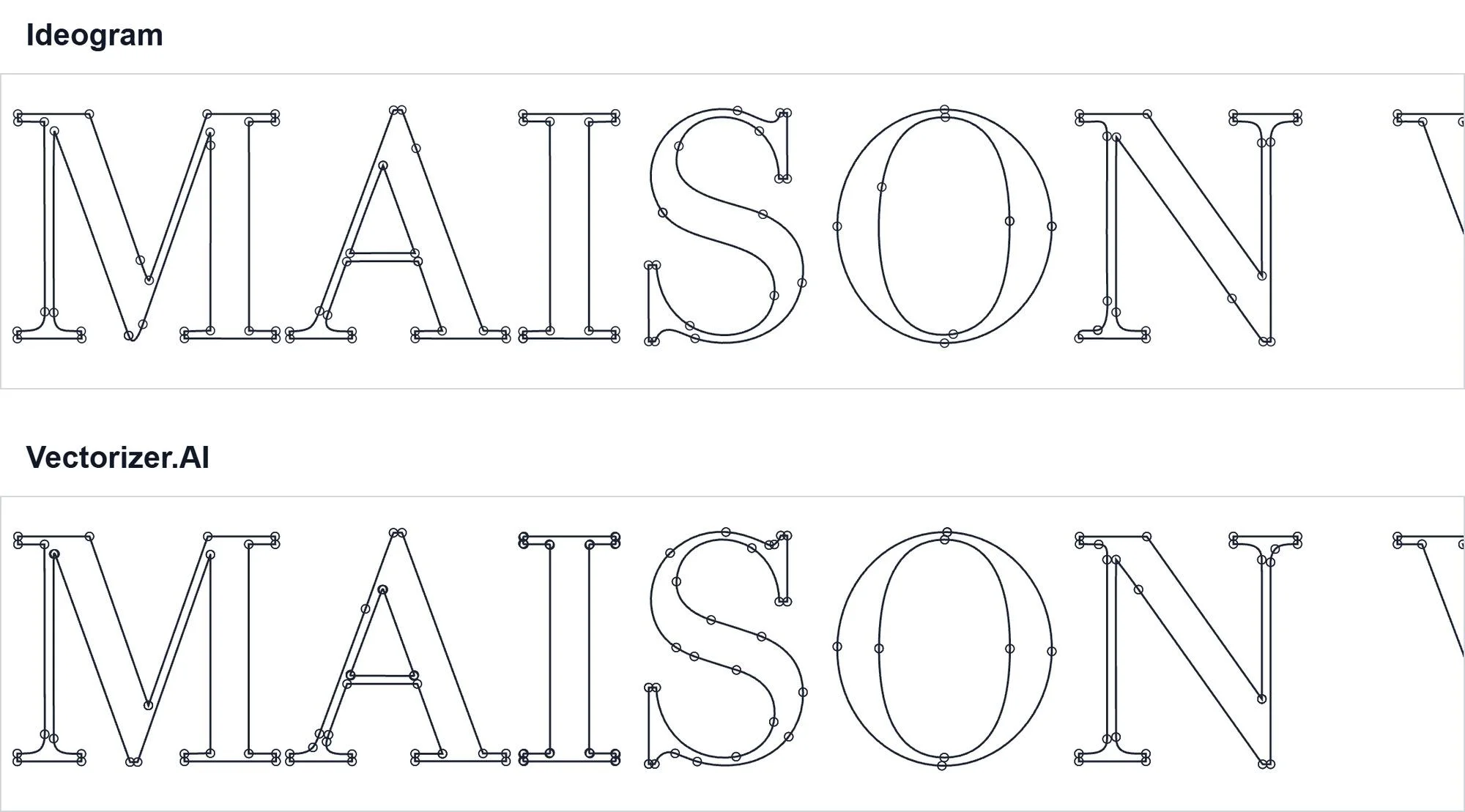
VTracer made 4.4x more anchor points than Ideogram across the nine images it accepted, and Recraft made more on both logos. Adobe Express and Kittl had fewer points than Ideogram on three images each. On those images, Adobe Express had turned the art into one color, and Kittl had cut it to four colors at 1,024 px.
Results: Which vectorizer keeps gradients and colors accurate?
Only one of the 7 tools kept gradients as real SVG gradients: Ideogram. It also matched the original colors most closely on every logo.
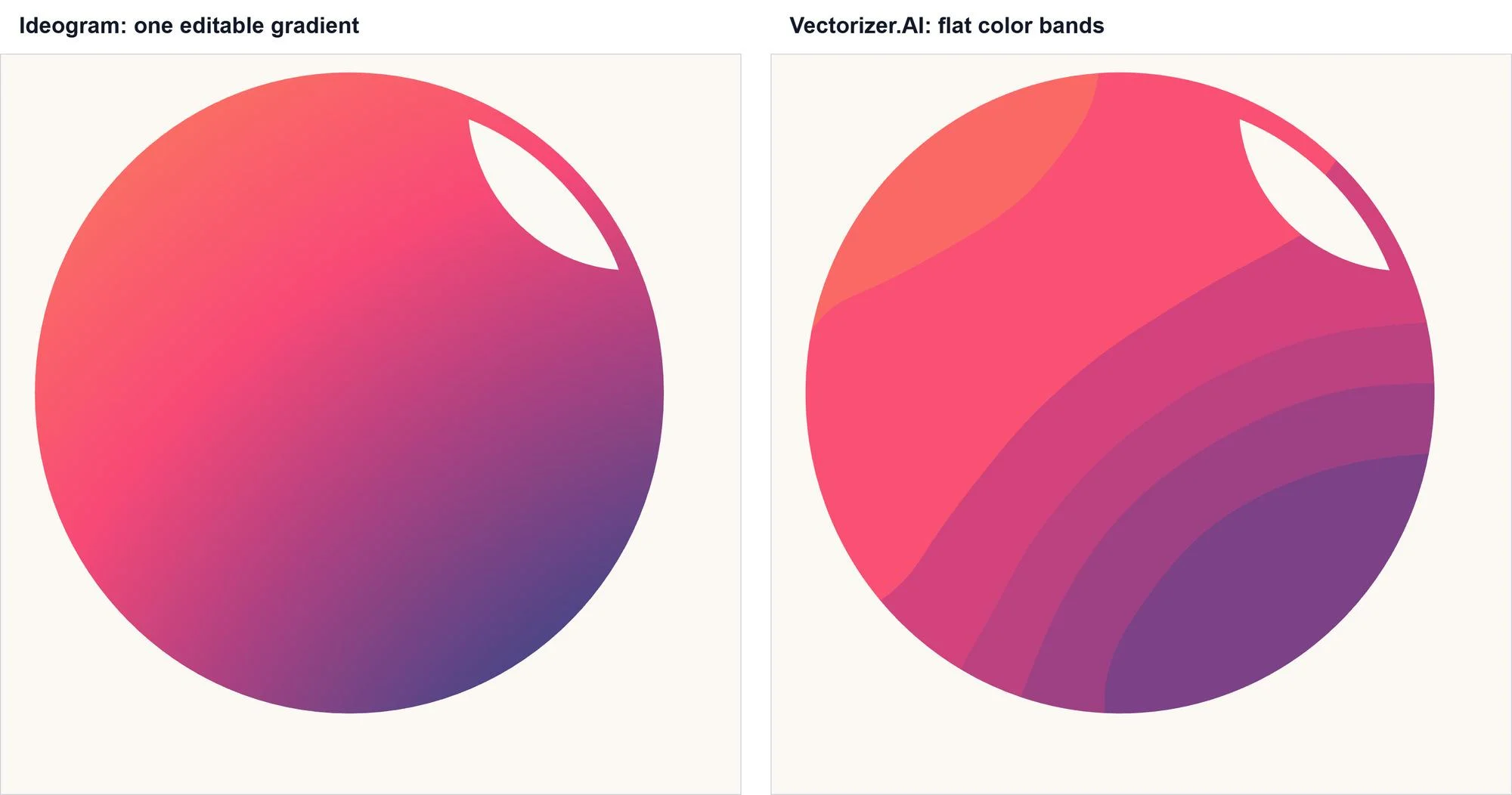
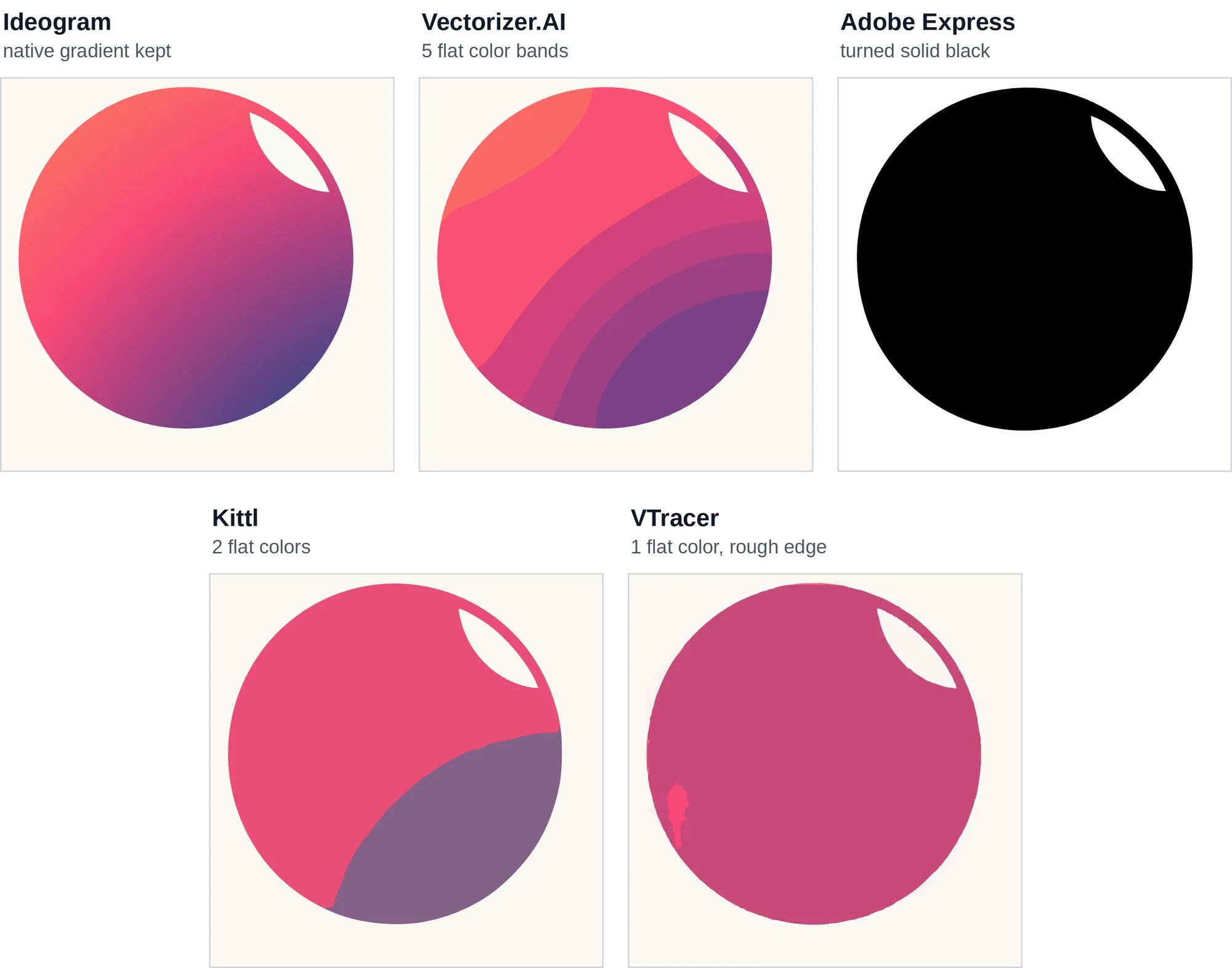
Gradients: the Lumora orb blends coral into rose into violet. Ideogram kept it as one smooth gradient you can still edit in Illustrator. Vectorizer.AI rebuilt it as five flat color bands, with visible steps between them. Vector Magic’s preview showed the same banding, and its own FAQ says it doesn’t convert gradients into gradient shapes. Adobe Express filled the orb solid black. Kittl, Recraft, and VTracer wrote no gradients into any file.
Color accuracy: lower ΔE means closer to the original.
| Logo | Ideogram ΔE | Vectorizer.AI ΔE |
|---|---|---|
| Maison Vellard wordmark | 0.55 | 0.56 |
| Alder & Stone badge | 0.70 | 0.72 |
| Hôtel Valmont monogram | 0.36 | 0.37 |
| Lumora gradient logo | 0.29 | 0.36 |
| Travel icon set | 0.62 | 0.80 |
Both tools stayed under 1 on every logo, so the colors look the same to the eye. The gradient logo shows the clearest gap, because Ideogram keeps the blend that Vectorizer.AI approximates with bands. Ideogram was also closer on the hotel illustration (1.03 vs 1.33) and the wine label (1.20 vs 1.26). On the sketch, the photo, and the poster, the two tools landed within 0.31 of each other.
Against the free tools, Ideogram’s color was closer than Kittl’s on 9 of 9 images, VTracer’s on 9 of 9, Adobe Express’s on 9 of 10, and Recraft’s on 2 of 2. Kittl’s poster isn’t included, because its file showed the wrong background color in a browser, so a fair comparison wasn’t possible.
Tip: for a two-color logo, choose the Simple detail level in Ideogram’s Vectorizer. Simple uses fewer shapes, which keeps a flat brand mark lean.
Results: What happens when your image is bigger than 3 megapixels?
Vectorizer.AI shrinks it, and Ideogram doesn’t. Every one of our 2048 px images came back at 1,773 px after a Pre-Crop dialog, because its web app caps input at 3 megapixels. Ideogram kept each 2048 px image at 2048 px, and the 16.8 MP poster went in with no crop step.
| Tool | What it accepts | What you get back |
|---|---|---|
| Ideogram | JPEG, PNG, or WebP up to 50 MB (API) | 2048 px stayed 2048 px |
| Vectorizer.AI | 3 MP and 30 MB | 1,773 px |
| Adobe Express | JPG or PNG up to 40 MB | the original size |
| VTracer (web) | up to 16 MP | the original size |
| Kittl | PNG or JPG | 1,024 px every time |
| Recraft (free converter) | up to 5 MB | 2048 px |
| Vector Magic (online) | large images get shrunk | resized unless you pre-crop |
A 3 MP cap is plenty for an app icon. For a large print file, it means cropping before you upload or working from a scaled-down trace.
Results: Do vectorizers keep small lettering readable?
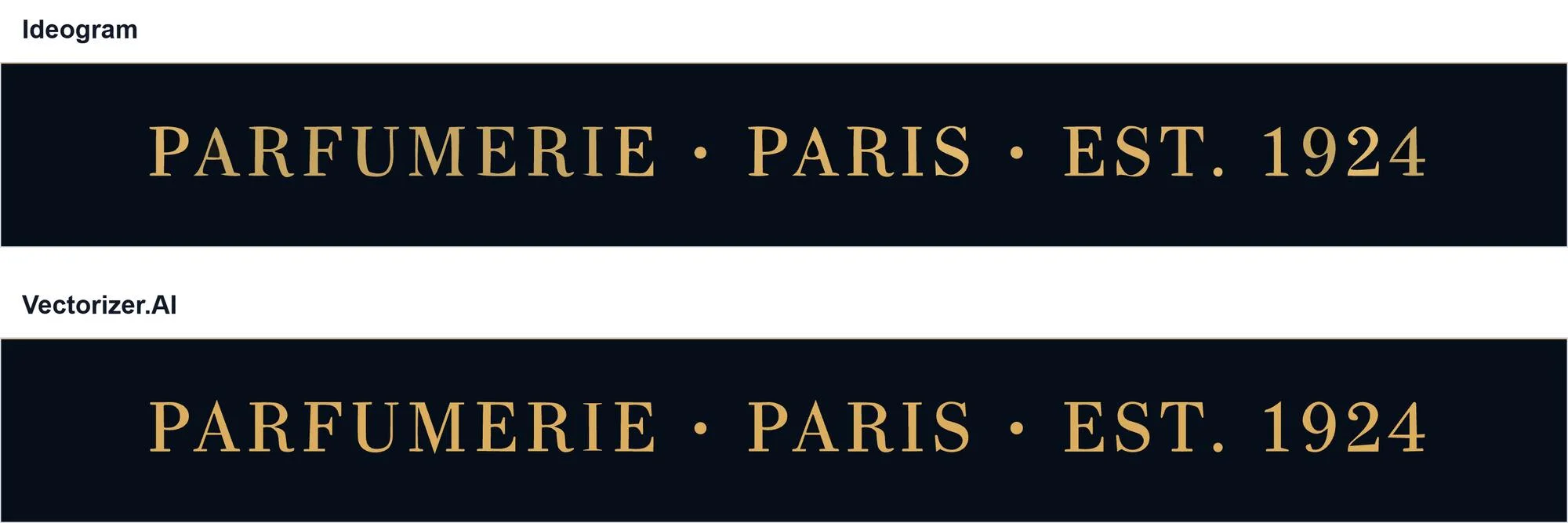
Ideogram and Vectorizer.AI kept small lettering readable. Both kept every letter of the 6 pt tagline “PARFUMERIE · PARIS · EST. 1924” intact, with the openings inside the letters still open. Both also kept the curved “ALDER & STONE COFFEE ROASTERS” arc clean. Ideogram’s file was 3.6x smaller.
The free tools had a harder time. On the Lumora logo, Adobe Express drew the “SLEEP · BREATHE · RESTORE” letters unevenly and dropped the dots between the words.
Three checks before small lettering goes to print:
- Start from your largest file. The more pixels a 6 pt line has, the cleaner its letters trace.
- Zoom to 400%: look for closed-up “e”s, filled counters, and letters that touch.
- Re-set very small text in the brand font if it will be printed tiny. Vectorized letters are outlined shapes, so you can’t retype them.
Tools: The 7 best AI image vectorizers, tool by tool
Our ranking, from the test: 1. Ideogram, 2. Vectorizer.AI, 3. Adobe Express, 4. Kittl, 5. Recraft, 6. Vector Magic, 7. VTracer.
1. Ideogram: best overall for brand logos, labels, and gradient art
Ideogram’s files were smaller, with fewer points, than Vectorizer.AI’s on all 10 images, and it was the only tool that kept gradients editable. It also took a 16.8 MP poster without asking you to crop it.
How to vectorize an image in Ideogram: open Apps and choose Vectorizer, then add up to 100 images to the source area. Choose a detail level (Simple, Detailed, or Auto), select Vectorize, and select Download on each result. To change a color before you download, open a swatch under the artwork and type a hex value. The full walkthrough, with close-ups, is in our guide to turning an image into an editable SVG.
Inside the file: you get filled shapes you can select and recolor in Illustrator, Figma, or Inkscape, native gradients where the art has them, and lettering as outlined shapes.
Price: each conversion used 10 credits on our Pro plan, and Ideogram’s plans start at $20 a month. Developers can call the Vectorizer API endpoint at $0.10 per image, for JPEG, PNG, or WebP files up to 50 MB.
Before you hand off a file: Ideogram’s SVGs usually start with a full-size background shape, and gradient IDs such as g0 repeat from file to file. Rename the IDs if a developer will place more than one SVG inline on the same page. The Ideogram Vector page explains what each file contains.
2. Vectorizer.AI: best for cut files and print-shop formats
Vectorizer.AI is the pick when the next stop is a cutter, an engraver, or a print shop that wants DXF, EPS, or PDF. It exports all of them and has presets for cutting and engraving.
On our 10 images: it made clean shapes and very few colors, 2 to 3 on the flat logos. Every image over 3 MP was scaled down to 1,773 px, and gradients came out as flat bands.
Price: upload and preview are free. Downloads need the web plan at $9.99 a month, and API plans start at $9.99 for 50 credits. Uploads are deleted after 24 hours.
Tip: crop to the logo before you upload, so the 3 MP goes to the part you need.
3. Adobe Express: best free one-off converter
Adobe Express’s Convert to SVG is free with an Adobe account and takes JPG or PNG files up to 40 MB. It kept our images at their original size.
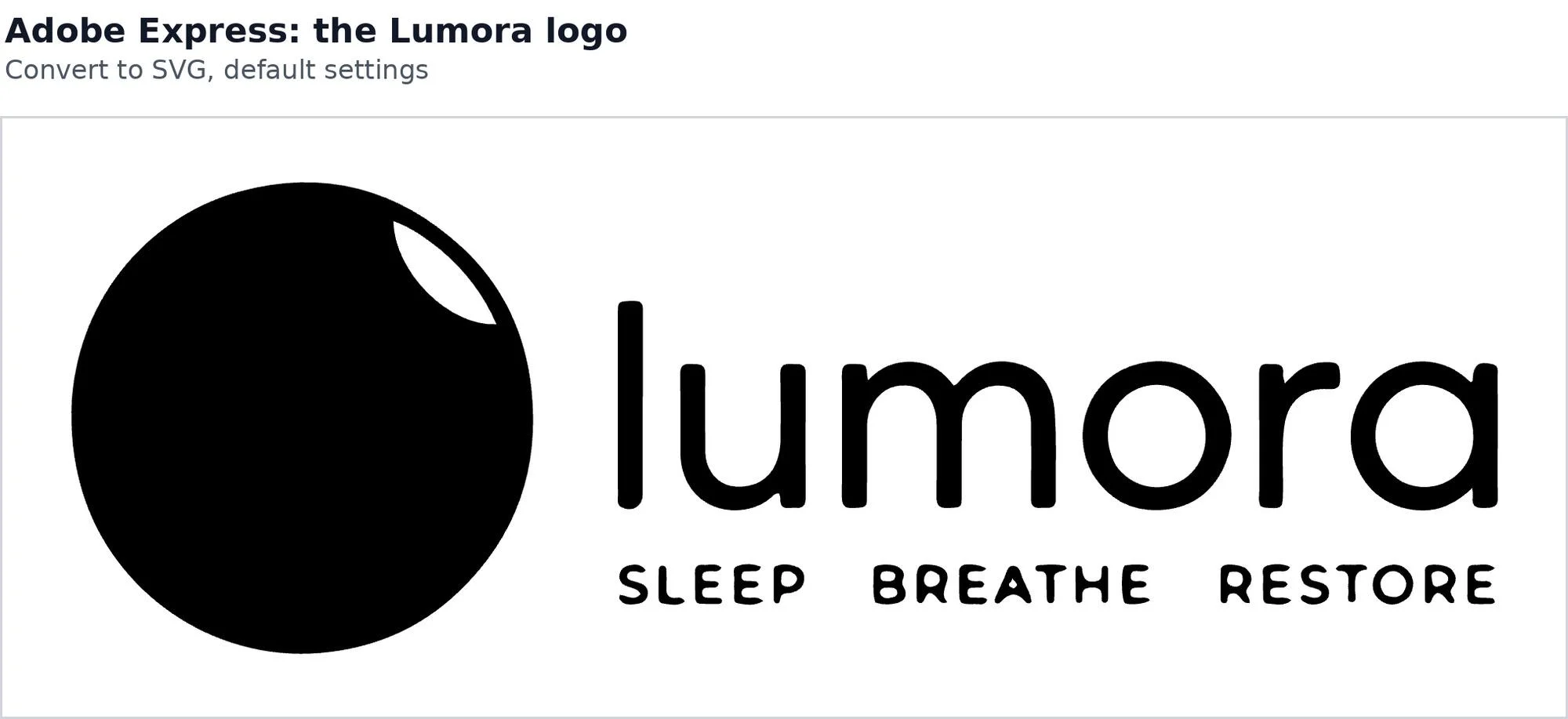
One color by default on some files: it chose a single color on 4 of the 10 images and removed the background. That suits a stamp or a one-color cut file. For a full-color logo, check the preview before you download. On the photo, its colors came closest to the original, in a 4 MB file.
For Creative Cloud users: Illustrator’s Image Trace gives you manual control over colors, paths, and corners.
4. Kittl: best for merch designers already working in Kittl
Kittl’s vectorizer is free and drops the result straight into Kittl’s merch templates.
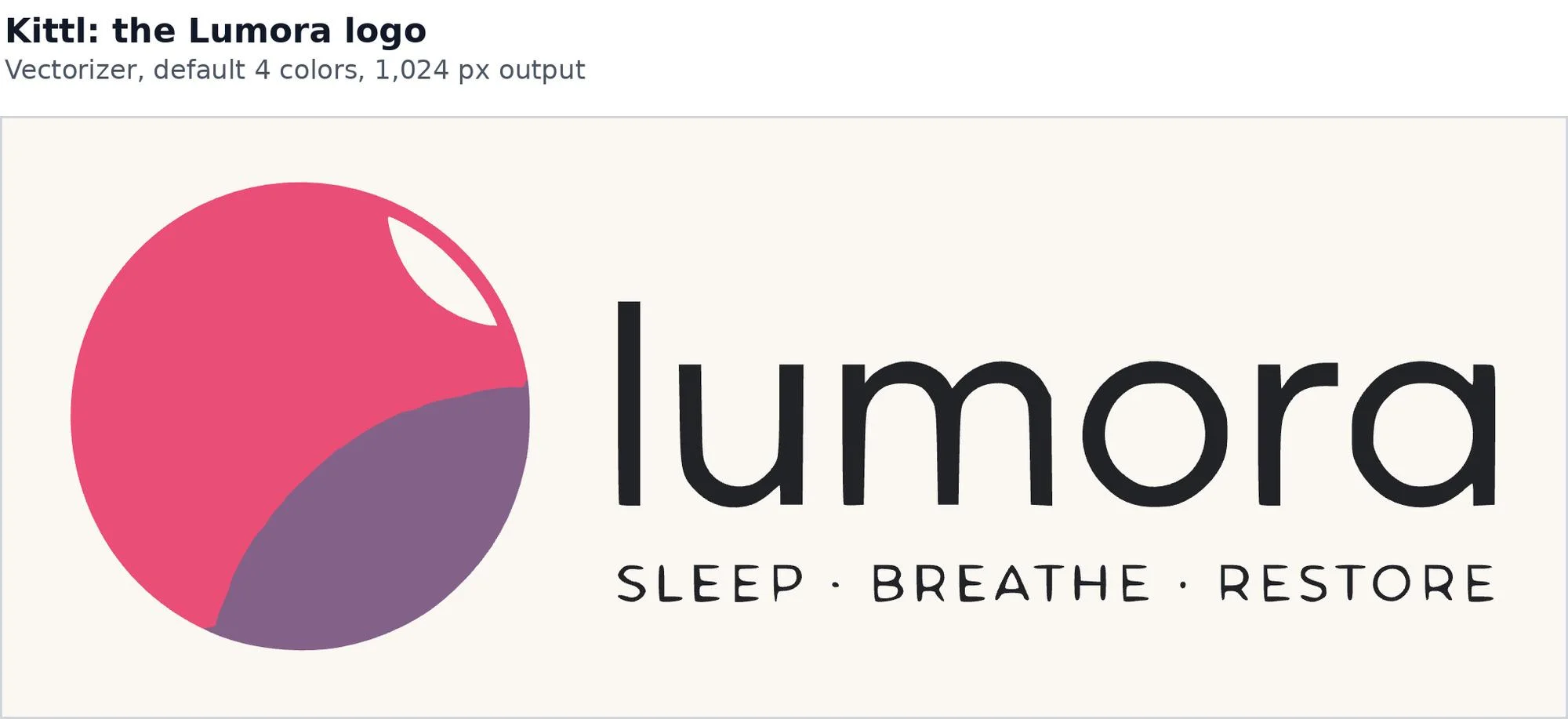
Size and colors: it uses four colors by default and returns a 1,024 px SVG whatever size goes in. Flat logos came out clean. The gradient orb split into two flat colors, and on the photo only VTracer’s colors drifted further from the original.
5. Recraft: best for vectorizing, then designing in the same canvas
Recraft suits teams that will keep editing or generating vectors in Recraft after the trace.
On our two logos: it made 1,456 and 1,730 anchor points, against Ideogram’s 808 and 1,156. Each SVG also carried 111 to 153 KB of embedded content-credential data, more than half of each file.
Limits: the free converter takes files up to 5 MB, and the free plan stopped our uploads after two images.
6. Vector Magic: best for hand-correcting a trace
Vector Magic lets you fix the trace in a segmentation editor before you download, which helps with scans and messy edges.
In the free preview: it picked two colors for the perfume logo, kept the tagline clean, showed the gradient orb as bands, and resized our 2048 px files on upload.
Price: previews are free. The online edition is $9.95 a month. The desktop edition is $295 one-time and adds DXF and AI output and batch processing. Vector Magic comes from the same company as Vectorizer.AI.
7. VTracer: best free, open-source tracer
VTracer runs in the browser for free, and because it’s open source, developers can build it into their own tools.
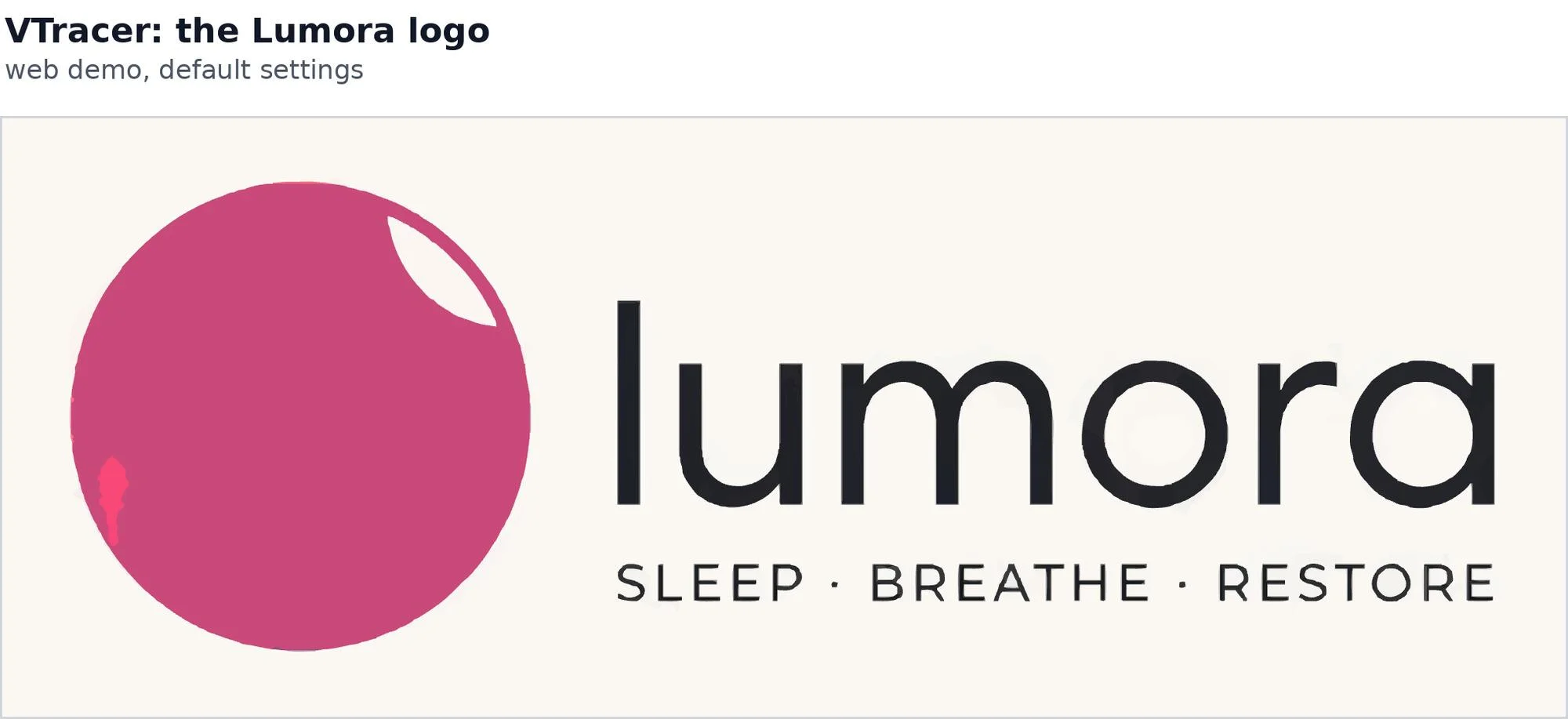
On our images: it made full-color traces, the most anchor points of any tool overall, and files 2.4x larger than Ideogram’s on the nine images it accepted. The web demo stops at 16 MP; the desktop app takes larger files.
For desktop users: Inkscape’s Trace Bitmap is the other free route, and it works offline.
Tools: Can you vectorize a photo?
Yes, you can, as a poster-style illustration, not a photo-real file. Ideogram turned our perfume bottle photo into a 463 KB SVG, against 1.1 MB from Vectorizer.AI and 4 MB from Adobe Express.
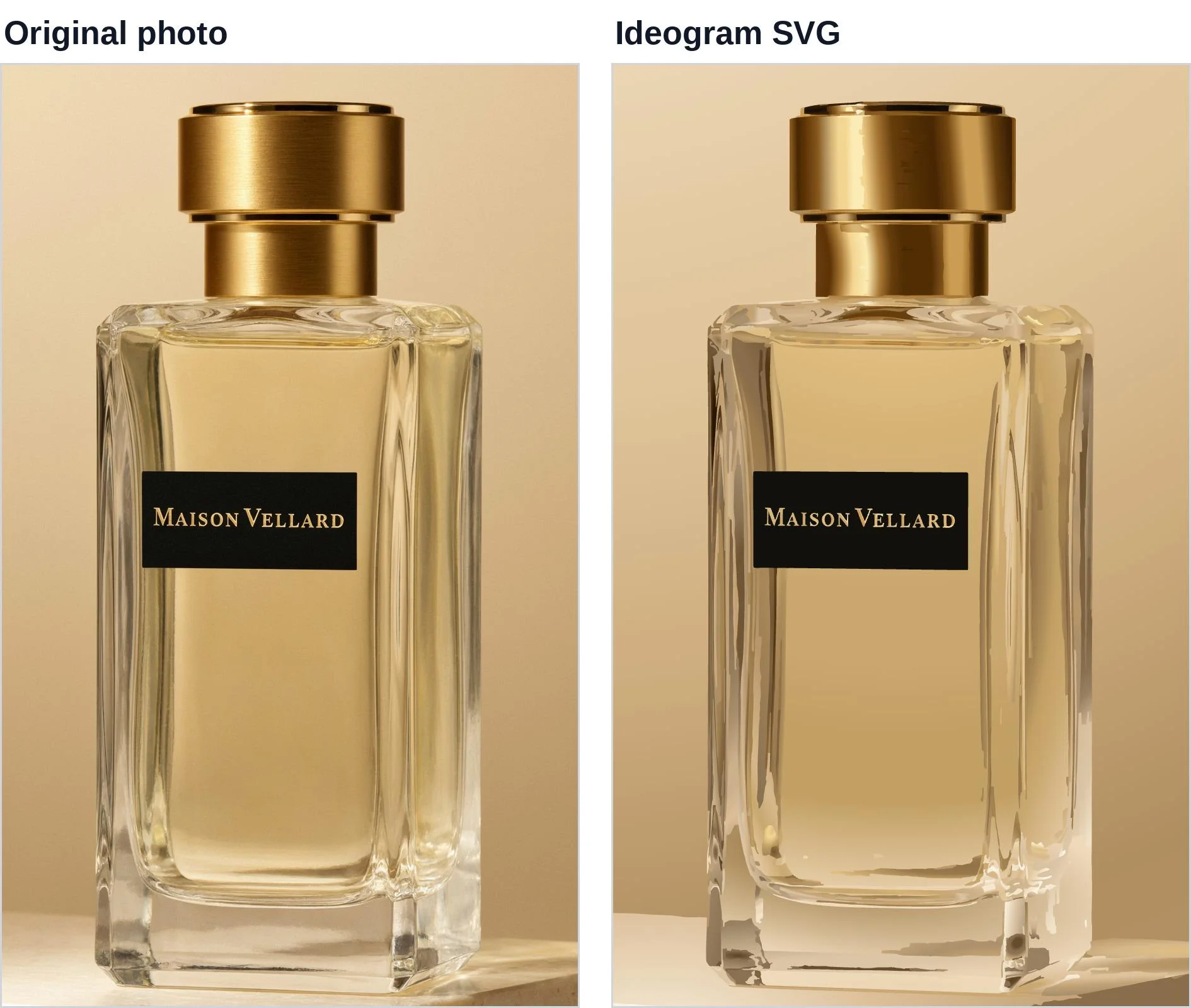
The cap, the label, and the glass edges hold up best. Textured surfaces such as the stone block become patches of flat color, because a vector file can’t hold photo grain. A vectorized photo works for packaging art, posters, merch, and large signs, where a graphic look is part of the design. When you only need more pixels, enlarge the photo with Ideogram Upscale instead.
Tools: What are the best free image vectorizers?
For a free SVG download with no subscription, use Adobe Express or VTracer. Kittl and Recraft are free with limits.
- Adobe Express: free download with an Adobe account, up to 40 MB; picks one color on some images.
- VTracer: free and open source, in the browser or on desktop; up to 16 MP on the web.
- Kittl: free download; SVGs come out at 1,024 px.
- Recraft: free plan; files up to 5 MB and limited uploads.
- Inkscape: free desktop app with Trace Bitmap.
- Vector Magic and Vectorizer.AI: free previews; downloads need a paid plan.
Canva also vectorizes through an app inside its editor, but downloading an SVG from Canva needs a Canva Pro plan.
Which vectorizer is best for Cricut, vinyl, and laser cutting?
For SVG-based cutters, Ideogram’s files are small and low in points, which means fewer nodes for the blade to follow. For DXF, Vectorizer.AI and Vector Magic’s desktop edition export it directly.
Before you cut:
- delete the background shape
- merge shapes drawn on top so openings become real holes
- turn gradients into flat colors
- put each vinyl color on its own layer
Once the file is ready, Ideogram’s print-on-demand tools let you preview it on shirts and mugs.
Tools: Do you need an AI vector generator or a vectorizer?
A vectorizer traces a file you already have. A generator makes a new SVG from a prompt. Ideogram does both: the Vectorizer converts your existing logo, and Generate Vector creates new artwork from a description. If you’re starting from an idea instead of a file, compare your options in our list of AI vector generators.
Tools: FAQs about AI image vectorizers
Is Vectorizer.AI free?
Can ChatGPT or Gemini vectorize an image?
Which vectorizer gives the cleanest SVG with the fewest anchor points?
Can a vectorizer keep gradients?
Is it safe to upload my logo to an online vectorizer?
Can Ideogram convert a PNG or JPG to SVG?
Vectorize your logo in Ideogram
Add your PNG to the Ideogram Vectorizer and get a clean, editable SVG.