
8 Best Canva Alternatives (2026): Free Plans, Prices, and Real Results

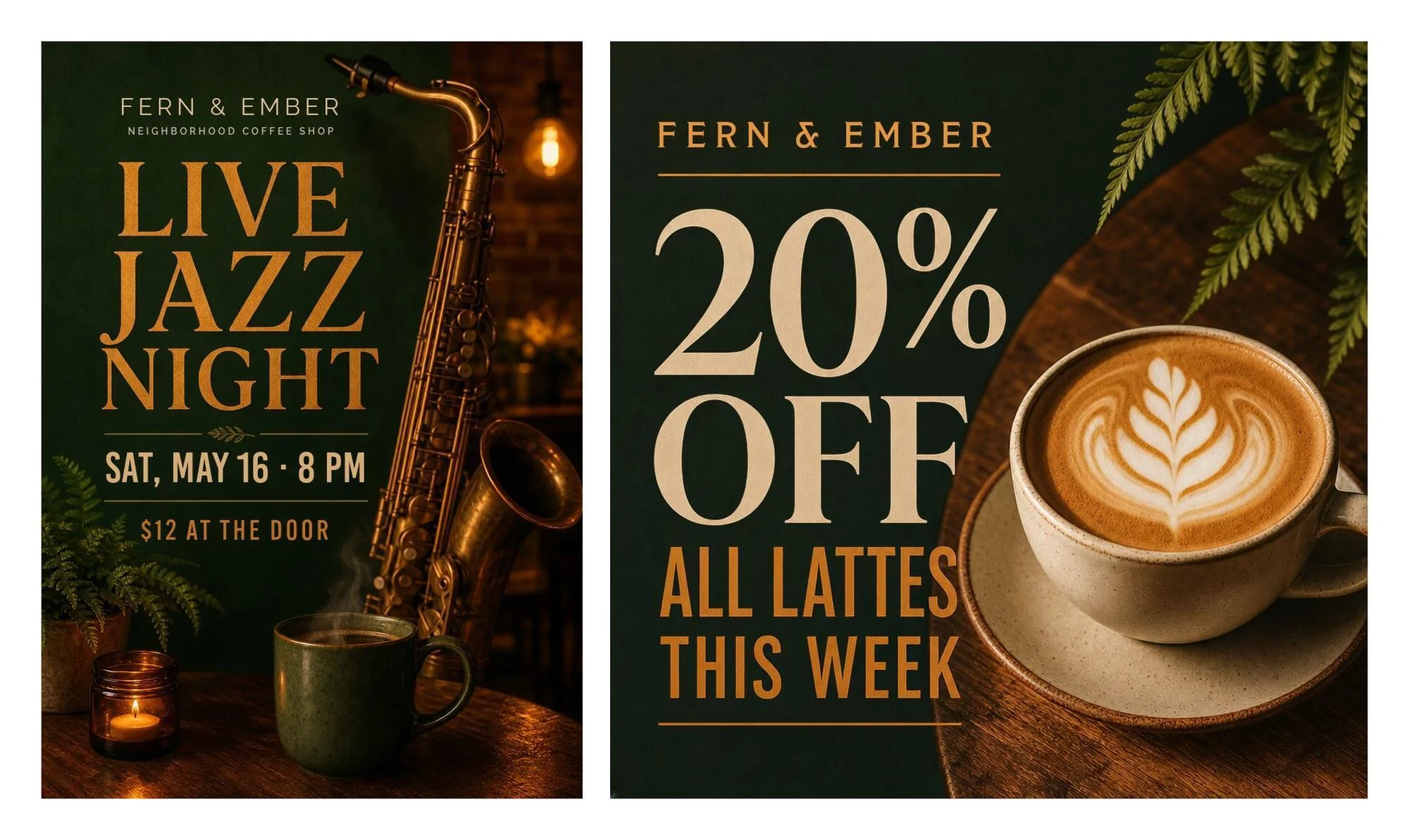
What’s the best Canva alternative in 2026? For designs that start from an idea and need every word right, it’s Ideogram. In our test, it set “LIVE JAZZ NIGHT,” “SAT, MAY 16 · 8 PM,” and “$12 AT THE DOOR” correctly on the first try, then changed the price to $15 with one instruction. For a template-for-template swap, Adobe Express is the closest match.
If Canva keeps getting pricier and your flyers all look alike, these eight alternatives cover every job, from free photo editors to team design systems, with prices and free-plan limits for each.
Overview : Our short answer, by job
- Flyers, promos, and thumbnails that start from an idea: Ideogram finished our whole brief, including the price fix and the story resize, while Canva and Adobe Express stopped at their free-plan limits.
- Canva’s workflow without Canva: Adobe Express has the same template-first editor, with Firefly built in.
- Leaving Canva over price: VistaCreate Pro is $120 a year for up to 10 seats.
- Logos, labels, and merch: Kittl is built around type tools, and it runs Ideogram’s models inside its editor.
- Decks, reports, and infographics: Visme handles charts and data better than a social-post editor.
- A team designing together: Figma keeps everyone in one file with shared components.
- Mostly photo fixes: Pixlr has the cheapest paid plan here, and Photopea is free if you work in PSD files.
Overview : How we tested the Canva alternatives
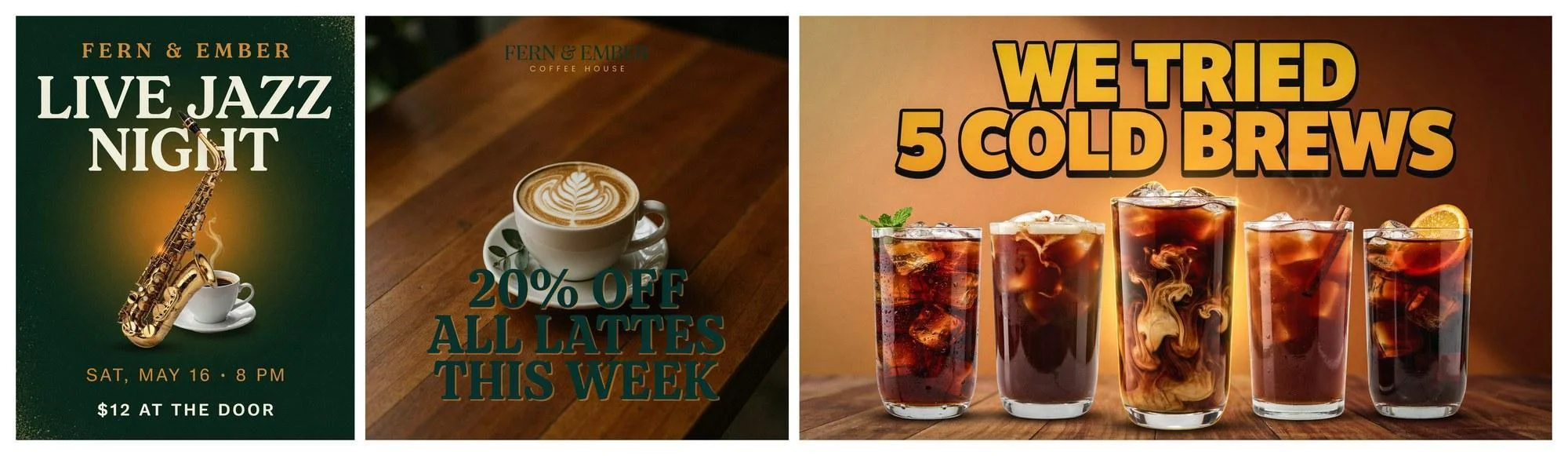
We wrote one brief for a neighborhood coffee shop, Fern & Ember, and ran it through Ideogram, Canva’s Dream Lab, and Adobe Express. We kept the first result, typed the prompts word for word, and used each tool’s own AI route to a finished design. Adobe Express and Canva ran on free accounts. Ideogram ran on our Pro plan; its free allowance is listed in the pricing section.
The prompts we used:
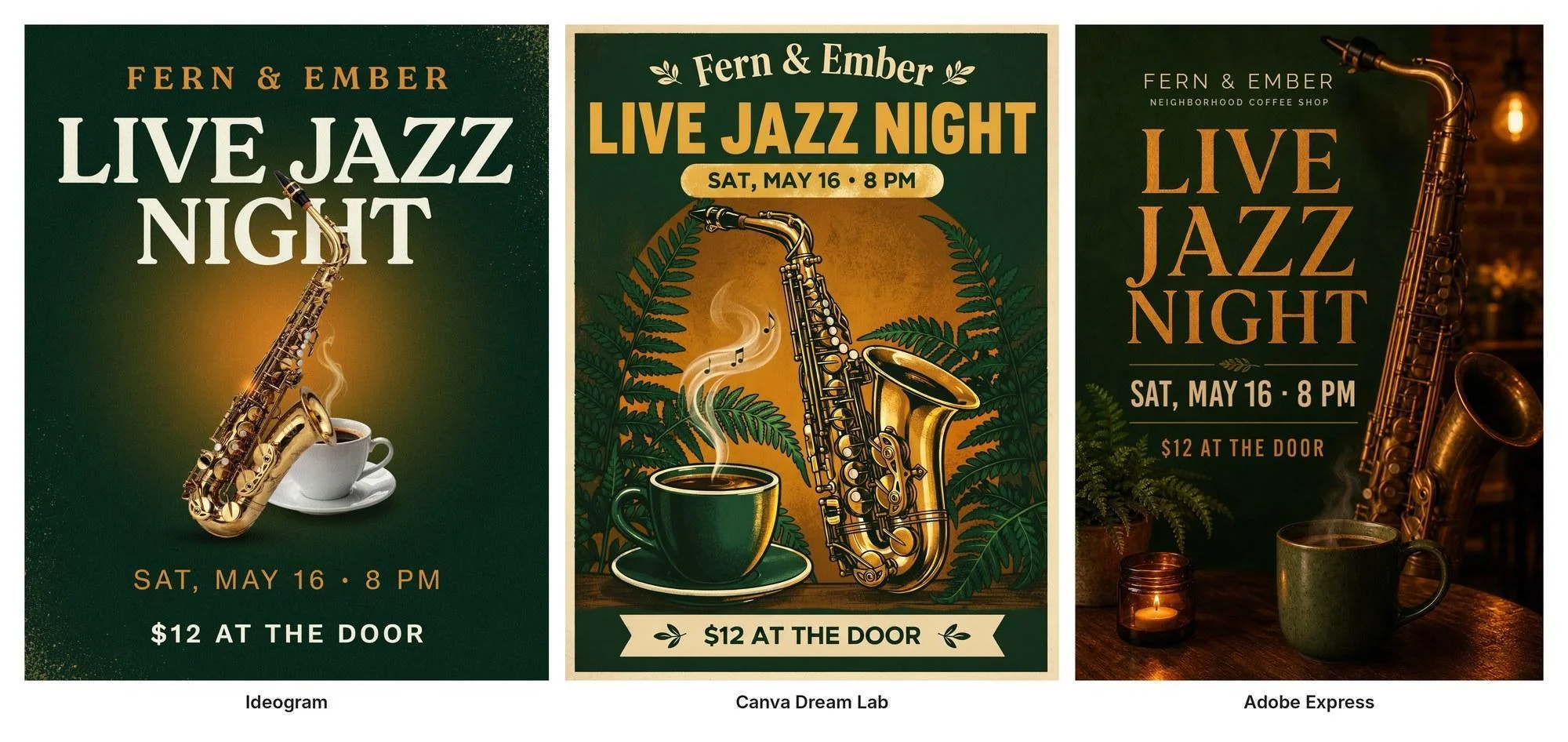
Event poster for a neighborhood coffee shop called “Fern & Ember”. Headline: “LIVE JAZZ NIGHT”. Below it: “SAT, MAY 16 · 8 PM”. At the bottom: “$12 AT THE DOOR”. Warm evening mood, a saxophone and a steaming coffee cup, deep green and amber colors.
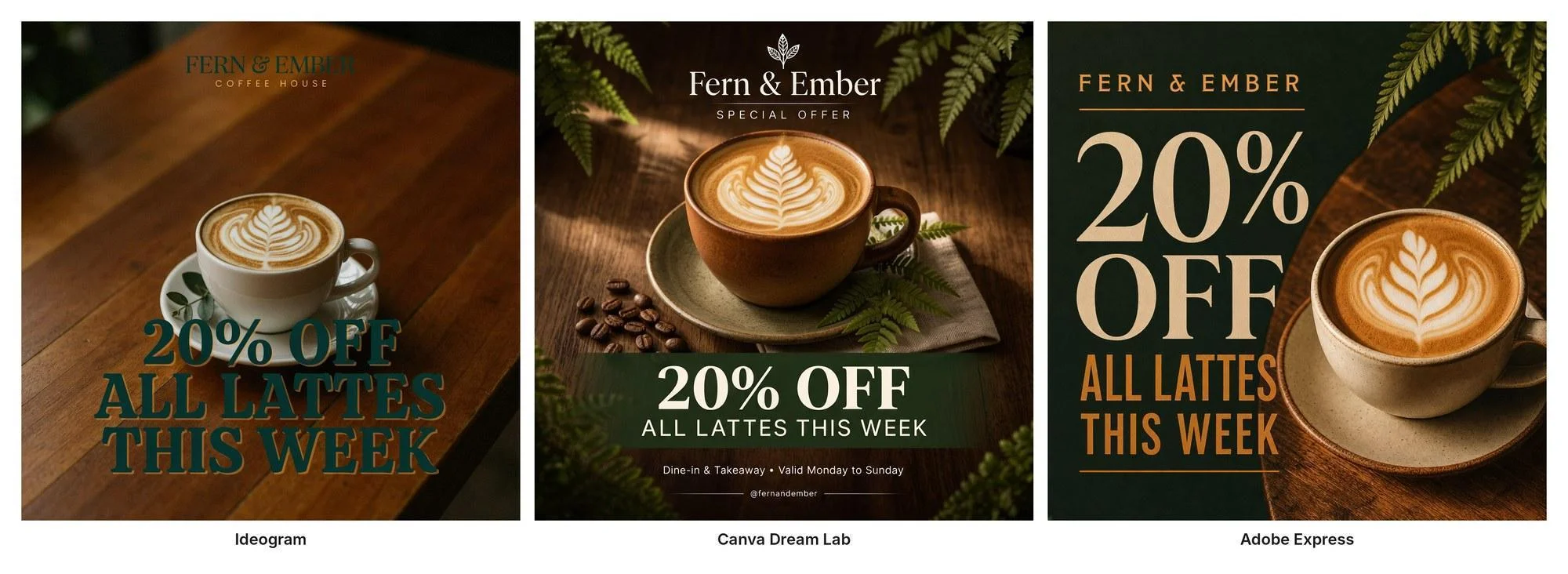
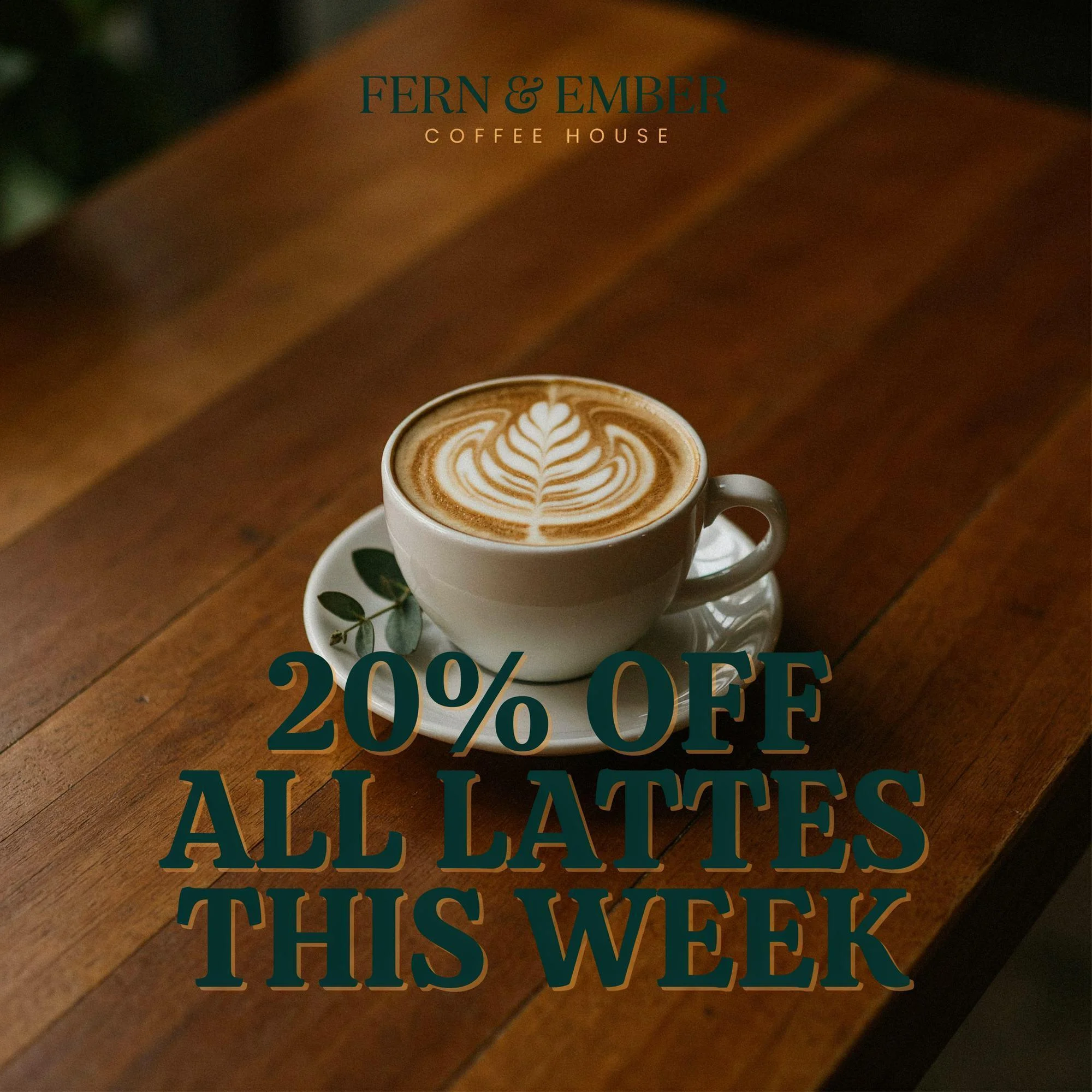
Instagram promo post for a coffee shop called “Fern & Ember”. Big text: “20% OFF ALL LATTES THIS WEEK”. A latte with leaf latte art on a wooden table, deep green and amber colors.
YouTube thumbnail for a coffee channel. Bold title text: “WE TRIED 5 COLD BREWS”. Five glasses of iced cold brew coffee in a row, bright and punchy, high contrast.
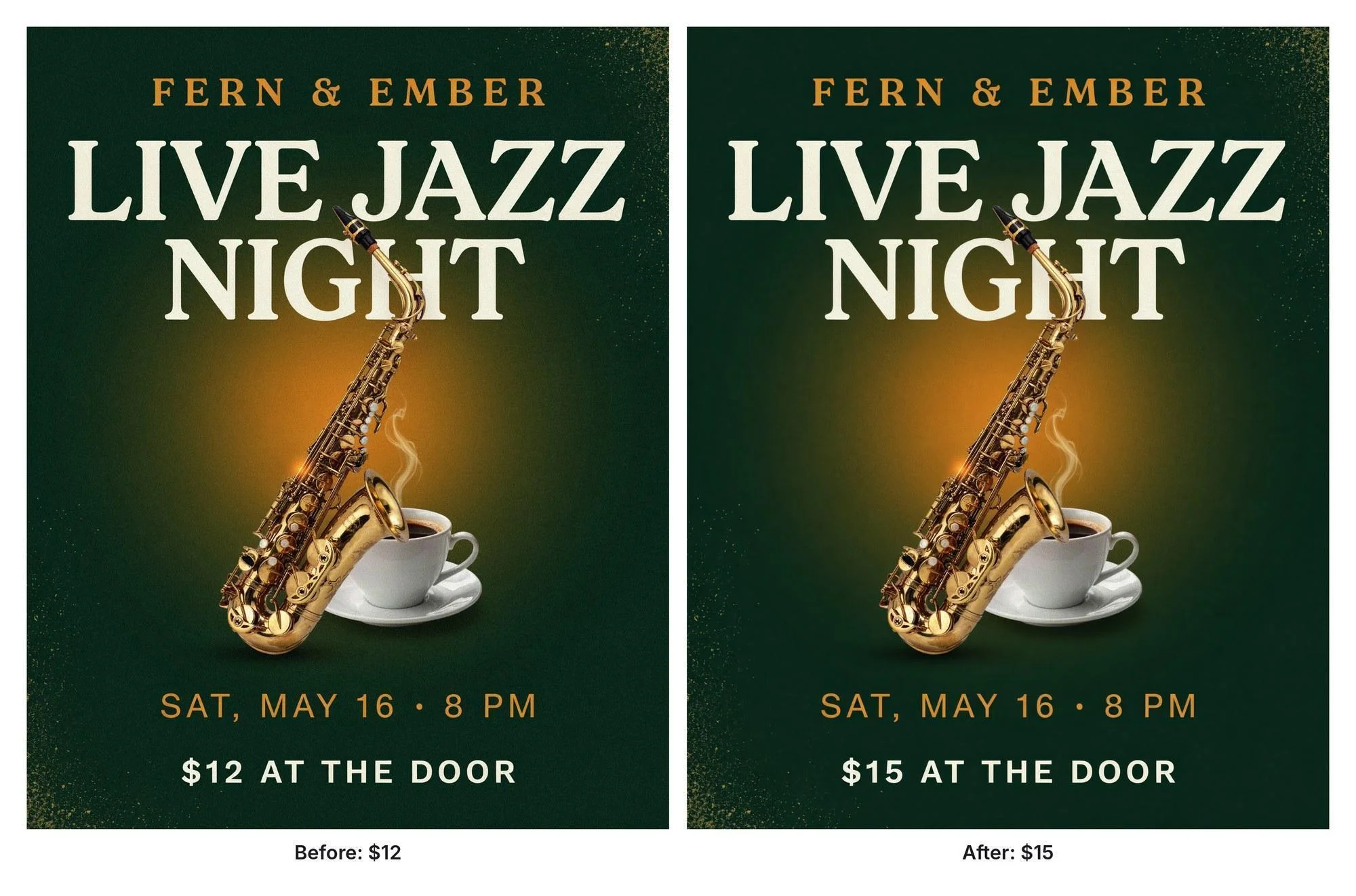
Change “$12 AT THE DOOR” to “$15 AT THE DOOR”. Keep everything else exactly the same.
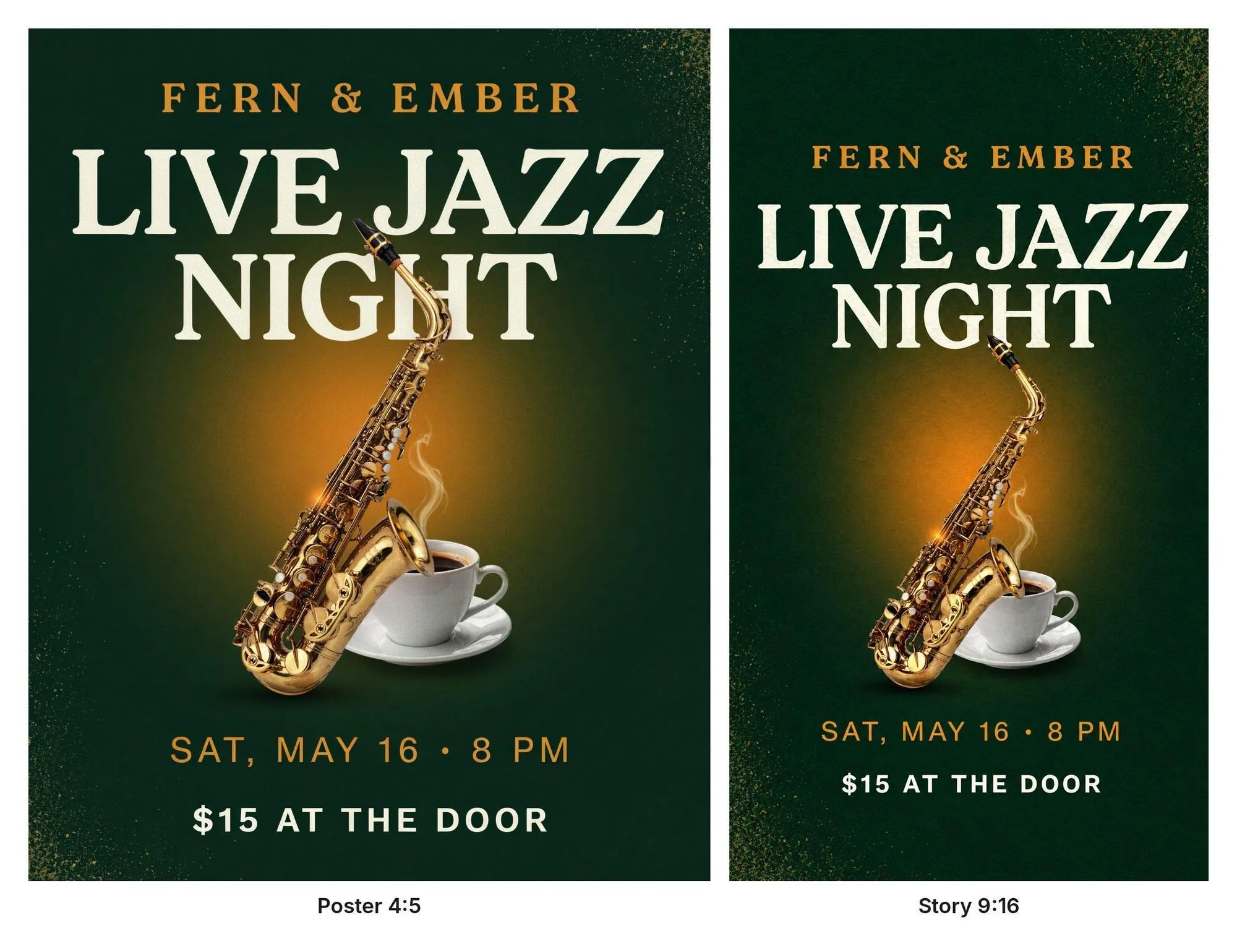
Turn the finished poster into a 9:16 story.
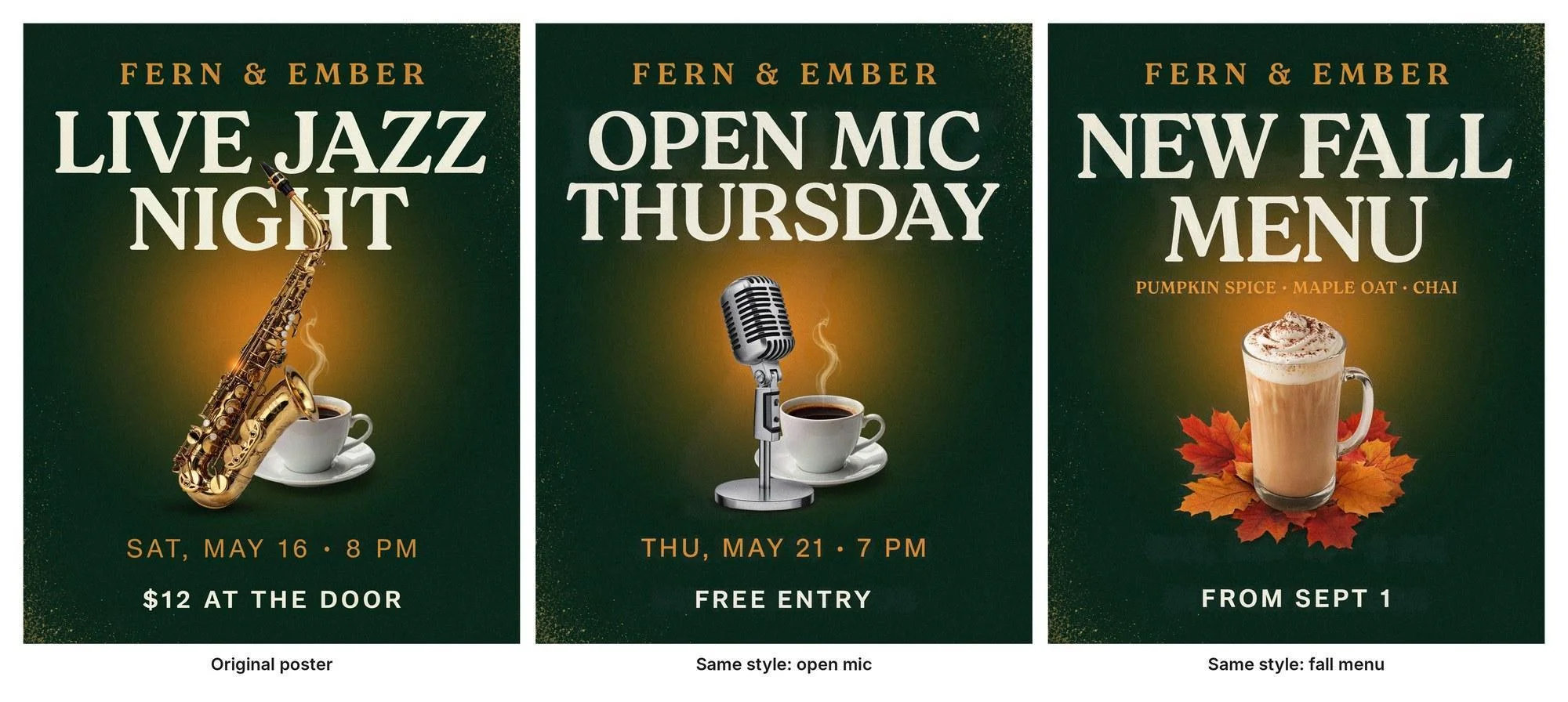
Use the style of @img_1 exactly: the same deep green and amber colors, the same cream serif headline type, the same layout. Event poster for a neighborhood coffee shop called “Fern & Ember”. Headline: “OPEN MIC THURSDAY”. Below it: “THU, MAY 21 · 7 PM”. At the bottom: “FREE ENTRY”. A vintage microphone next to a steaming coffee cup. No other text.
We ran it again with “NEW FALL MENU,” “PUMPKIN SPICE · MAPLE OAT · CHAI,” and “FROM SEPT 1.”
What we checked:
- Text: every word and number spelled as typed.
- Extra text: taglines, hours, or handles we never asked for.
- Readability: can you read the headline at phone size?
- Edit after: can you change one price without starting over?
- Resize: does the layout still work as a story?
- Limits: did the free plan stop us before the brief was done?
We tested Ideogram, Canva, and Adobe Express hands-on. Kittl, VistaCreate, Visme, Figma, Pixlr, and Photopea are covered from their own product, pricing, and help pages.
Overview : Test results: Ideogram vs Canva vs Adobe Express
All three tools spelled the poster correctly on the first try. The difference showed up after that: Ideogram finished all five tasks, while Canva and Adobe Express hit free-plan limits partway through.
| Task | Ideogram | Canva (Dream Lab, free) | Adobe Express (AI Assistant, free) |
|---|---|---|---|
| Poster: 4 lines spelled right | ✓ 4 of 4 | ✓ 4 of 4 | ✓ 4 of 4 |
| Poster: extra text | None | None | Added “Neighborhood coffee shop” under the name |
| Instagram promo: text right | ✓ | ✓ | ✓ |
| Instagram promo: extra text | Small “Coffee house” under the name | Added “Special offer,” “Dine-in & Takeaway • Valid Monday to Sunday,” and an @handle | None |
| YouTube thumbnail | ✓ Title right, five glasses | Stopped: monthly AI limit reached | Stopped: daily design limit reached |
| Change $12 to $15 | ✓ One instruction, about 25 seconds | ✗ Needs a paid plan | ✓ Changed as an editable text layer |
| Resize to a 9:16 story | ✓ Re-laid out, all text intact | ✗ Magic Resize is paid | Not run (daily limit) |
| Download size | 2K, or 4K with upscaling | 1760 × 2336 poster | 800 × 1120 poster on the free plan |
Three things we learned:
- Spelling is no longer the gap. Canva’s new model got every poster line right. The bigger risk is copy you didn’t write: every one of Canva’s four promo versions added opening days, a slogan, or a handle. Ideogram added a small “Coffee house” under the name, and Adobe’s poster added a line taken from our own prompt.
- The edit is where time goes. A typo or price change used to mean regenerating. Ideogram and Adobe Express both changed $12 to $15 in place; on Canva’s free plan, the poster was a flat image.
- Free plans run out fast. On our free accounts, Canva stopped after two prompts (the account had used some AI earlier in the month) and Adobe Express after three requests.
Tool 1 : Ideogram: best for designs that start from a prompt and need the words right
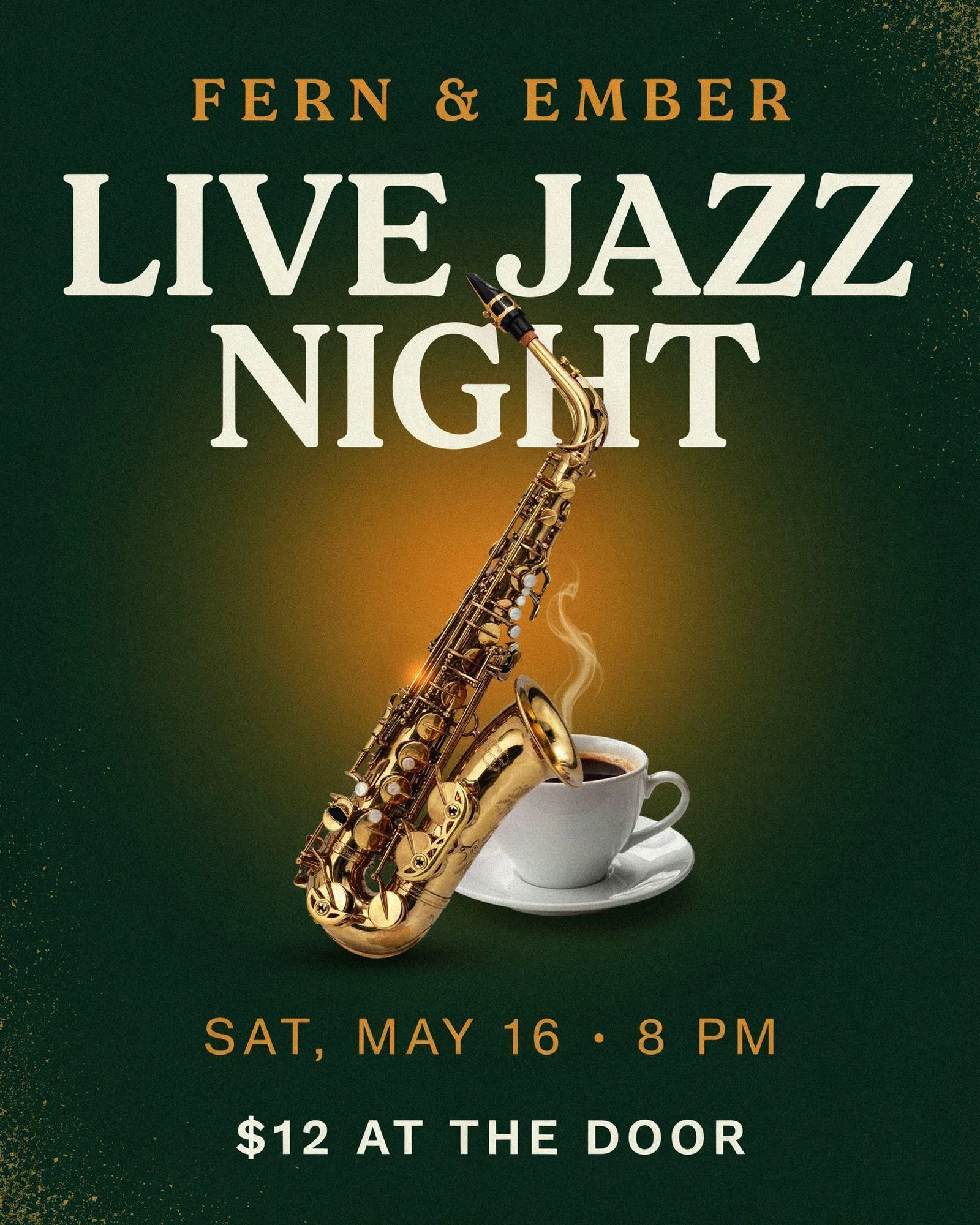
Our poster came back with all four lines exactly as typed, a saxophone and coffee cup on a green-to-amber glow, and no extra copy. That is the job Ideogram does better than a template editor: you describe the design, and the headline, date, and price arrive in the image, ready to post.
It suits owners and marketers who make a new poster, promo, or thumbnail every week and are tired of designs that look like everyone else’s template.
Event posters and flyers with exact details
Put every word you need in quotes and say where it goes (“Headline,” “Below it,” “At the bottom”). Ideogram placed each line where we asked and spelled “SAT, MAY 16 · 8 PM” with the middle dot intact. Its text rendering is built for posters, signs, and packaging, and the docs on writing prompts for text in images cover longer copy.
Social posts and promos
Our 1:1 latte promo spelled “20% OFF ALL LATTES THIS WEEK” correctly in large serif letters under a latte with leaf art. Ideogram follows color cues closely, so for text over a photo, add a contrast cue such as “cream text on a dark green band” to keep the offer crisp at phone size. To keep a house look across a month of posts, save a style from your best result with Ideogram Styles.
Tip: end the prompt with “no other text” when you want only your copy on the design.
YouTube thumbnails with bold titles
“WE TRIED 5 COLD BREWS” came back in thick yellow letters with a dark outline above five glasses of cold brew. It was generated at 2560 × 1440, and we downloaded it at 4K with upscaling. Short titles of five words or fewer stay big enough to read in a crowded feed.

Changing a word without starting over
We opened the poster in Precise Edit and typed one instruction: change “$12 AT THE DOOR” to “$15 AT THE DOOR” and keep everything else the same. It took about 25 seconds and 6 credits, and the rest of the poster stayed as it was. For text you expect to change often, editable text layers let you retype words, fonts, and colors directly, and our guide to fixing a misspelled word in an AI image walks through both routes.
One design in every size
Ad Resizer turned the 4:5 poster into a 1080 × 1920 story by rebuilding the layout, not cropping it, so all four lines stayed in frame. It offers 31 presets across social, display, and print sizes, with platform safe zones. Our walkthrough on resizing one ad for every format shows a full set.
Keeping your brand look
We attached the jazz poster as a reference image and asked for two more Fern & Ember posters in the same style, “OPEN MIC THURSDAY” and “NEW FALL MENU.” Both came back on the first try with the same green-and-amber palette, the same cream serif headline, the same layout, and every line spelled right, including “PUMPKIN SPICE · MAPLE OAT · CHAI.” Each took 22 credits at High quality.
That is how a template-free brand look works in Ideogram: one finished design becomes the reference for the next. Beyond a single reference, you can save a look as a Style, set color palettes, or train custom models on 15 to 100 of your own images on the Pro and Team plans.
Logos you can scale
A logo you generate isn’t built from shared template elements, so Canva’s exclusivity issue doesn’t apply. Before registering any logo, check with a trademark attorney. The Vector model outputs SVG files for signs and print.
Making designs in bulk
Batch Generation runs up to 500 prompts from a spreadsheet, and the Ideogram MCP server lets you create images from Claude or ChatGPT.
Pricing, free plan, and commercial use
- Free: 30 credits a week for eligible Google or Apple sign-ups. Free images are public, and downloads are JPEG.
- Plus: $20 a month, or $15 a month billed yearly; images are private.
- Pro: $60 a month, or $42 a month billed yearly.
- Team: $30 per user a month, or $240 per user billed yearly ($20 a month), with 3,600 priority credits per user a month, central billing and administration, and early access to collaboration features.
- Commercial use: allowed on every plan, including Free. Ideogram’s Terms of Service don’t claim ownership of what you generate or restrict commercial use of it.
Full details are on Ideogram plans and credits, and our explainer on who owns the images you make in Ideogram covers rights.
Where it fits best: one-page designs. For a multi-page menu or a slide deck, make the visuals in Ideogram and lay out the pages in your editor of choice.
Tool 2 : Adobe Express: the closest like-for-like Canva swap
Adobe Express works the way Canva users expect: templates, drag-and-drop pages, and a brand kit on the paid plan. In our test, its AI Assistant made four poster versions, all spelled correctly, though the first added “Neighborhood coffee shop” under the name from our own prompt. Its promo was clean, with cream and amber type on a dark green panel and nothing added. When we asked it to change $12 to $15, it opened the poster on a canvas and updated the price as a text layer you can keep editing.
The catch on the free plan is volume. After the poster, the edit, and the promo, Express said we’d reached the daily design generation limit and offered stock templates for the thumbnail instead. Free downloads came out at 800 × 1120 for the poster.
- Best for: teams already in Adobe, and anyone who wants Canva’s template workflow with Firefly built in.
- Free plan: templates, 5 GB storage, and a daily allowance of AI generations.
- Paid: Premium is $9.99 a month; resizing an existing design and brand kits are Premium features.
If you mostly use Adobe’s generator for images, our roundup of Adobe Firefly alternatives compares it with other image models.
Tool 3 : VistaCreate: the cheapest Canva lookalike
VistaCreate’s editor looks and works much like Canva’s, with a large template library and animated templates for social posts. It is owned by Vista, the print company, so business cards and flyers can go straight to print.
- Best for: small businesses that want Canva’s workflow for less.
- Free plan: templates, 10 GB storage, unlimited downloads, and one brand kit.
- Paid: Pro is $10 a month billed yearly ($120 a year) for up to 10 seats, with AI tools and resizing.
Tool 4 : Kittl: best for type-heavy designs, logos, and merch
Kittl leans into typography: text effects, badges, and vector tools for T-shirts, labels, and logos. Its image generator lets you pick from several AI models, including four Ideogram models, so you can use Ideogram’s text rendering inside Kittl’s editor.
- Best for: merch sellers and designers who build type-led artwork.
- Free plan: for personal use only, with PNG or JPG exports up to 800 px.
- Paid: Pro is $12 per editor per month billed yearly; commercial use needs a paid plan.
Our guide to AI tools for T-shirt design covers merch artwork in more depth.
Tool 5 : Visme: best for presentations, reports, and infographics
Visme is built for content that carries numbers: charts, maps, data widgets, and interactive slides. It is a better fit than Canva for quarterly reports and training decks.
- Best for: marketers and teams who present data.
- Free plan: 500 MB storage and 10 AI credits a month; published projects carry a Visme watermark, and the free and Starter plans are for personal use.
- Paid: Starter from $12.25 a month billed yearly.
Tool 6 : Figma: best for teams building a design system
Figma is the pick when design is a team sport: live co-editing, comments, and reusable components keep every file on brand. It has AI image tools, and many teams pair it with an image generator for visuals.
- Best for: product, UI, and brand teams.
- Free plan: 3 collaborative design files and 500 AI credits a month.
- Paid: Professional from $16 a month per full seat billed yearly, or $20 billed monthly.
Tool 7 : Pixlr: best for quick photo fixes on a budget
Pixlr runs in the browser and covers the photo jobs people use Canva for: background removal, retouching, and quick collages, plus AI image generation.
- Best for: sellers and creators who edit photos more than they lay out pages.
- Free plan: ad-supported, with starter AI credits and a daily save limit.
- Paid: Plus from $1.99 a month billed yearly.
Tool 8 : Photopea: best free Photoshop-style editor
Photopea opens PSD files in the browser and gives you layers, masks, and adjustment tools for free. It suits people who want real editing control without a subscription, or who prefer to design without AI.
- Best for: designers who work with layered files.
- Free plan: the full editor, with ads; your work belongs to you.
- Paid: an optional ad-free Premium plan.
Reference : Canva alternatives at a glance
| Tool | Best for | Builds designs from | Free plan | Paid from |
|---|---|---|---|---|
| Ideogram | Posters, promos, thumbnails with exact text | A prompt | 30 credits a week; public images | $15/mo billed yearly |
| Adobe Express | Closest Canva swap | Templates and AI | Yes, with a daily AI limit | $9.99/mo |
| VistaCreate | Budget Canva lookalike, print | Templates | Yes, one brand kit | $10/mo billed yearly |
| Kittl | Type, logos, merch | Templates and several AI models | Personal use only | $12/editor/mo billed yearly |
| Visme | Decks, reports, infographics | Templates | Yes, personal use | $12.25/mo billed yearly |
| Figma | Team design systems | Blank canvas and components | Yes, 3 shared files | $16/seat/mo billed yearly |
| Pixlr | Quick photo fixes | Photo editor and AI | Yes, with ads | $1.99/mo billed yearly |
| Photopea | Free PSD editing | Layers | Full editor with ads | Optional ad-free plan |
| Canva, for reference | Templates for almost everything | Templates and Dream Lab | Yes, with a monthly AI limit | Pro $18/mo or $144/yr |
The “builds designs from” column is the real choice. Template editors are fastest when a layout already exists. A prompt-first tool is faster when the design has to be new.
Reference : Can AI replace Canva?
For one-page designs with text (posters, promos, thumbnails, ads, and logos), yes: an AI design tool can now produce a finished, correctly spelled design from a single prompt. For multi-page layouts, slide decks, print files with bleed, and team approval workflows, a template editor is still the better tool.
Canva knows this. Its own image model in Dream Lab spelled our poster correctly too. The gap now is what happens next: whether the tool adds copy you didn’t write, whether you can fix a word without starting over, and whether the free plan lets you finish.
| Job | AI design tool | Template editor |
|---|---|---|
| A poster, promo, or thumbnail from an idea | ✓ | Not marked |
| An original logo, not built from shared templates | ✓ | Template elements aren’t exclusive to you |
| The same look across 50 posts | ✓ Style references, custom models, batch | ✓ Brand kit |
| A multi-page menu, deck, or report | Not marked | ✓ |
| A print-ready PDF with bleed | Not marked | ✓ |
| Locked templates and approvals for a team | Not marked | ✓ |
The workflow that combines both: make the visual with the exact text in Ideogram, fix any word with Precise Edit, then drop it into the layout you already use. Our roundup of AI tools for editing text in images compares the editing step in more detail.
Reference : Which Canva alternative should you pick?
| If you mostly make… | Pick | Why |
|---|---|---|
| Weekly promos and event flyers | Ideogram | Exact text from a prompt, then one-step edits and resizing |
| YouTube thumbnails | Ideogram | Bold, correctly spelled titles at 2560 × 1440 |
| Invitations and menus from templates | Adobe Express or VistaCreate | Big template libraries |
| Logos and merch | Ideogram or Kittl | Original artwork plus SVG, or Kittl’s type tools |
| Decks and reports | Visme | Charts and interactive slides |
| Product or UI design with a team | Figma | Components and live co-editing |
| Photo touch-ups | Pixlr or Photopea | Photo-first editors |
| Locked brand templates for a large team | Stay on Canva or Adobe Express | Brand controls and approvals |
For more options aimed at small teams, our list of AI image generators for business compares tools by use case.
Reference : Free Canva alternatives
Every tool here has a free plan, but “free” means different things. Two limits matter most: whether you can use the result commercially, and how many AI designs you get before the plan stops you.
| Tool | What’s free | Commercial use on free |
|---|---|---|
| Ideogram | 30 credits a week; images are public; JPEG downloads | Yes, under Ideogram’s terms |
| Adobe Express | Templates and a daily allowance of AI designs | Yes for Firefly outputs |
| VistaCreate | Templates, unlimited downloads, one brand kit | Yes, per its help center |
| Kittl | 5 projects, exports up to 800 px | No, personal use only |
| Visme | 500 MB, 10 AI credits a month, watermark on published projects | No, personal use only |
| Figma | 3 shared files, 500 AI credits a month | Not stated |
| Pixlr | Editor with ads, starter AI credits | Yes for AI outputs, per its FAQ |
| Photopea | The full editor, with ads | Yes |
If you’d rather design without AI at all, Photopea and Figma work fine without it, and the open-source editors Penpot and Inkscape are free for good.
Reference : Moving off Canva: what to check first
- Your files: export the designs you’ll need again as PNG or PDF before you cancel. Other editors can’t open Canva files, so plan to rebuild your most-used templates.
- Your logo: Canva’s help page on trademarks says a logo built from its templates or stock elements can’t be registered, because those elements aren’t exclusive to you. If you plan to register a logo, check with a trademark attorney first.
- Your brand kit: write down your hex codes and font names first. Brand kits are a paid Canva feature.
- “Alternatives” Canva owns: Affinity and Leonardo.ai belong to Canva, so moving to them keeps you in the same company.
Reference : Canva alternatives FAQ
What is the best alternative to Canva?
For posters, promos, thumbnails, and logos made from a prompt, Ideogram: in our test it spelled every line right, changed a price with one instruction, and resized the design to a story. For a template-for-template swap, Adobe Express is the closest match.
Is there a free app like Canva?
Yes. Adobe Express, VistaCreate, Pixlr, and Photopea all have free plans with templates or full editors. Ideogram’s free plan gives you 30 credits a week for AI designs, and you can use the results commercially.
Which AI can replace Canva?
For one-page designs with text, Ideogram, Adobe Express’s AI Assistant, and Canva’s own Dream Lab can all generate a finished design from a prompt. In our test, Ideogram finished all five tasks: poster, promo, thumbnail, price edit, and resize.
Can I trademark a logo I made in Canva?
Not if it uses Canva templates or stock elements. Canva’s help center says those elements aren’t exclusive to you. Before registering any logo, check with a trademark attorney.
Is Affinity owned by Canva?
Yes. Canva bought Affinity in 2024, and the Affinity app is now free with a Canva account.
What is the best alternative to Canva’s AI image generator?
Ideogram, if your images include text. It handled every text brief in our test and lets you fix a word or resize the design without starting over.
Try it on your next design
Type your poster’s headline, date, and price into Ideogram and see it come back spelled right.