
How-to guide
How to Design a Book Cover with AI in 5 Steps

Can you make a book cover with AI and keep the title in the image? Yes. Put the exact title in quotes, name a type style, and say where it sits. We made four covers this way in Ideogram 4.6, and all 39 words on them came back spelled as typed, from a two-word title to a six-word subtitle.
You’ll get the prompt formula we used, the size setting that matches Amazon’s Kindle cover, every step in the app with screenshots, and the way to add or change a line after the cover is finished.
Overview: The book cover prompt, in one line
Genre and format + one focal image + palette and mood + “TITLE” in quotes with a type style and position + “AUTHOR NAME” in quotes with a type style and position + “No other text.”
Here it is filled in for a literary novel:
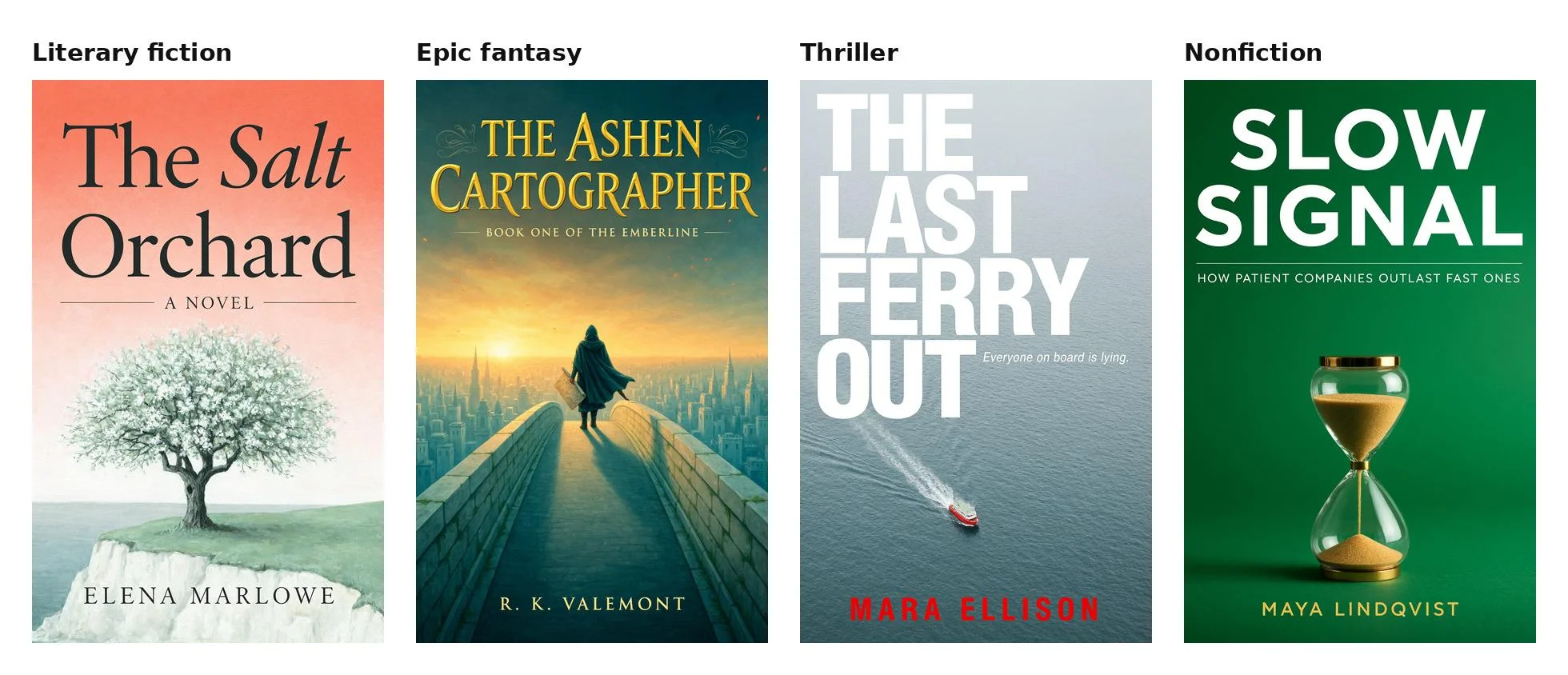
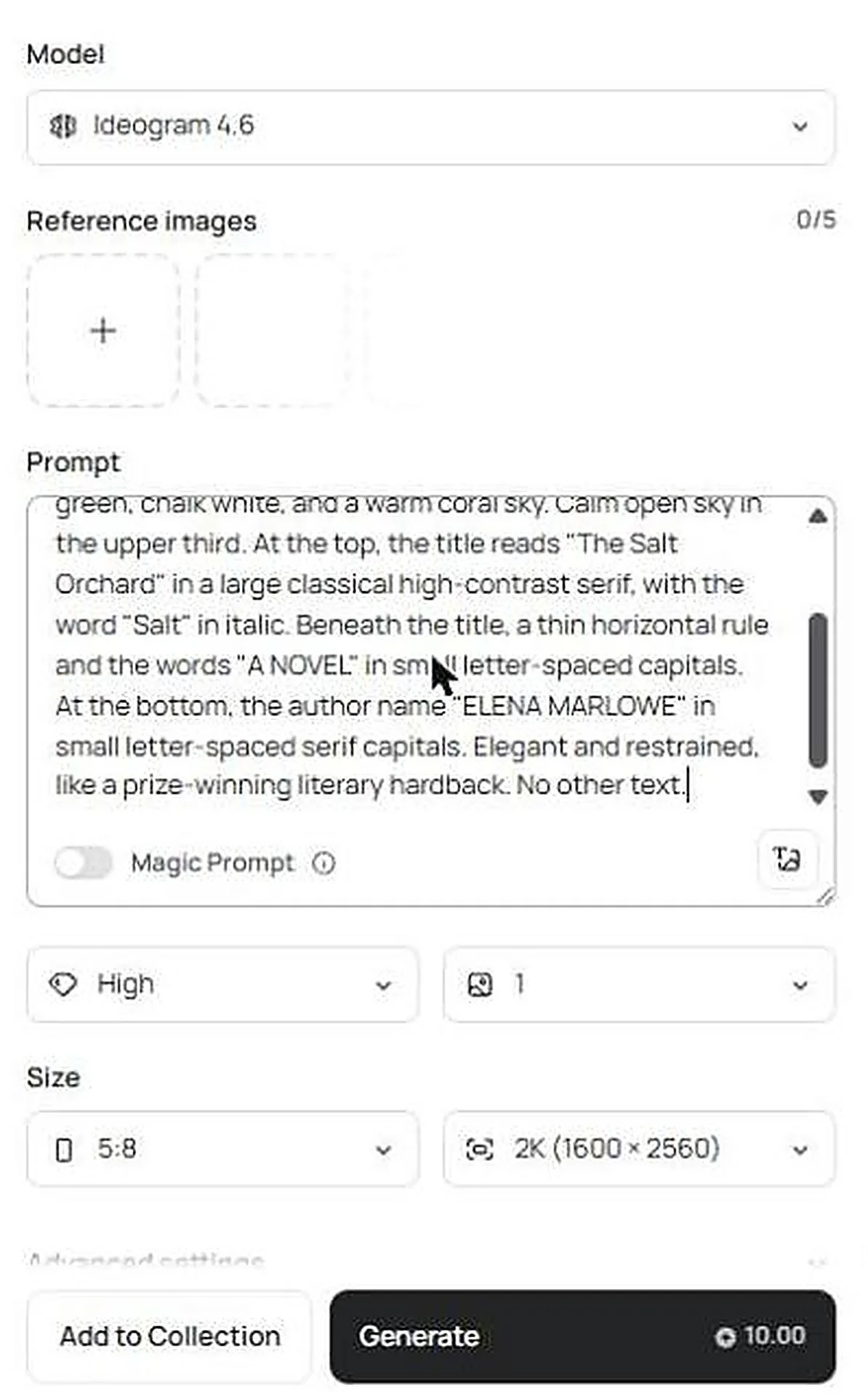
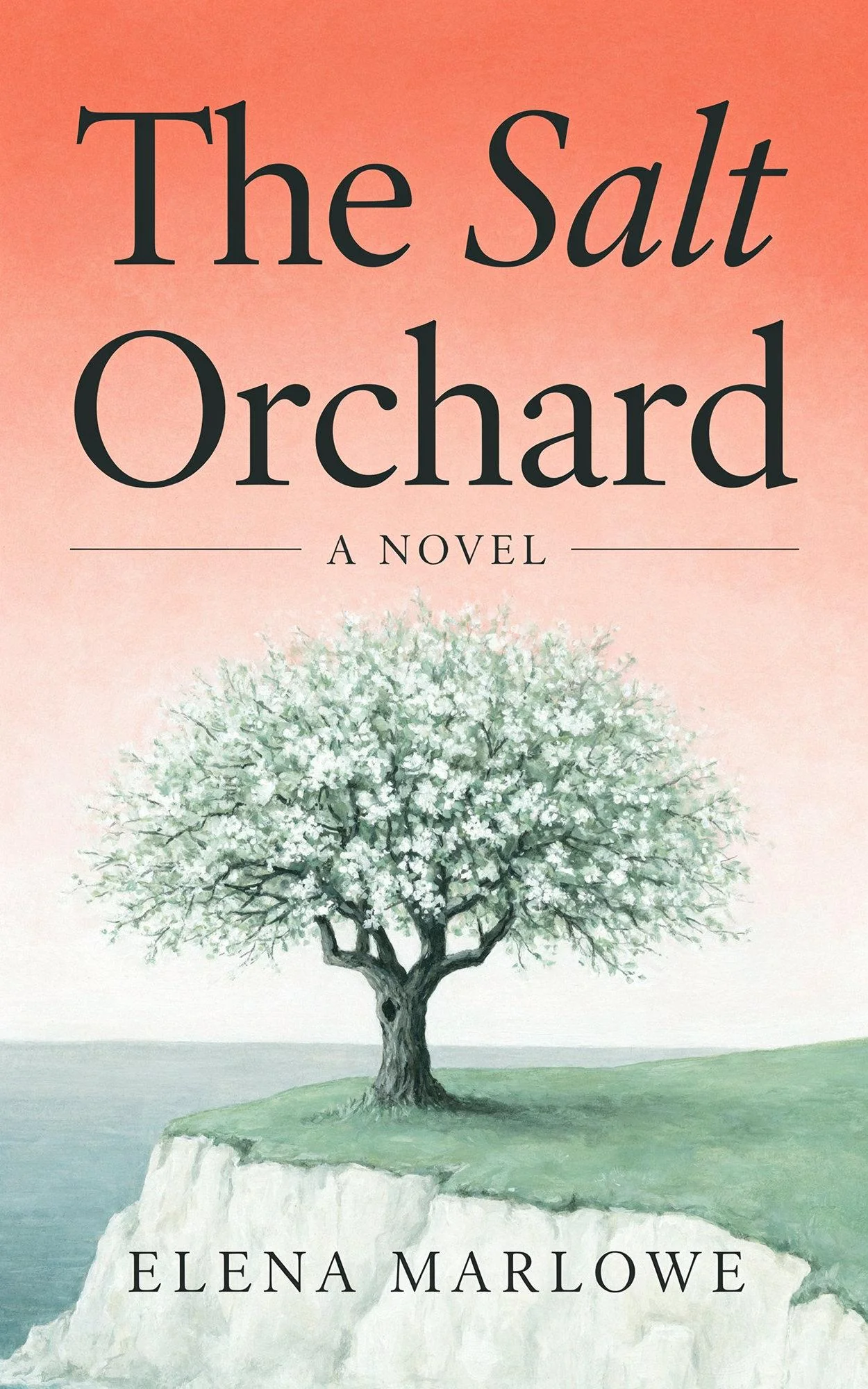
A literary fiction book cover, flat front cover artwork filling the whole frame. A single old apple tree in white blossom on a pale sea cliff, painted in soft gouache with sage green, chalk white, and a warm coral sky. Calm open sky in the upper third. At the top, the title reads “The Salt Orchard” in a large classical high-contrast serif, with the word “Salt” in italic. Beneath the title, a thin horizontal rule and the words “A NOVEL” in small letter-spaced capitals. At the bottom, the author name “ELENA MARLOWE” in small letter-spaced serif capitals. Elegant and restrained, like a prize-winning literary hardback. No other text.
Guide: How to create a book cover with AI in Ideogram, step by step
These are the steps we followed for “The Salt Orchard,” with the screen you’ll see at each one.
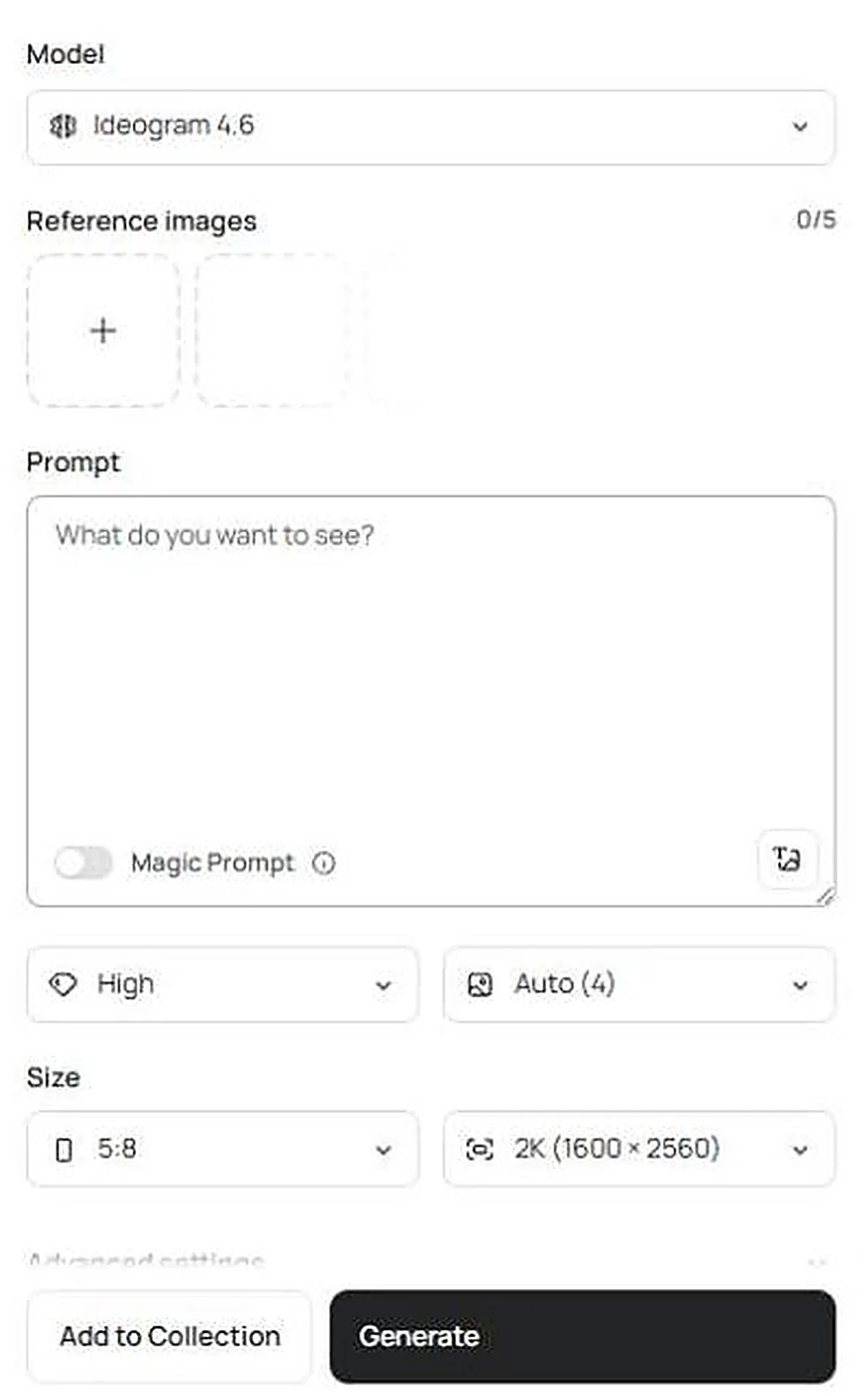
1. Sign up and open the Image app
Go to ideogram.ai and select Get started to create your account. If you want to compare the options first, see the ways to sign up. Then choose Image in the left menu. Open the Model menu at the top of the panel and pick Ideogram 4.6.
2. Set the cover size before you write anything
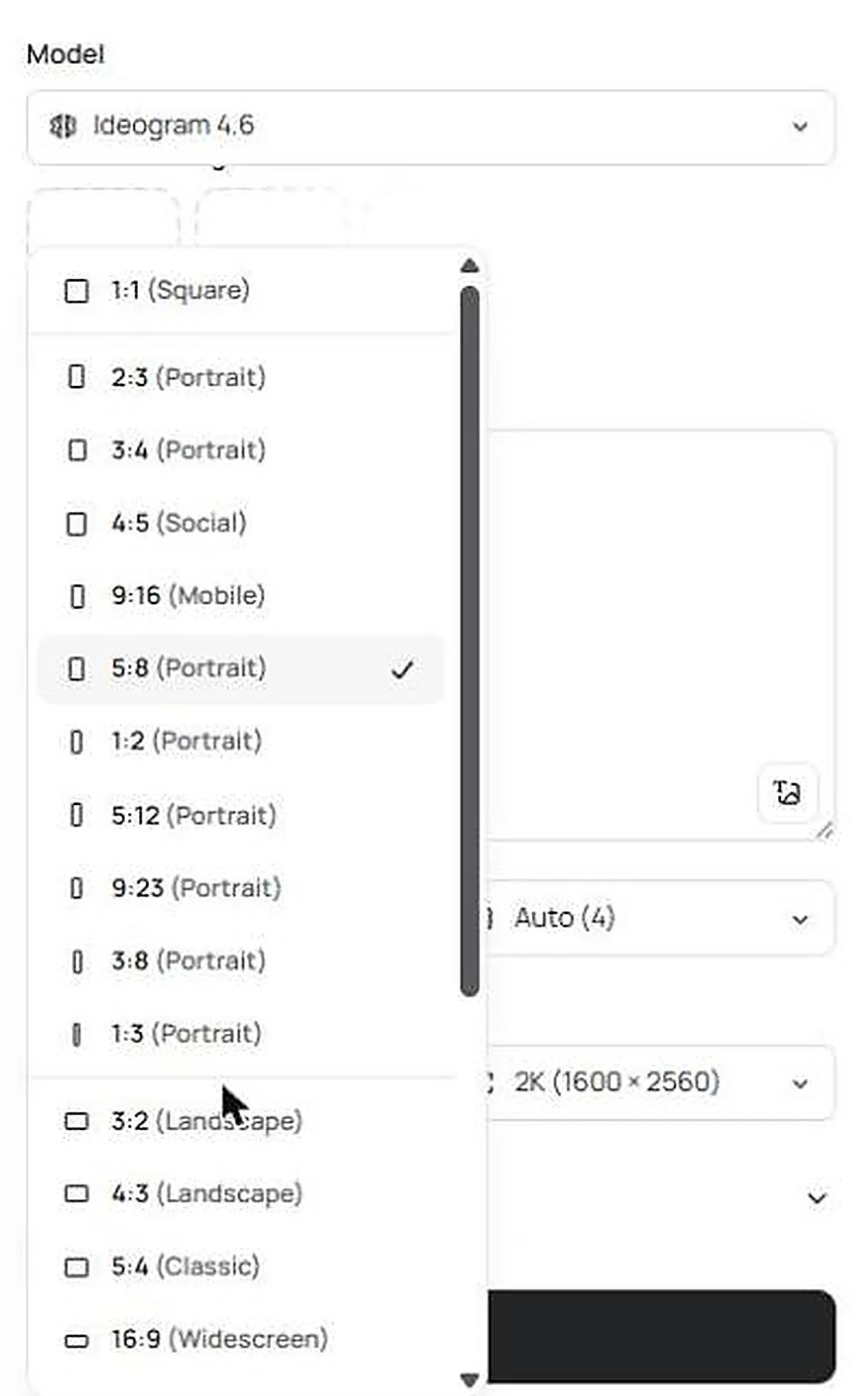
Under Size, open the first menu and choose 5:8 (Portrait). That is the 1.6:1 shape Amazon recommends for Kindle covers, so nothing gets cropped later.
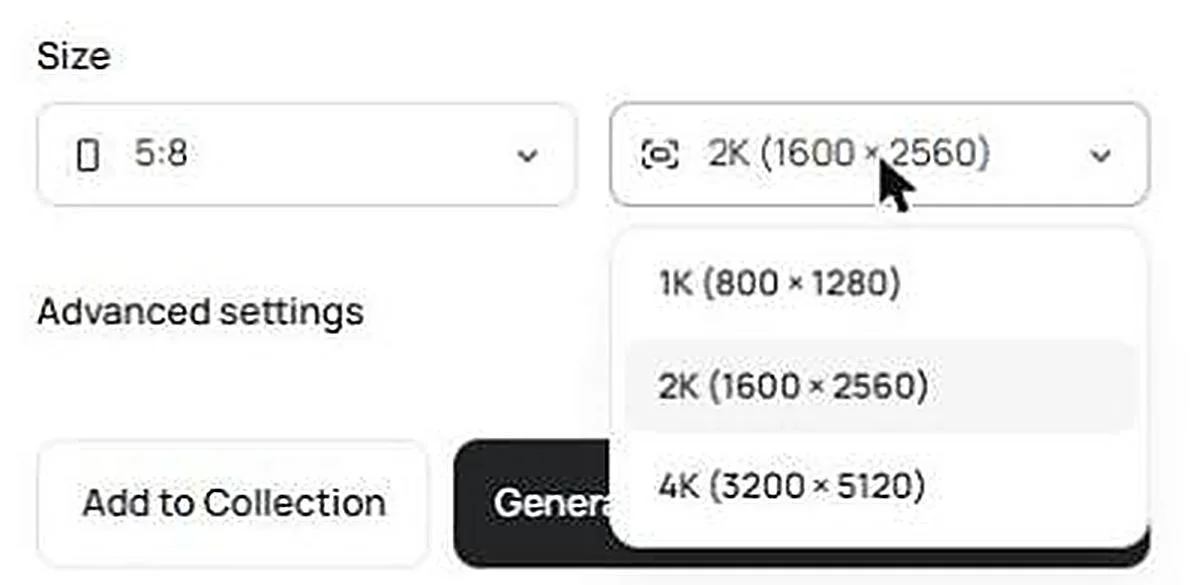
In the menu beside it, choose 2K for a first try or 4K if you plan to print. At 5:8, 2K is 1,600 × 2,560 pixels and 4K is 3,200 × 5,120.
3. Write your book cover prompt
Paste the formula into Prompt and fill in each part. Leave Magic Prompt off. It rewrites your prompt for you, and here you want the exact wording you typed. Set quality to High and the number of images to 1, or more if you want options to choose from.
The Generate button shows the credit cost before you commit. Our cover cost 10 credits at 2K and High quality.
For more on ordering the parts of a prompt, see how to structure an Ideogram prompt.
4. Generate, then check every word
Select Generate. The cover appears in the panel on the right. Open it at full size and read each line letter by letter: title, subtitle, author name, and any tagline.
5. Download the file
Select the download arrow above the image. On a free account the file is a JPEG at its original size, and paid plans can also choose PNG. At 2K the cover is 1,600 × 2,560 pixels.
Guide: How to get the title and author name right on the cover
On our four covers, the title, subtitle, and author name were all set inside the image. This is the prompt wording that did it.
- Quote every word that must appear: the title, subtitle, author name, and tagline each go inside quotation marks. Ideogram’s text rendering treats quoted words as the text to set.
- Describe a type style, not a font file: say “tall high-contrast serif,” “bold condensed sans-serif capitals,” or “ornate gold serif capitals.” Ideogram draws the lettering from your description of its weight, shape, and mood.
- Give the order and the position: title at the top, author name at the bottom, subtitle directly under the title.
- End with “No other text”: none of our four covers added a word we didn’t ask for.
New to type terms? A serif letter has small strokes at its ends, and a sans-serif letter doesn’t. Condensed means narrow, and letter-spaced means extra room between the letters.
We cover more placements, including text on objects, in our guide to writing text into an image prompt.
Book cover type styles by genre
| Genre | Title style we asked for | Author name style | Position |
|---|---|---|---|
| Literary fiction | Large classical high-contrast serif, one word in italic | Small letter-spaced serif capitals | Title top, name bottom |
| Epic fantasy | Large ornate gold serif capitals with engraved detail | Gold letter-spaced serif capitals | Title top, series line under it, name bottom |
| Thriller | Very large bold condensed sans-serif capitals, stacked | Letter-spaced sans-serif capitals in red | Title fills the upper half, name bottom |
| Nonfiction | Very large heavy modern sans-serif capitals, two lines | Letter-spaced sans-serif capitals in gold | Title across the top, rule and subtitle under it, name bottom |
AI book cover prompts for fantasy, thriller, and nonfiction
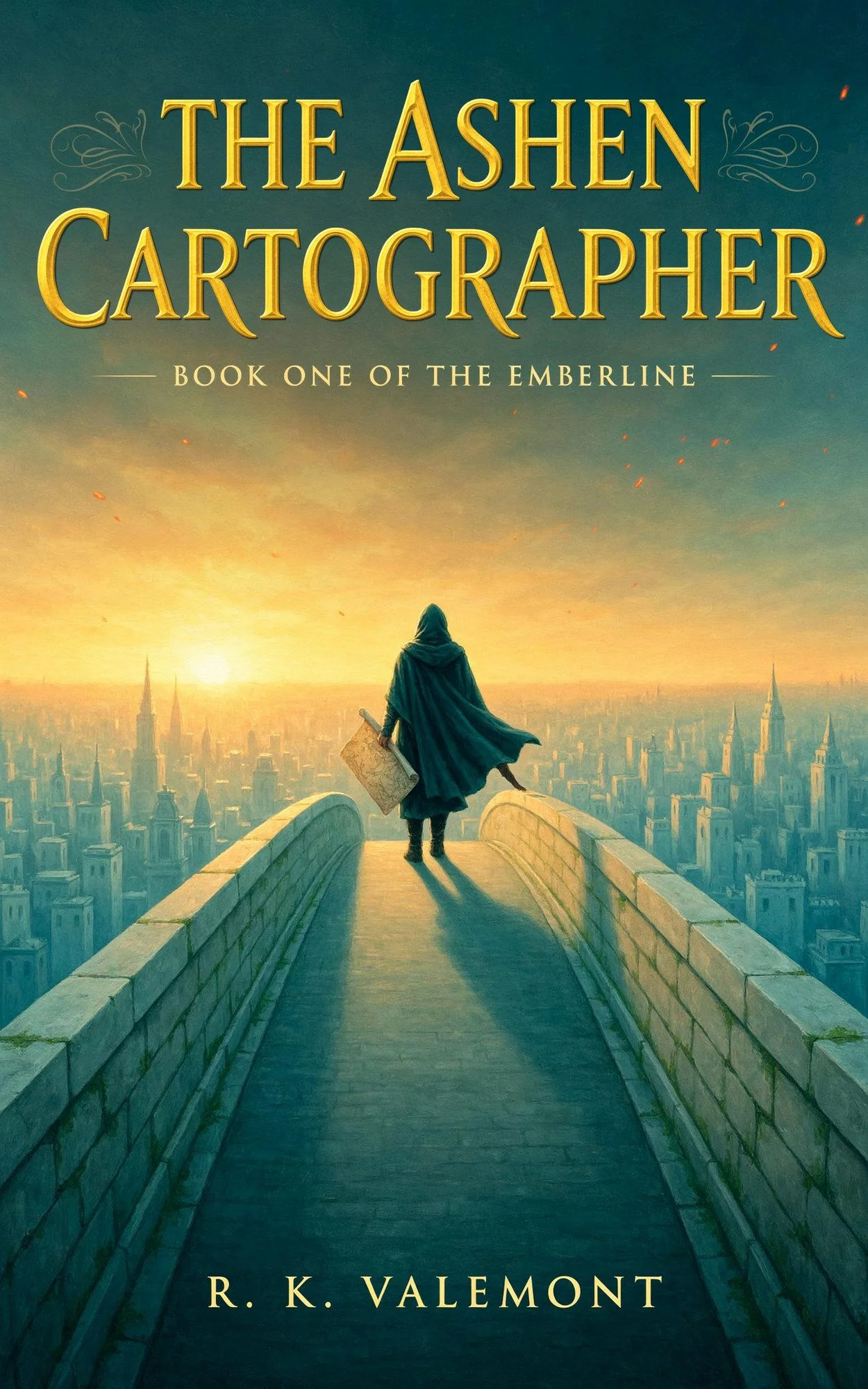
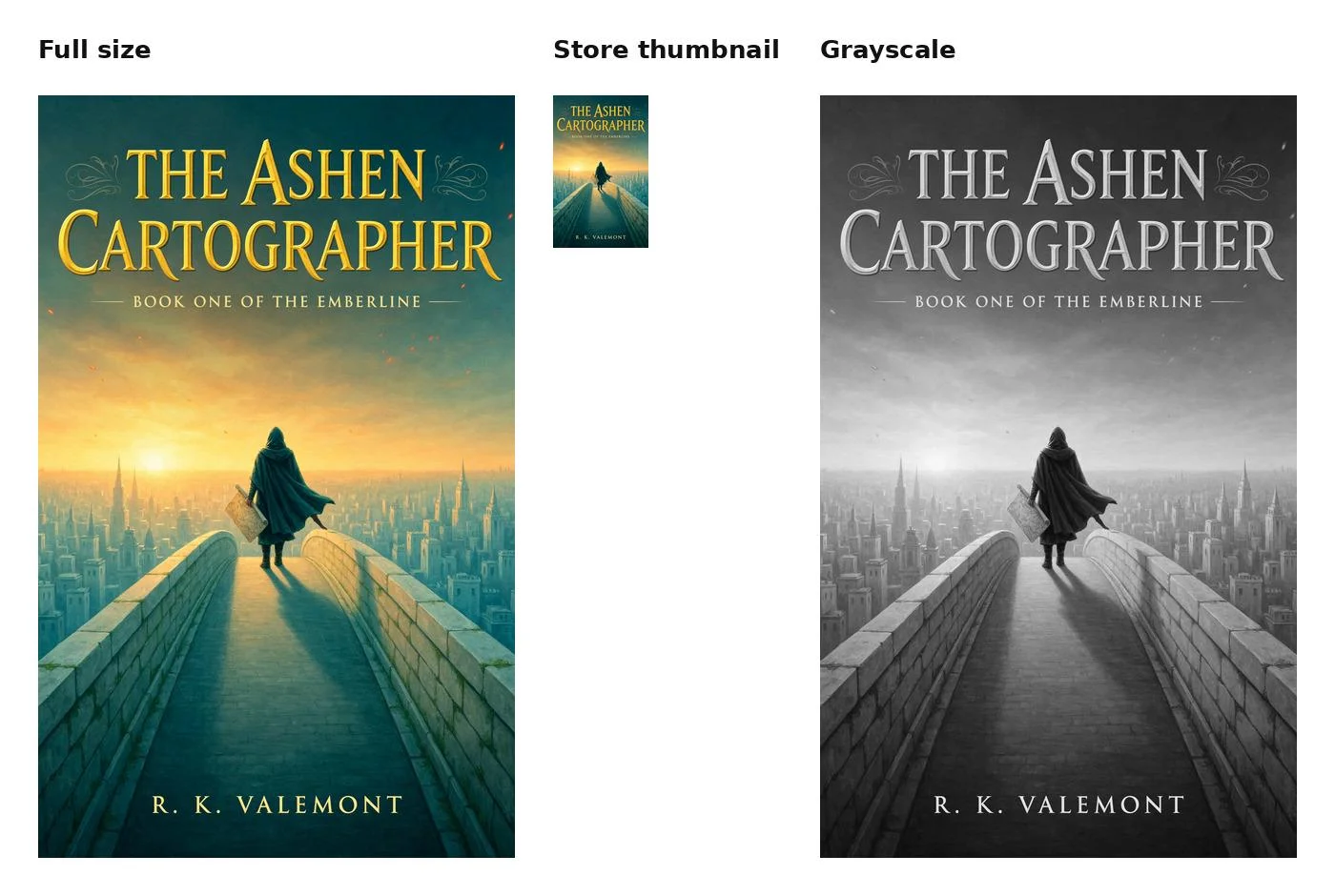
An epic fantasy book cover, flat front cover artwork filling the whole frame. A lone cloaked mapmaker stands on a high stone bridge above a vast city of pale towers at sunrise, painted in a rich, detailed oil-painting style with luminous gold light, deep teal shadows, and drifting embers. At the top, the title reads “THE ASHEN CARTOGRAPHER” in large ornate gold serif capitals with fine engraved detail, set on three lines. Below the title, small letter-spaced capitals read “BOOK ONE OF THE EMBERLINE”. At the bottom, the author name “R. K. VALEMONT” in gold letter-spaced serif capitals. The look of a bestselling fantasy hardback from a major publisher. No other text.
The title came back on two lines, with “CARTOGRAPHER” filling the full width. To set the line breaks yourself, name the words for each line in the prompt.
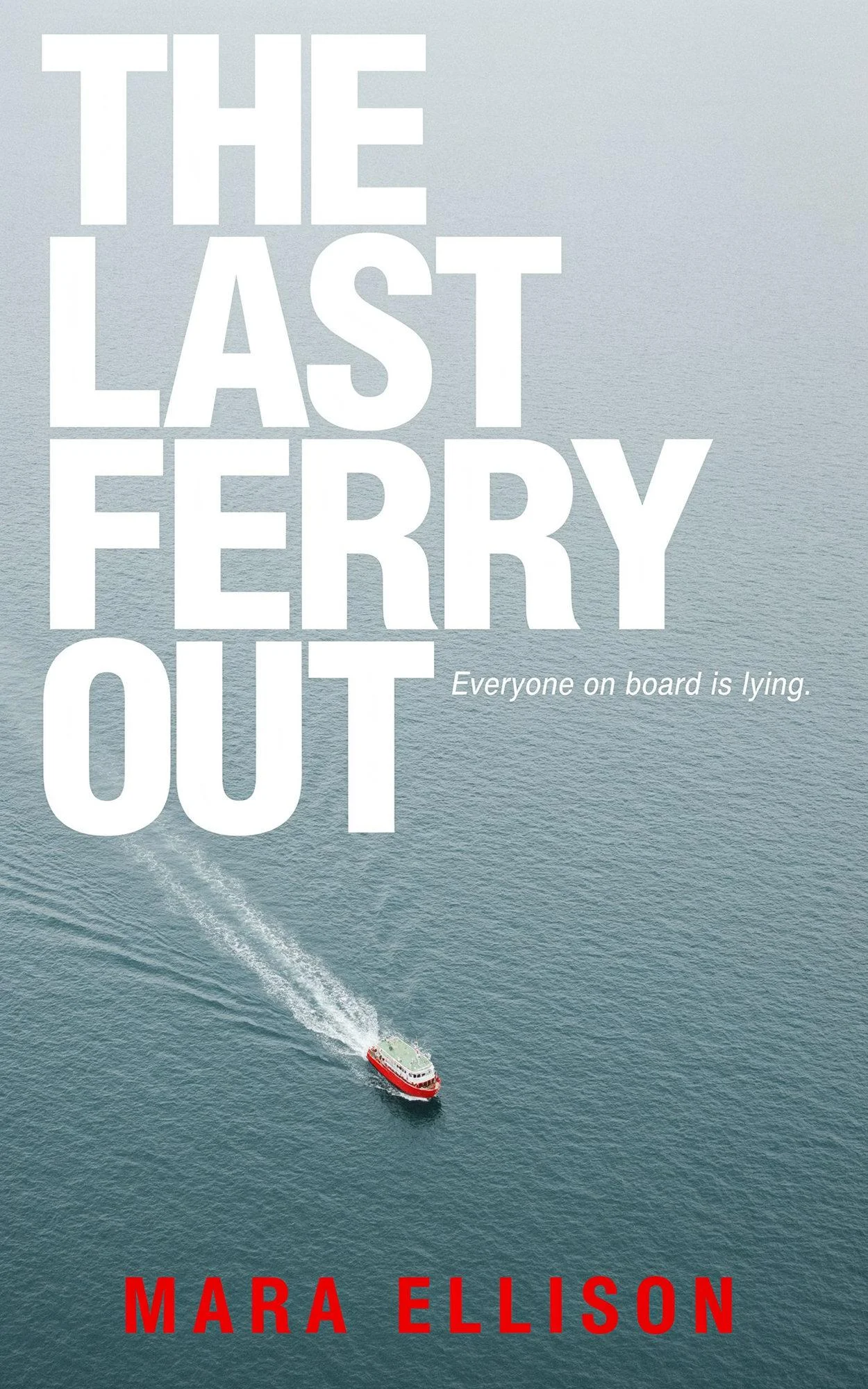
A psychological thriller book cover, flat front cover artwork filling the whole frame. A photographic image seen from high above: one small ferry crossing a wide grey-blue sea in pale morning light, trailing a long white wake, cool desaturated tones with a single accent of signal red on the ferry’s hull. The title “THE LAST FERRY OUT” in very large bold condensed sans-serif capitals, white, stacked on four lines and filling the upper half. Under the title, a small tagline in white reads “Everyone on board is lying.” At the bottom, the author name “MARA ELLISON” in letter-spaced sans-serif capitals in signal red. Clean and high-contrast, like a bestselling thriller from a major publisher. No other text.
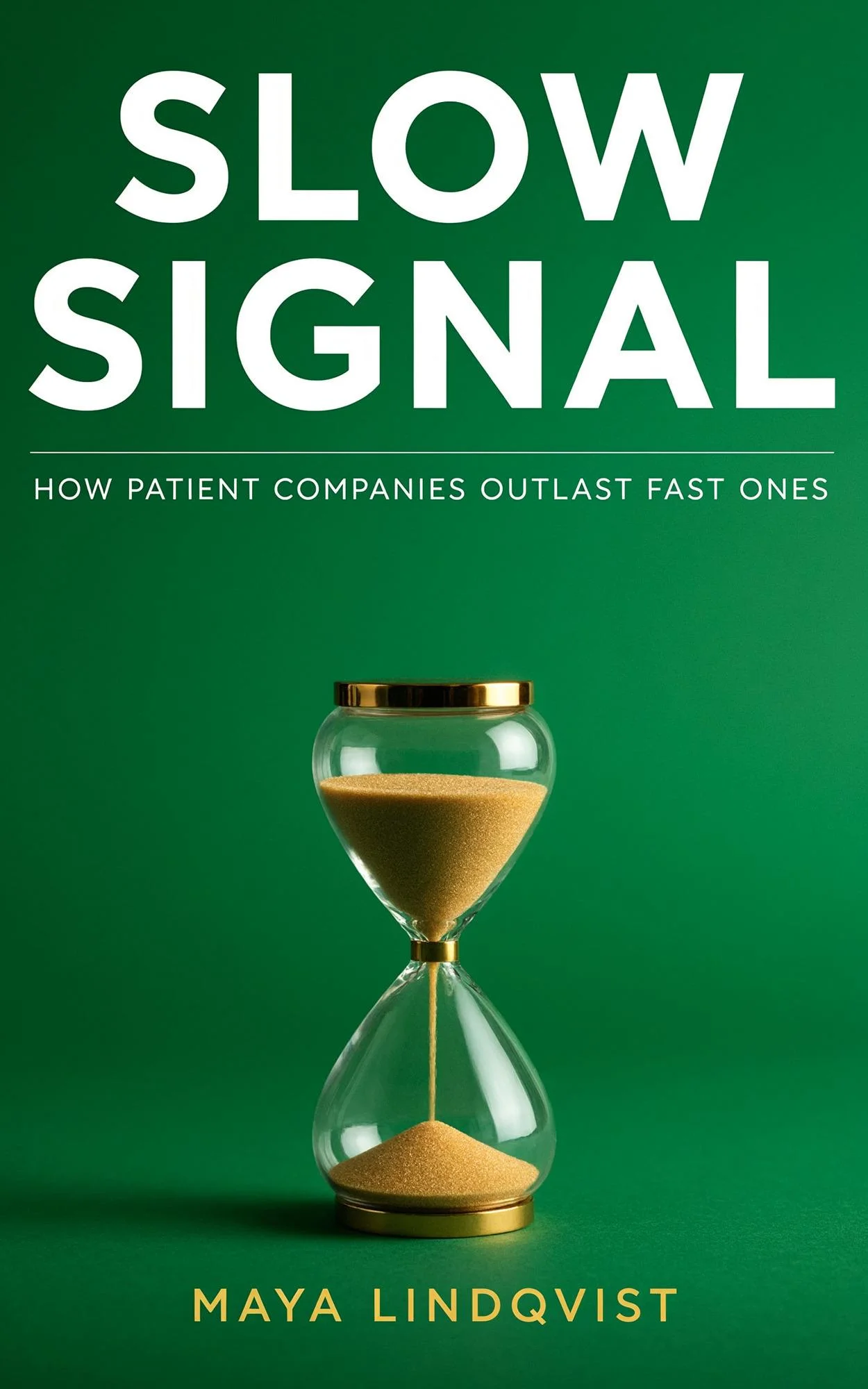
A premium business nonfiction book cover, flat front cover artwork filling the whole frame. A studio photograph of one clear glass hourglass with fine gold sand falling, centered in the lower half on a seamless rich emerald-green backdrop, soft directional light, a gentle shadow, bright saturated color, crisp detail. Generous clean space above it. At the top, the title “SLOW SIGNAL” in very large, heavy, modern sans-serif capitals, white, tightly spaced, stacked on two lines and spanning the full width of the cover. Directly beneath the title, a thin white rule, then the subtitle “HOW PATIENT COMPANIES OUTLAST FAST ONES” in small letter-spaced sans-serif capitals, white. At the bottom, the author name “MAYA LINDQVIST” in letter-spaced sans-serif capitals in warm gold. Confident and luxurious, like a lead title from a major business publisher. No other text.
Heavy sans-serif capitals hold up better at thumbnail size than a fine serif.
Across the four covers, 39 of 39 words matched the prompt on the first run. The line we read first on every cover is the author name: it’s the smallest type and the easiest to skim past.

Guide: How to change the title, subtitle, or author name after the cover is done
Details change late in publishing: a new subtitle, a pen name, or a prize line. You can change one line and keep the cover.
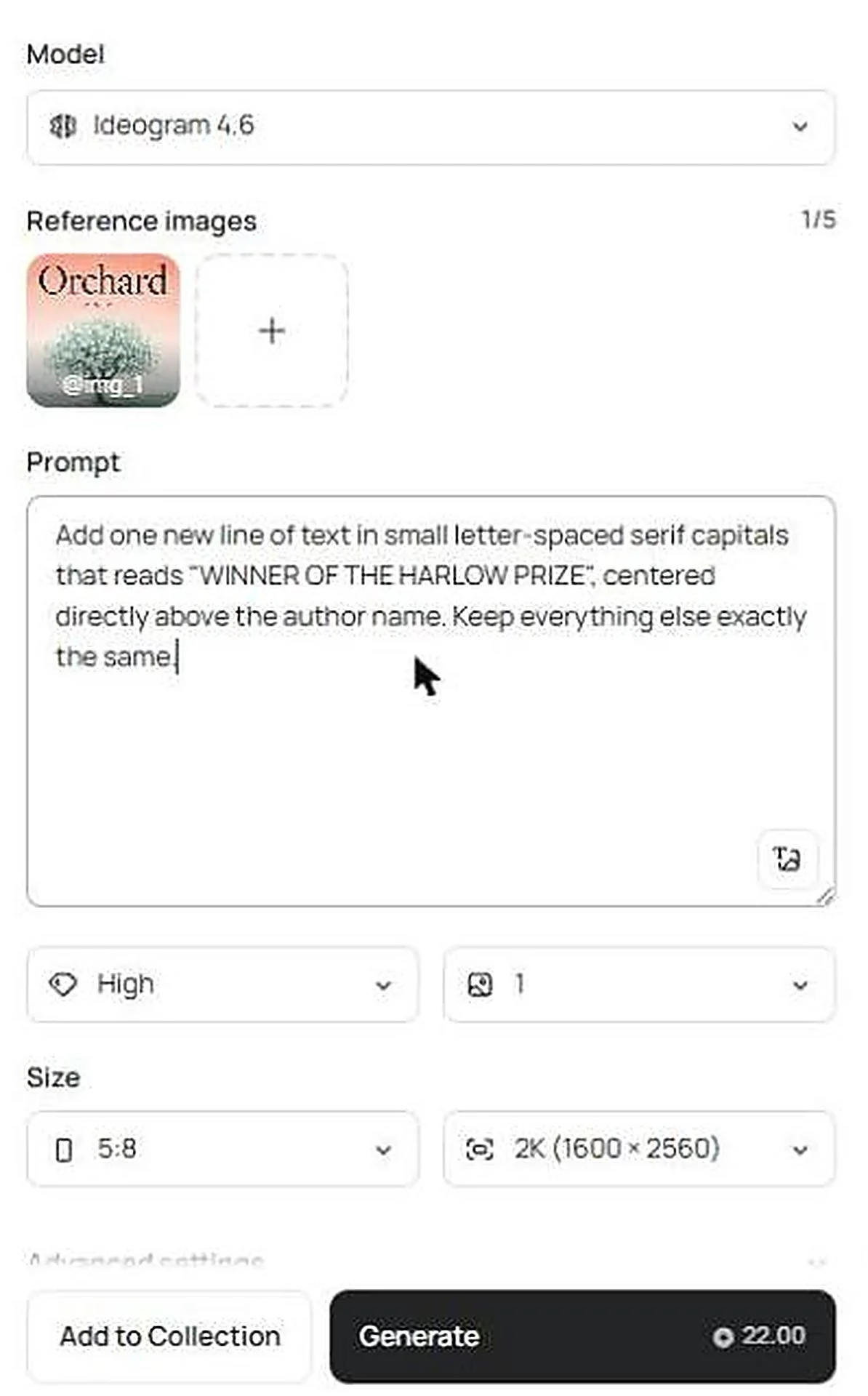
- In the Image app, select the + under Reference images, choose Library, and pick your finished cover.
- Keep the same size and resolution as the original.
-
Describe the single change and quote the new words. We typed:
Add one new line of text in small letter-spaced serif capitals that reads “WINNER OF THE HARLOW PRIZE”, centered directly above the author name. Keep everything else exactly the same.
- Check the cost on Generate, then run it. Ours cost 22 credits at 2K and High quality with one reference image.
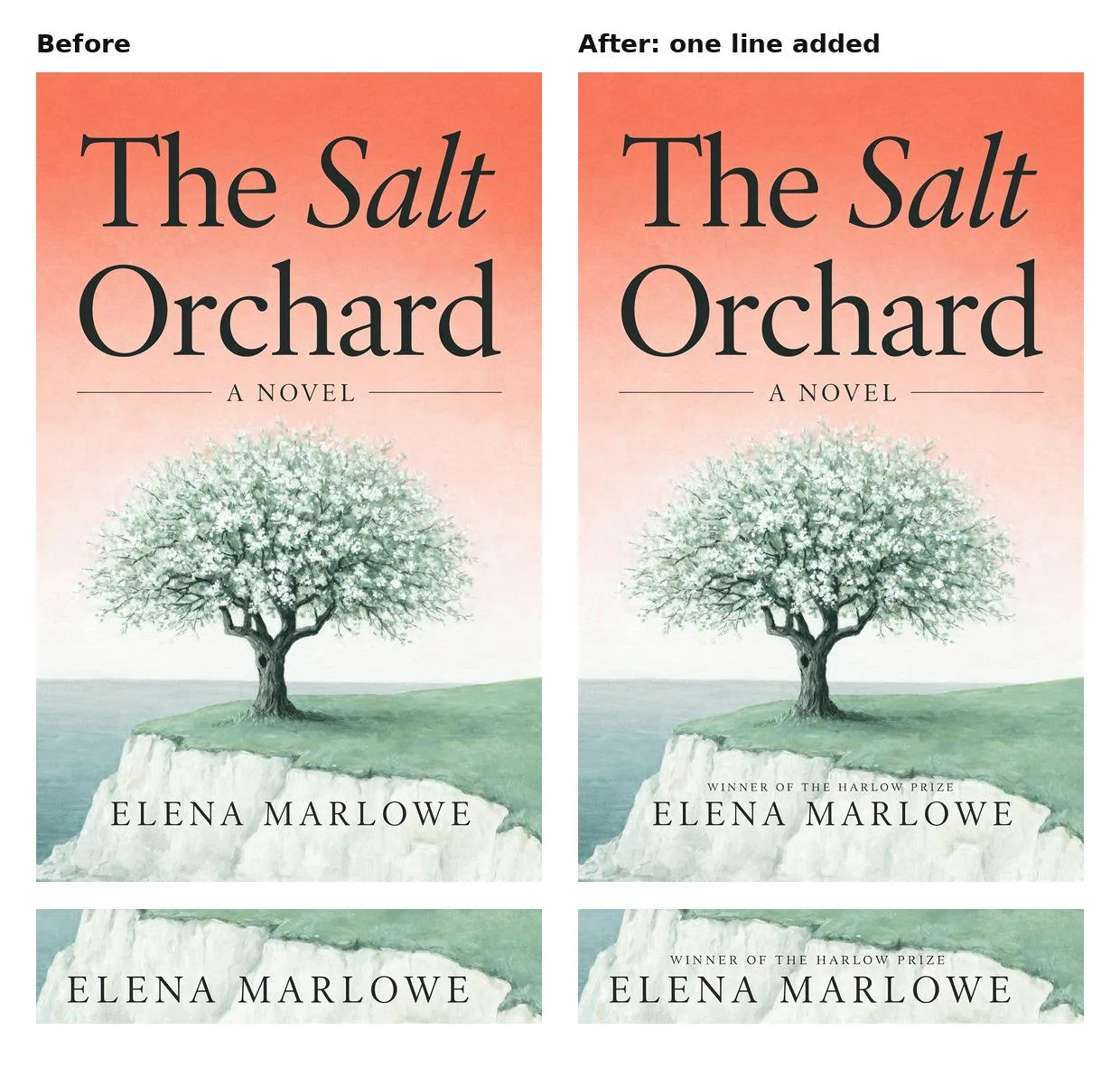
We compared the two files pixel by pixel. Outside the area of the new line, 99% of pixels were identical, and the rest changed too little to see (8 levels out of 255 at most). The title, the tree, and the author name stayed where they were.
To replace a word, follow our walkthrough on fixing a misspelled word without recreating the image. To change the font or the size of a line, turn the lettering into editable text layers. Each edit on Ideogram 4.6 can start from your last result, so you can make one change at a time.
Guide: Book cover size and dimensions for Kindle, paperback, and hardcover
How to make an ebook cover the right size
| Cover | Size |
|---|---|
| Amazon’s ideal Kindle cover | 2,560 pixels high × 1,600 pixels wide, a ratio of at least 1.6:1 |
| Ideogram 5:8 at 2K | 1,600 × 2,560 pixels |
| Ideogram 5:8 at 4K | 3,200 × 5,120 pixels |
The 2K file is an exact match. Amazon accepts JPEG or TIFF files under 50 MB, so save your cover in one of those formats before you upload. The full list is in Amazon’s cover image requirements.
Paperback and hardcover covers
A print cover is one file that holds the back, the spine, and the front. Trim size is the finished page size of your book, and 300 DPI is the resolution printers ask for. Spine width depends on your page count and paper, so download the template from your printer first, then place your Ideogram cover on the front panel.
| Trim size | Pixels at 300 DPI | Ideogram setting |
|---|---|---|
| 5 × 8 in | 1,500 × 2,400 | 5:8 at 2K |
| 5.5 × 8.5 in | 1,650 × 2,550 | 5:8 at 4K, trimmed slightly at top and bottom |
| 6 × 9 in | 1,800 × 2,700 | 2:3 at 4K |
Your printer’s template adds a margin around the edges, so follow its measurements for the final file. If you need a larger file than 4K, Ideogram Upscale enlarges a finished cover.
Guide: How to make a good book cover that looks designed, not generated
What makes a good book cover is the same with or without AI: one idea, a title you can read at a glance, and type that tells the reader the genre. Each point below has the prompt words that get it.
- One focal subject: “a single old apple tree” or “one small ferry.” There is one thing to look at.
- A limited palette: name two or three colors, such as “sage green, chalk white, and a warm coral sky.”
- A named medium: “painted in soft gouache,” “a photographic image seen from high above,” or “a studio photograph.”
- Room for the type: say where the image stays quiet, such as “calm open sky in the upper third.”
- The books you want to sit beside: close the prompt by naming that kind of book, such as “like a prize-winning literary hardback.”
Then run three checks before you upload:
- Thumbnail: shrink the cover to store size. The title should still read.
- Every letter: read each line at full size.
- Grayscale: remove the color. The title should still stand out from the background.
Reference: Can you use an AI book cover on Amazon KDP?
Yes, as long as you declare it. KDP is Kindle Direct Publishing, Amazon’s self-publishing service.
- Disclosure: when you publish or republish a book, Amazon asks whether it contains AI-generated content, and a cover image counts. Answer yes for a generated cover. The wording is in Amazon KDP’s content guidelines.
- Commercial use: we explain the terms in who owns the images you make in Ideogram.
- What you depict: use an invented scene and your own title. Leave out real people, existing characters, and publisher logos. For questions about registering your cover, talk to an attorney.
- Before launch: if your cover should stay unseen until release day, read who can see your Ideogram images.
- Launch graphics: Ad Resizer adapts a finished design to square, 9:16, and 16:9 sizes for placements such as TikTok and Meta Reels.
Reference: Questions about making a book cover with AI
Is there a free way to make a book cover with AI?
Is it legal to use an AI-generated book cover?
Can I make a book cover on my phone?
Can I put my own photo on the cover?
Can AI make the spine and back cover too?
What are the four elements of a book cover?
Make your cover
Sign up for Ideogram, set the size to 5:8, and paste the cover formula with your own title in quotes.