
Does Ideogram add a watermark? What the image files contain

Ideogram images had no visible watermark in the files tested for this post on November 16, 2026. No logo, wordmark or badge appeared on any of 16 API outputs or on two assets downloaded from the app.
Fourteen of the 16 API files did carry a signed C2PA manifest, also called Content Credentials, that names Ideogram and marks the image as created with generative AI. None of the files contained the prompt or the seed.
Ideogram’s public documentation does not state a watermark or provenance policy, so most findings below are measurements of specific files on one day. The table marks which answers are measured and which are documented.
Overview : Ideogram watermarks and metadata at a glance
| Question | Answer | Basis |
|---|---|---|
| Visible watermark | None found in 16 API files and 2 app assets | Measured |
| C2PA content credentials | Present in 14 of 16 API files and 1 of 2 app assets | Measured |
| What the manifest says | “Ideogram AI-generated image”, created with generative AI, signed by Ideogram | Measured |
| Prompt or seed inside the file | Not found in any file | Measured |
| EXIF, XMP and PNG text | No file has XMP or text chunks. Most files have no EXIF, and some hold a Make tag reading “Ideogram AI” | Measured |
| Where the prompt and seed are | The API response, or the CSV in a Library bulk download | Documented |
| Invisible watermark | Not addressed in public documentation, and not detectable by inspecting a file | Documentation gap |
| API subscription | The API needs no subscription. Ideogram 4.5 costs $0.03 to $0.10 per image generated from a prompt | Documented |
Overview : Does Ideogram add a visible watermark to images?
Ideogram did not add a visible watermark to any image tested on November 16, 2026. Each file was viewed whole and at 100% in all four corners, and none showed an Ideogram logo, wordmark, text overlay or badge.

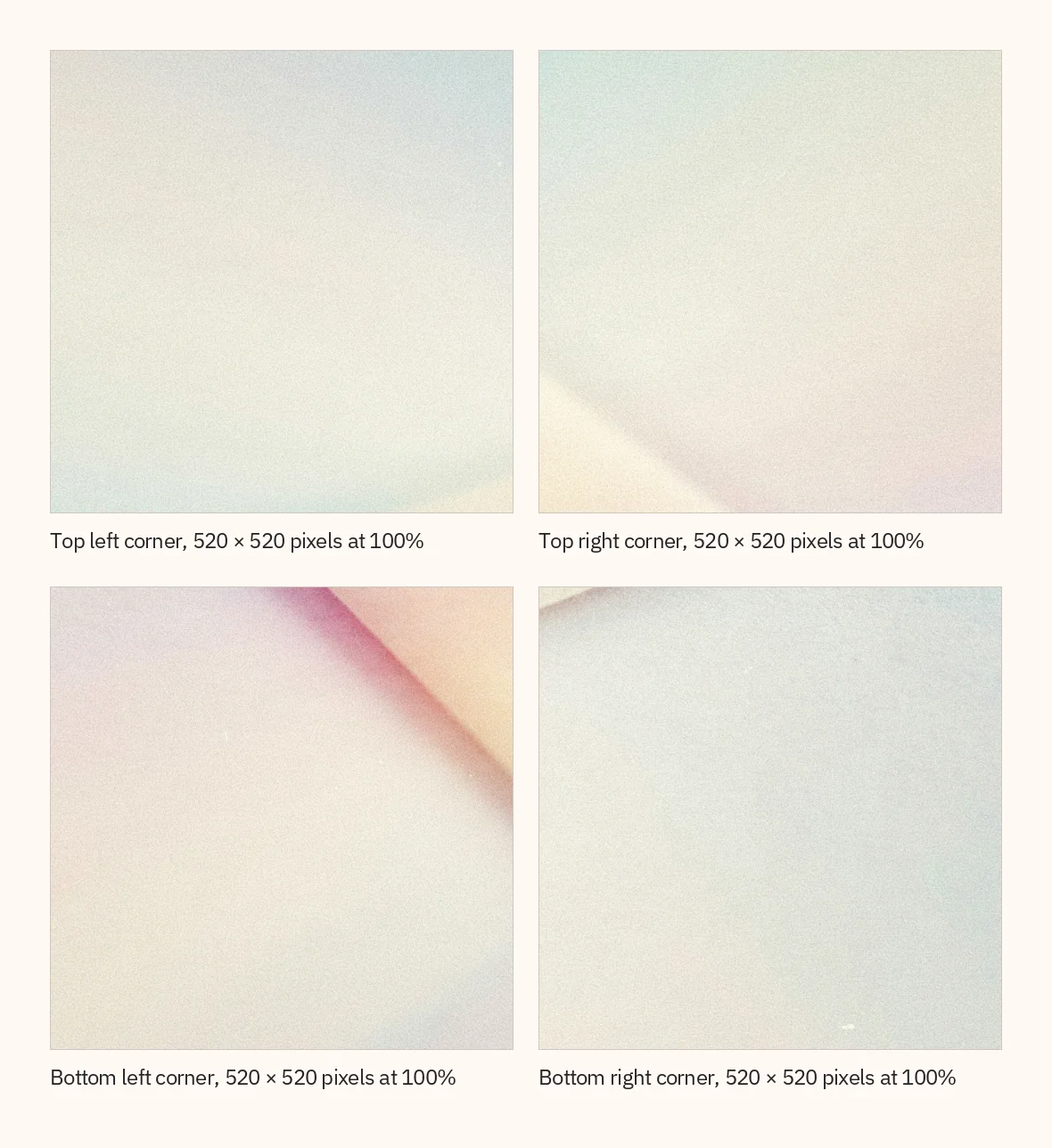
The Terms of Service refer to “watermarks included on any User Output” without describing one, so a measurement cannot be read as a policy. Ideogram’s documentation also does not address invisible watermarking, and inspecting a file cannot show whether its pixels carry a statistical signal.
Overview : Do Ideogram API images have a watermark, and do you need a membership to avoid one?
Ideogram API images had no visible watermark in the files tested, and the Ideogram API needs no subscription. A free Ideogram account can create an API key, and each request draws on a prepaid balance.
Ideogram 4.5 costs $0.03 per image generated from a prompt at Low quality, $0.06 at Medium and $0.10 at High. These prices were checked on November 16, 2026, against the public pricing catalog. The Ideogram API pricing guide covers every other endpoint.
No Ideogram page ties a watermark to a plan, and the pricing page does not mention one. The download guide lists a narrower choice of file type and size for accounts without a paid plan:
| Download option | Without a paid plan | With a paid plan |
|---|---|---|
| JPEG at original size | Yes | Yes |
| PNG or WebP | No, except transparent images at 1K | Yes |
| Upscaled sizes | No | Yes, for credits |
A free-plan download was not tested.
In the file : What C2PA content credentials do Ideogram files carry?
Ideogram files carried C2PA content credentials in 14 of the 16 API outputs tested. C2PA is an open technical standard for recording the origin and edits of digital content, and a Content Credential, also called a C2PA manifest, is signed metadata stored inside the file.
Each manifest sat in one PNG chunk named caBX and made the same set of statements.
| Field | Value in the files tested |
|---|---|
| Title | Ideogram AI-generated image |
| Claim generator | Ideogram, with a version label: V_4_0 on Ideogram 4.5 and 4.0 files, V_3_1 on the Ideogram 3.0 file |
| Action | c2pa.created |
| Digital source type | trainedAlgorithmicMedia, which IPTC names “Created using Generative AI” |
| Time | The time of generation, in UTC |
| Ideogram assertion | com.ideogram.generation, holding created_at, generation_id, provider, system_name and system_version |
| Thumbnail | A preview image, 1,024 pixels wide in the files checked |
| Signer | Ideogram Provenance Signer (Prod), issued by Ideogram, Inc., ES256 |
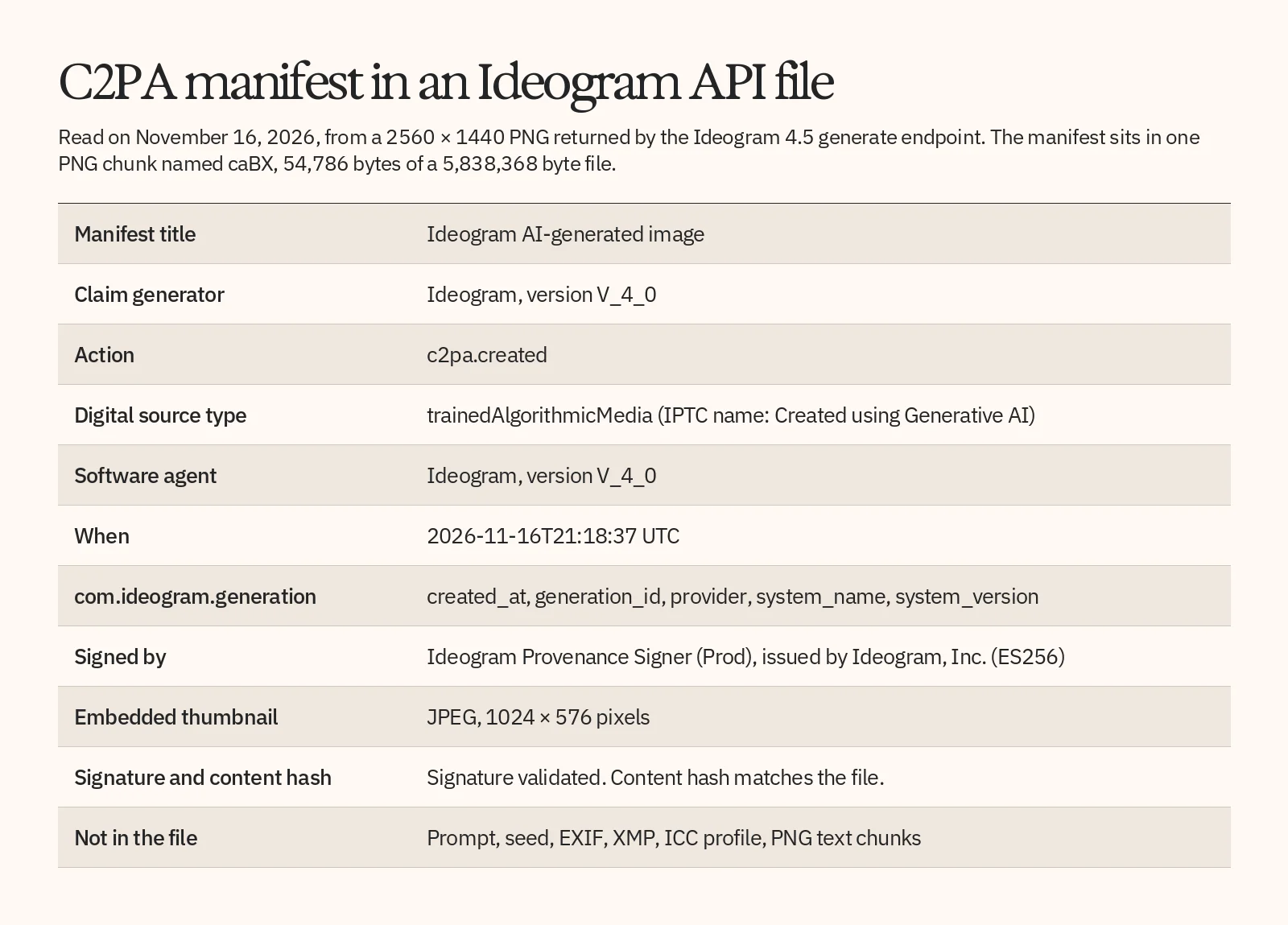
The signature verified and the content hash matched in every one of those files. The signing certificate chains to a root certificate that Ideogram issued itself. That root was not on the published C2PA trust list when checked on November 16, 2026, so the open-source c2pa library reported each manifest as Valid and its signer as untrusted. A verifier that relies on that list may show the issuer as unrecognized.
Edits were recorded the same way as new images. The seven outputs generated from a source image and the one Precise Edit result each listed a single c2pa.created action and no ingredients, so the manifest did not reference the image that was edited. An edit of a camera photo was not tested.
Two API files had no manifest. Both came from the older background removal endpoint, and both were made from inputs that had one.
In the file : Is the prompt, seed or EXIF data stored in the image file?
Ideogram did not store the prompt or the seed in any file tested. In the 14 API files made from a prompt, a search of the metadata for words from that prompt, and of the whole file for its seed value, returned no match. The other files held only the fields described in this post.
EXIF was absent from most files. Where it appeared, it was one 134-byte block with four tags: Make, set to “Ideogram AI”, and three timestamps.
| File type | EXIF | Color profile | XMP or PNG text |
|---|---|---|---|
| Ideogram 4.5 and 4.0, opaque, including edits | None | None | None |
| Ideogram 4.5, transparent background | Make and timestamps | sRGB | None |
| Ideogram 3.0 | Make and timestamps | None | None |
| Background removal, older endpoint | Make and timestamps | sRGB | None |
In the file : Where are the prompt and seed recorded instead?
Ideogram records the prompt and the seed outside the image file. Through the API they come back in the JSON response for each image, and in the app a bulk download from Library includes a CSV file that lists them.
The Generate with Ideogram 4.5 reference documents five fields for each image:
| Field | What it holds |
|---|---|
prompt | The final prompt the image was generated from |
seed | The random seed |
resolution | The image size, written as WIDTHxHEIGHT |
is_image_safe | Whether the image passed safety checks; if false, url is empty |
url | The direct link to the image |
In a response received on November 16, 2026, a 344-character prompt sent with Magic Prompt off came back as a 1,613-character structured prompt. Store the response if you need the exact text behind an image. The generation_id in the manifest matched the image ID in that response’s URL, which lets you join a saved file to your own log.
The API setup guide states that image links expire and tells you to download and store any result you want to keep. It gives no duration. In the 15 responses logged, each link’s expiry time was 24 hours after the request.
In the app, the bulk-download CSV has one row per item. It lists the file name, prompt, Magic Prompt text, aspect ratio, model, visibility, seed, style, color palette and a link to the asset, as the Ideogram FAQ describes.
In the file : Are files downloaded from the app different from API files?
Files downloaded from the Ideogram app matched API files in one of the two assets tested. An opaque image carried the same kind of C2PA manifest, and a transparent design carried EXIF and a color profile but no manifest.
| Property | App, opaque image | App, transparent design | API, Ideogram 4.5 opaque | API, Ideogram 4.5 transparent |
|---|---|---|---|---|
| Size in pixels | 2048 × 2048 | 3333 × 3333 | 2560 × 1440 | 2048 × 2048 |
| C2PA manifest | Yes, valid | No | Yes, valid | Yes, valid |
| EXIF | None | Make and timestamps | None | Make and timestamps |
| Color profile | None | sRGB | None | sRGB |
Both app assets were made by apps inside Ideogram on a paid workspace and saved as PNG from the download menu. A standard prompt-to-image generation, a free-plan download and the JPEG and WebP options were not measured, so treat this comparison as two data points.
Handling : What survives re-saving, resizing and uploading?
Ideogram’s C2PA manifest stayed valid only while the file’s bytes were unchanged. Every re-save, resize or pixel copy tested produced a file with no manifest.
| Handling | C2PA manifest | EXIF Make tag, where the file had one |
|---|---|---|
| Copy or rename, bytes unchanged | Present, valid | Present |
| Re-save as JPEG, PNG or WebP, or resize to 50%, with Pillow | Gone | Gone |
| Pixels copied into a new image, as a screenshot does | Gone | Gone |
| Convert to JPEG, or resize to 50%, with macOS sips | Gone | Present |
| One pixel changed, original manifest put back | Present, Invalid | Not applicable |
In the last row, the reader reported the file as Invalid because the content hash no longer matched. The C2PA FAQ describes both behaviors: a manifest can be separated from its file, and a change to the content breaks the signed link.
To keep the credentials, store the bytes the API returned, or the original file from the download menu, and pass that file on unchanged. A site that re-encodes uploads has the same effect as the re-saves above. No upload to a social platform was tested.
Handling : How do you check an Ideogram file yourself?
You can check an Ideogram file by opening the original in a Content Credentials reader. The reader shows the manifest and reports whether the signature and the content hash hold.
- Keep the original file. Use the bytes from the API link or the download menu, not a screenshot or a re-saved copy.
- Open it in a reader. The C2PA Verify tool runs in a browser, and the open-source c2pa library does the same job in a script.
- Read the claim. Look for the title, the digital source type and the signer.
- Read the validation state, which the c2pa library reports as Invalid, Valid or Trusted.
import json
import c2pa

with open("image.png", "rb") as f:
    reader = c2pa.Reader("image/png", f)
    report = json.loads(reader.json())

manifest = report["manifests"][report["active_manifest"]]
print(manifest["title"])
print(manifest["signature_info"]["issuer"])
print(report["validation_state"])
On the test file this printed “Ideogram AI-generated image”, “Ideogram, Inc.” and “Valid”. On a re-saved copy it raised a ManifestNotFound error.
Valid means the signature and the hashes check out. Trusted adds that the signer is on the trust list the reader uses. The Content Authenticity Initiative documentation notes that “a cryptographically valid signature is not automatically from a trusted signer”, and that a missing manifest does not by itself show that content is false.
When the test file was opened in the Verify tool on November 16, 2026, the tool showed the title “Ideogram AI-generated image”, a content summary saying that the image was generated with an AI tool, and “Ideogram, Inc.” as the issuer. It gave the credential the status “Unrecognized”, with a note that the issuer could not be recognized. That status matches the trust-list result above: the signature is valid, and Ideogram’s signing root is not on the list the tool checks. This is a reading of one file on one day.
Reference : What do Ideogram’s terms say about watermarks and disclosing AI content?
Ideogram’s terms bar removing watermarks from outputs and encourage you to say when an image was made with AI. They do not define “watermark” or mention Content Credentials.
| Document | What it says |
|---|---|
| Terms of Service, section 6.2(H) | You may not “remove any watermarks included on any User Output or otherwise generated by the Services”. |
| Usage Policy, item (D) | Do not use or distribute an output “in a misleading way”, for instance by presenting it as “entirely human generated” or as “an actual photograph of a real event”. Ideogram also encourages you “to proactively disclose” that an output was created using AI. |
| API Terms of Service, section 2.3.1 | A developer’s application must identify that outputs were created by the Ideogram AI Model, for example with a “Powered by Ideogram” tagline. |
Rules on labelling AI-generated content also vary by platform and by country, so check the ones that apply where you publish.
Reference : How were these files tested?
The findings in this post come from 16 files returned by the production Ideogram API and two assets downloaded from the web app, all inspected on November 16, 2026.
| Source | Files inspected |
|---|---|
| Ideogram 4.5, prompt only | Three opaque files and one transparent file |
| Ideogram 4.5 with a source image | Seven files |
| Ideogram 4.5 Precise Edit | One file |
| Ideogram 4.0 and Ideogram 3.0 | One file each |
| Background removal, older v1 endpoint | Two files |
| Web app download menu, paid workspace | Two app-generated assets |
Each file was read with Pillow for EXIF, color profile and PNG chunks, and with the open-source c2pa library, version 0.39.0, for the manifest and its validation. Upscaled outputs, video, SVG files and models from other providers were not tested. Results can change when Ideogram updates its pipeline, so inspect a current file before you rely on them.
Reference : Frequently asked questions
Does the Ideogram free plan add a watermark?
Can you remove a watermark from an Ideogram image?
Is C2PA the same as a watermark?
Which file format does the Ideogram API return?
Can you tell whether an image was made with Ideogram?
Do you have to label Ideogram images as AI-generated?
Read a file’s credentials yourself
Generate one image with the Ideogram API, then read its Content Credentials with the short script above. The Ideogram API overview shows how to get a key, and the API pricing tab lists what each request costs.