
Bulk image generation: from a spreadsheet of prompts to the API

Ideogram has two ways to make hundreds of images without selecting Generate each time. Batch runs a spreadsheet of prompts in the app, and the API runs them from your own code.
To generate images in bulk with Ideogram, put one prompt per row in a spreadsheet and upload it to Batch. A file holds up to 500 prompt rows, each row makes 1 to 4 images, and you see the credit cost before the batch starts.
For larger or repeating jobs, send the prompts through the Ideogram API. It has no batch endpoint, so your code sends one request per generation, up to 10 in flight at a time by default. Teams working at catalog volume add a custom model and a production workflow through Ideogram Enterprise.
Overview : Two routes to bulk generation
Batch is the route for a person with a spreadsheet. The API is the route for a team with a pipeline. They differ in size, in the models they reach, and in how the results come back.
| Topic | Batch in the app | The API |
|---|---|---|
| What you send | You upload a spreadsheet with one prompt per row, as a .csv, .xls, .xlsx or .ods file of up to 1 MB. | Your code sends one request per generation. |
| Size of a run | A file holds up to 500 prompt rows, with 1 to 4 images per row. | There is no batch endpoint. You send requests with bounded concurrency, and the default limit is 10 in-flight requests. |
| Models | Batch supports Ideogram 2.0, 2a, 3.0, 4.0, auto, and custom models. It does not support Ideogram 4.5, partner models or video. | The API reaches every model and tool in its reference, including Ideogram 4.5 and Precise Edit. |
| What you get back | You download a ZIP file of the results from the Batch page. | Each response holds image URLs. They expire, so your code downloads what you want to keep. |
| How it is charged | Batch uses credits. Each row is charged like the same generation in the app, and the review screen shows the total first. | The API charges a fixed price per image in US dollars, from a prepaid balance. |
You need at least 2 credits to submit a batch, and the batch stops if your credits run out. The plan comparison under Settings, then Plans, shows what your plan includes, and the help center’s Batch page has the full reference.
Batch : Run a batch from a spreadsheet
A batch takes five steps. The example rows below are for a coloring book, and the same file layout works for Pinterest pins, product concepts, or a set of merchandise designs.
Step 1 : Open Batch and download a template
In the sidebar’s More section, select Batch, or go to ideogram.ai/batch. Select Download template, then choose the Simple template or the Full template. The Simple template covers the basics, and the Full template has every column.
Step 2 : Fill in one prompt per row
Each prompt row is one generation. Only the prompt column is required, and any other cell you leave blank uses its default.
| Column | Allowed values | Default |
|---|---|---|
| prompt | Your prompt text (the only required column) | None |
| model | 2a, 2.0, 3.0, 4.0, auto, or a custom model’s id or name | 3.0 |
| num_images | 1 to 4 | 4 |
| aspect_ratio | A ratio such as 16:9, or auto, landscape, portrait or square | None |
| magic_prompt | off, auto or on | auto |
| visibility | private or public | private |
| rendering | turbo, default or quality | default |
| seed_number | A number | None |
| negative_prompt | What to leave out of the image | None |
| style | A style value, ignored on 4.0 rows | auto |
| color_palette | A preset palette name, or up to 5 hex codes separated by spaces | None |
Two defaults matter for cost. A blank model cell means Ideogram 3.0, and a blank num_images cell means four images, so set num_images to 1 when you want one image per row.
prompt,model,num_images,aspect_ratio,rendering
"A coloring page of a fox reading under a tree, bold black outlines",4.0,1,3:4,default
"A coloring page of an owl on a stack of books, bold black outlines",4.0,1,3:4,default
"A coloring page of a hedgehog with a teapot, bold black outlines",4.0,1,3:4,default - Keep the header row the same as the template’s column names.
- Delete the template’s example rows before you upload.
- Save CSV files as UTF-8.
- Format cells as text in a spreadsheet app, so a value like
2:3does not turn into a date.
Step 3 : Upload the file and review the batch
Select Upload spreadsheet. On the Review your batch generation screen, check the First row panel and the Batch summary, which shows the number of generations, the image count, and the credits needed against the credits available.
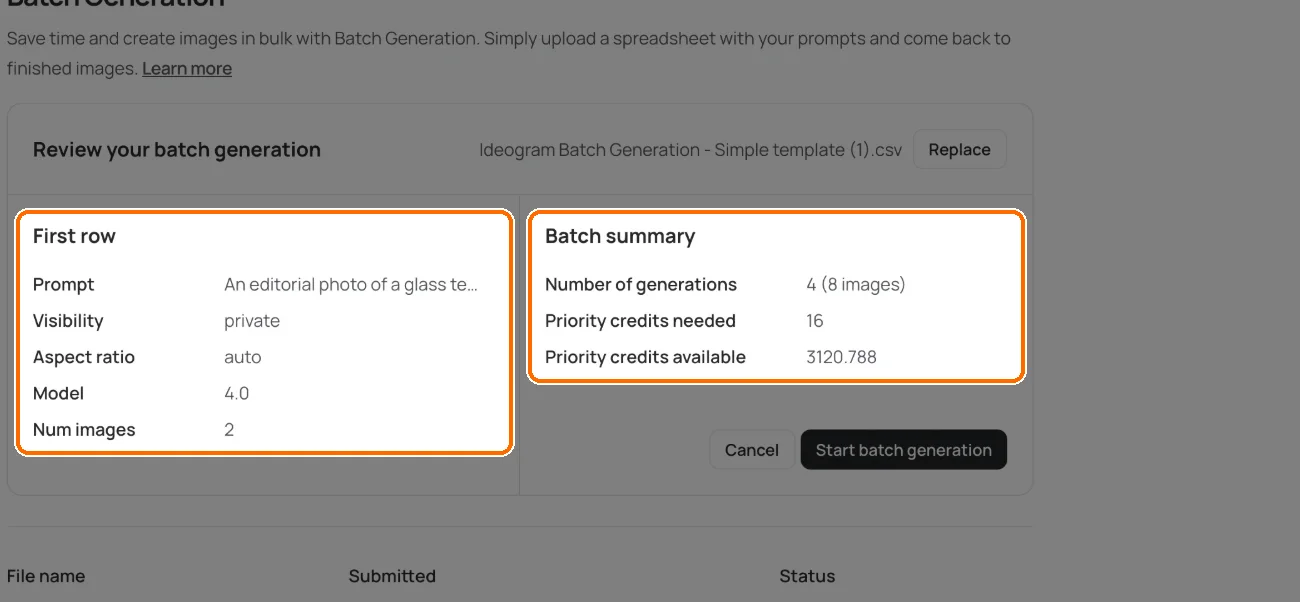
If the file is rejected, read the validation errors, correct the spreadsheet, and upload it again or choose Replace. The panel shows the first five errors when there are more, so fixing those can reveal others. A warning is different from an error: it describes a setting that is ignored on an otherwise valid row, such as a style on an Ideogram 4.0 row.
Step 4 : Start the batch
Select Start batch generation, then select Got it when Batch submitted appears. You can keep using Ideogram while the batch runs, and you get a notification when it is ready.
If your credits run out midway, the batch stops. Add credits, then select Resume on the Batch Generation page. Stop halts a running batch in the same place.
Step 5 : Download the results
The Batch Generation page lists your batches with their file name, the time submitted, and a status of In progress, Done or Stopped. Select Download on a batch to get a ZIP file named Ideogram Batch Download, followed by your file name.
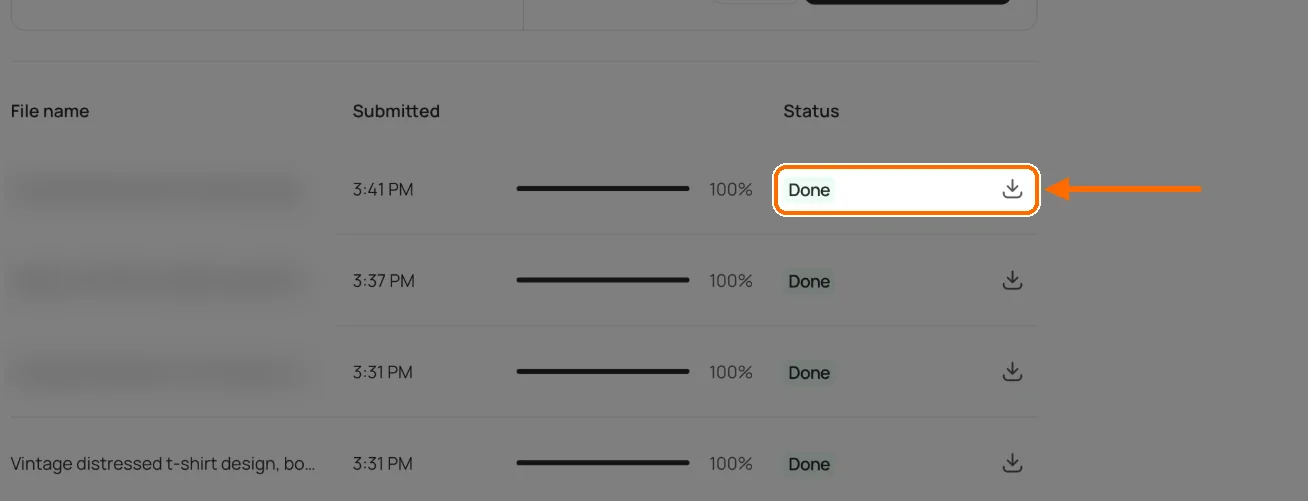
You do not have to wait for the end. Once a batch has produced output, a download gives you the results available at that point, and it does not stop the batch.
Run your first batch
Download the template, add one prompt per row, and review the cost before you start.
Batch : How many images and credits is 500 rows?
The limit is 500 prompt rows, plus the header. The image count is the sum of num_images across those rows, so a full file requests between 500 and 2,000 images.
Each row is charged like the same generation in the app. On November 15, 2026, the help center’s plans page listed an Ideogram 3.0 image at 3, 6 or 9 credits for Turbo, Default or Quality, and an Ideogram 4.0 image at 3, 6 or 10 credits.
| A 500-row file | Images | Credits |
|---|---|---|
| Ideogram 3.0 or 4.0, Turbo, 1 image per row | 500 | 1,500 |
| Ideogram 3.0 or 4.0, Default, 1 image per row | 500 | 3,000 |
| Ideogram 3.0, Default, 4 images per row (the template defaults) | 2,000 | 12,000 |
| Ideogram 4.0, Quality, 4 images per row | 2,000 | 20,000 |
For scale, the same page lists 2,400 credits a month on Plus and 7,500 on Pro, and it values one credit at one US cent of list price. A 500-image batch at Default uses more than a month of Plus credits and under half a month of Pro credits. The review screen shows the exact number before you start.
Batch : What Batch does not do
Batch does not support Ideogram 4.5, partner models, or video. Ideogram 1.0 is retired, so a file that uses it is rejected.
Settings can be narrower in Batch than in the Image app. A style is ignored on Ideogram 4.0 rows, so describe the look in the prompt. A color palette isn’t supported on a custom-model row, and a custom-model row can be rejected when the plan does not cover it. The help center’s page on custom models explains how a model is trained.
The template has no column for a source or reference image. A job that starts from a product photo or a character reference belongs in the Image app or the API.
The API : When to move to the API
Four signs tell you a job has outgrown a spreadsheet.
- A run needs more than 500 prompt rows, or the same job repeats every day.
- The job needs Ideogram 4.5, Precise Edit, or a tool such as Ad Resizer or Background Remover.
- The job starts from an image, such as a product photo. The Batch template has no column for a source or reference image, and the Ideogram 4.5 generate endpoint accepts up to five.
- The results have to land in your own system, such as a CMS, a DAM or a storefront, without a download step.
The Ideogram API has no batch endpoint. You send one request per generation and decide how many run at once. Image endpoints return the result directly by default, and you can ask for an asynchronous response or a signed webhook instead. Image URLs expire, so download anything you want to keep.
import csv
from concurrent.futures import ThreadPoolExecutor

import requests

API = "https://api.ideogram.ai/v2/image/generate/ideogram-4-5"
HEADERS = {"Api-Key": "<your-api-key>"}


def generate(row):
    # The endpoint takes a multipart form, so each field is a form part.
    form = {"prompt": (None, row["prompt"]), "quality": (None, "medium")}
    response = requests.post(API, headers=HEADERS, files=form, timeout=300)
    if not response.ok:
        print(row["name"], "failed with status", response.status_code)
        return
    image = response.json()["data"][0]
    # The URL is empty when an image does not pass safety checks.
    if image.get("url"):
        with open(row["name"] + ".png", "wb") as file:
            file.write(requests.get(image["url"], timeout=60).content)


with open("prompts.csv", newline="", encoding="utf-8-sig") as source:
    rows = list(csv.DictReader(source))

# Stay under the default limit of 10 in-flight requests.
with ThreadPoolExecutor(max_workers=8) as pool:
    list(pool.map(generate, rows))
The sample reads a CSV with a name and a prompt column, calls the Ideogram 4.5 generate endpoint for each row at Medium quality, and saves each image under the row’s name. It prints the name of a row that fails and moves on. A production job also retries those rows and records which ones are done. API usage is prepaid, and a free account is enough to create a key.
The API : What bulk work costs through the API
The API charges a fixed price per image. Our API pricing guide lists every operation, and the Ideogram 4.5 prices for generating from a prompt give these totals.
| Ideogram 4.5 quality | Per image | 1,000 images | 10,000 images |
|---|---|---|---|
| Low | $0.03 | $30 | $300 |
| Medium | $0.06 | $60 | $600 |
| High | $0.10 | $100 | $1,000 |
Set quality on every request. A prompt-only request that leaves it out runs at High, which is the $0.10 rate. With source images, High costs $0.22 per image.
The Ideogram 4.5 generate and Precise Edit endpoints accept a dry_run query parameter, which prices a request without running it. Volume discounts are available for annual commitments through Ideogram Enterprise.
Enterprise : At catalog volume: custom models and production workflows
Past a certain volume the question changes from how to send requests to how to keep every image on brand. Ideogram Enterprise addresses that in two ways.
A Custom Branded Model: Ideogram’s research team trains a custom model on your visual identity and your catalog, so output starts on brand. Brands with several product divisions can have a model for each.
A production workflow: Ideogram’s research and engineering team scopes and builds workflows for repetitive production work such as localization, format adaptation and retouching. Where outputs land in your CMS, DAM or storefront, and who owns the integration, are scoped with your team.
Credit volume, API volume discounts, SSO and support terms are also scoped with your team. Our retail and ecommerce examples show catalog work, and our guide to testing AI product images for accuracy covers the review step that a volume pipeline still needs.
Reference : Related guides
For the API, read the API overview, the API pricing guide, and our comparison of AI image generation APIs for enterprise developers. For print work, read how to use Print on Demand Studio.
Reference : FAQs
Does Ideogram have a bulk image generator?
Yes, Batch Generation in the Ideogram app turns a spreadsheet of prompts into images, with up to 500 prompt rows in a file and 1 to 4 images per row. For larger or repeating jobs, the Ideogram API generates images from your own code.
How many images can I generate at once with Ideogram?
A Batch file holds up to 500 prompt rows, and each row can request 1 to 4 images, so one file can request up to 2,000 images. The limit counts rows, not images.
Which file formats does Batch accept?
Batch accepts .csv, .xls, .xlsx and .ods files of up to 1 MB. Only the prompt column is required, and any other cell you leave blank uses its default.
Can I use Ideogram 4.5 in Batch?
No, Batch does not support Ideogram 4.5, partner models or video. It supports Ideogram 2.0, 2a, 3.0 and 4.0, the auto setting, and custom models. For bulk work on Ideogram 4.5, use the API.
Can I use a custom model in Batch?
Yes, you can use a custom model by putting its id or name in the model column. Custom-model rows need compatible model access and a plan that supports them, and some settings are narrower than in the Image app. For example, a color palette isn’t supported on a custom-model row. The help center’s Batch page lists the rules.
Does the Ideogram API have a batch endpoint?
No, the Ideogram API has no batch endpoint. You send one request per generation and control how many run at once. The default rate limit is 10 in-flight requests, and volume discounts are available for annual commitments.
Can I download results before a batch finishes?
Yes, once a batch has produced output, you can download a ZIP of the results available at that point. Downloading doesn’t stop the batch, and you can download again later for the images completed afterwards.
What happens if my credits run out during a batch?
The batch stops. Add credits, then select Resume on the Batch Generation page. On a Team plan, only team owners can buy more credits.
Are images from a batch private?
The visibility column sets it for each row, and its default is private. Private images need a plan that includes private generation, and on the free plan everything you generate is public.
Planning images at catalog volume?
Tell us what you produce and how much of it. We’ll talk through the app, the API, and a custom model with you.