
8 Best Creative Automation Platforms for Brand Teams in 2026

Your campaign concept is approved. Now you need a portrait feed ad, a vertical story, a wide banner, and market versions with different copy. Then the headline changes, and every affected asset needs another review.
The best creative automation platform depends on where that work piles up. You might need to produce and adapt the visuals, populate approved templates, or coordinate regional review and publishing. This comparison helps brand and creative operations teams choose around those production needs.
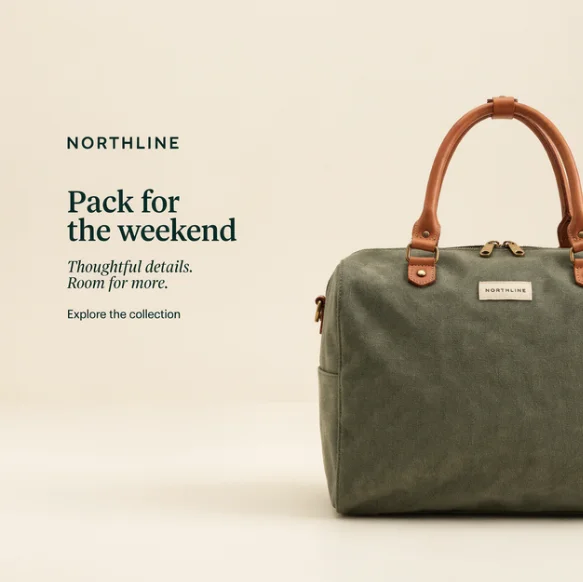
At Ideogram, we ran one campaign ourselves, resizing a fictional NORTHLINE ad into three placements and then changing its headline. For Celtra, Storyteq, Bannerflow, CHILI GraFx, Adobe, Canva, and Smartly, we worked from their product pages and documentation, current as of October 2026.
Overview : TL;DR: Which platform fits your creative workflow?
Choose Ideogram when your team needs branded visuals, campaign adaptations, and revisions. Shortlist Celtra, Storyteq, or Bannerflow when approved campaign systems need to produce many advertising or market versions. Consider CHILI GraFx for data-connected print and digital production, Adobe GenStudio for Adobe-centered campaign workflows, Canva Enterprise for distributed creation, and Smartly for production tied closely to paid media.
| Platform | Production fit | What to ask in a demo |
|---|---|---|
| Ideogram | Branded visuals and campaign adaptation | Custom Branded Model scope and API integration |
| Celtra | Modular digital campaign production | Template setup, feeds, and required modules |
| Storyteq | Global campaign adaptation | Regional workflows, motion templates, and approvals |
| Bannerflow | Display and feed-driven campaigns | Live updates, publishing, and serving costs |
| CHILI GraFx | Data-connected print and digital assets | Layout rules, output specifications, and connectors |
| Adobe GenStudio | Adobe-centered campaign production | Included features and connected products |
| Canva Enterprise | Distributed brand-controlled creation | Template permissions, bulk workflows, and approvals |
| Smartly | Creative production linked to paid media | Channel coverage, feeds, and activation |
Use the table to build a shortlist. During demos, ask each vendor to work with your creative, approved copy, and required outputs.
Overview : What does creative automation handle?
Creative automation uses software to produce, adapt, or route recurring creative work. Three jobs sit inside that definition, and a platform can cover more than one.
Generate and adapt the visual: Create campaign imagery, change a background, explore a product variation, or recompose an existing ad. Custom models and image references help guide the visual direction.
Produce variations from an approved design: Populate template fields with product images, prices, headlines, and translations. Layout rules determine what can change and how content fits different dimensions.
Review and deliver the assets: Assign reviewers, track versions, approve specific deliverables, and send them to a digital asset management system, publishing tool, or advertising platform.
Decide which of those jobs your team needs first. A template engine is useful when the design rules are settled. A visual production tool matters when the imagery itself needs to change.
The tools : The best creative automation platforms for brand teams
Tool 1 : Ideogram: Branded visual production and campaign adaptation
Ideogram is best for producing branded campaign visuals and adapting them across placements, languages, and late copy changes. Start with an existing ad, adapt its composition to new dimensions, and revise the copy for the next campaign.
One creative across three formats: We generated a square ad for NORTHLINE, a fictional travel bag brand, then uploaded it to Ad Resizer. We selected portrait feed at 1080 × 1350, Story / Reel at 1080 × 1920, and billboard at 970 × 250.
All three outputs retained the visible campaign wording: the brand name, headline, supporting line, and CTA. The portrait versions kept the bag cropped at the right edge. The wide banner recomposed the scene to show the full bag beside the copy. Ad Resizer regenerates the layout for each size so text and key elements stay legible. Select a supported platform safe zone to keep the ad within its placement area while retaining the requested output dimensions. Download the full set at once.
Original square
Portrait feed 1080 × 1350

Story / Reel 1080 × 1920

Billboard 970 × 250

Copy revisions after resizing: In Studio’s layered editor, we used AI Edit to replace the tall ad’s headline, “Pack for the weekend,” with “Your next escape starts here.” The new headline sits cleanly above the supporting copy, and the brand name, supporting lines, and CTA all stay readable, with space between the headline and the bag handle.


When your brand guidelines call for specific typography, Studio’s editable text layers give you direct control. Layerize Text turns detected lettering into text layers, so you can adjust wording and typography directly.
A production system built around your brand: Our enterprise Custom Branded Models are trained around a company’s visual identity, catalog, and design language. Our team can scope models and production workflows for different brands or product divisions. The Skechers case study describes division-specific models and material exploration using its Product & Material Library.
For product campaigns, Colorways supports color exploration, while Material Swap applies a reference texture or finish to a product image. Precise Edit handles targeted changes to a selected part of the image.
Localization and connected production: Ad Localizer rebuilds an ad in a target language while preserving its layout, logos, brand typography, and product. Through the API, supply approved translations line by line to use that exact wording instead of automatic translation. Each request handles one target language.
Export finished assets in the formats your template or publishing tool accepts, or build a connection through our API. Define the asset destination, metadata, and review step as part of that integration. Batch Generation is a separate spreadsheet-to-image workflow, supporting up to 500 prompt rows with compatible models. Ad Resizer and Ad Localizer also have API endpoints for automated production.
Ideogram also offers image-to-video generation through its video models and editable SVG generation through Ideogram Vector. Include those in your evaluation when the campaign needs motion or reusable vector artwork.
For enterprise production, discuss the model, workflow, integration, and data requirements together. Enterprise inputs are not used to train shared Ideogram models, custom training is opt-in, and configurable retention and Microsoft/Google SSO are available.
Tool 2 : Celtra: Modular production for digital campaigns
Celtra is a fit when your team wants to turn a campaign concept into a reusable digital production system. Its current Creative Automation offering combines modular control with generative workflows for images, animation, and video.
Build around a campaign system: Rather than commission each placement separately, prepare reusable creative elements and variation rules. Compare how the same setup handles a new product, audience, or market without rebuilding every placement.
Connect production with review: Celtra describes connected generation, review, approval, activation, and performance workflows. Its integration list includes Adobe Experience Manager, Workfront, Bynder, and Campaign Manager 360. Have the vendor show the connection your organization intends to use, including what information moves with the asset.
Separate production from serving: Celtra provides custom pricing. Its pricing page distinguishes production from serving, where charges can depend on impressions or video starts, and lists add-ons such as custom API integrations. Request a quote that separates those components so production volume and media delivery remain visible.
Tool 3 : Storyteq: Campaign adaptation across global teams
Storyteq suits a central brand team preparing campaign assets that regional marketers need to adapt. Its Adaptation Studio turns master creative into templates for versions across markets, channels, and formats.
Give local teams defined choices: The central team can protect brand elements while allowing regional changes. In your evaluation, specify which fields local users should control: headline, offer, product image, language, or disclaimer. Then try an exception, such as a translation that needs more space.
Match modules to the workflow: Storyteq describes Content Portal, Adaptation Studio, and Collaboration Hub as connected parts of its offering. Collaboration Hub handles briefs, reviews, and approvals. Check which modules your proposal includes and where reviewers will work.
Bring a motion example: Include one real video or animated master in the walkthrough, alongside static assets. Test a copy revision, check the timing, and export the version your channel requires. Record the time spent preparing the motion template and correcting the exported version.
Tool 4 : Bannerflow: Display campaigns with changing offers and feeds
Bannerflow is worth evaluating when display production, localization, and ongoing campaign updates occupy the same team. Its platform covers creative design, format scaling, dynamic feeds, translation, and campaign management.
Start with the changing data: A retailer may need the same campaign to show different products, prices, and offers. Bannerflow’s dynamic ads connect creative with feeds. Check how the platform handles a missing image, an unusually long product name, or a price that changes close to launch.
Review the market version: Its localization tools address translation and campaign adaptation. Use approved wording in the walkthrough and inspect the result at the actual display size. Legal copy that looks readable in an editor can become too small in a compact banner.
Follow the asset into delivery: Bannerflow covers display, social, digital out-of-home, and in-store use cases. Have the vendor demonstrate the required animated or HTML5 output and its publishing route. Request separate commercial detail for creation, publishing, and serving wherever those apply to your setup.
Tool 5 : CHILI GraFx: Data-connected print and digital production
CHILI GraFx is relevant when campaign assets depend on structured product information and layout rules across print, digital, and animated formats. Think retail promotions, point-of-sale graphics, and regional campaign production.
Make the design rules reusable: GraFx Studio uses design systems with components, dynamic layouts, anchoring, copy fitting, and other layout controls. Have a template designer demonstrate how a longer headline and a different product image affect the layout.
Populate from systems of record: CHILI GraFx documents connections with media and data sources, including DAM and PIM systems. Its data connector documentation explains how data can populate template variables. Agree on which system owns product descriptions, prices, and approved imagery before building the templates.
Name the implementation owner: Include both your production designers and integration team in the evaluation. Identify who builds connectors, maintains template logic, and resolves invalid data. For print, provide the printer’s specifications and inspect the exported file against those requirements.
Tool 6 : Adobe GenStudio for Performance Marketing: Campaign production within the Adobe stack
Adobe GenStudio for Performance Marketing suits teams that want campaign variations grounded in approved brand content and connected to Adobe workflows. Its documentation covers creation, content reuse, reviews, and campaign experiences.
Create from brand and campaign context: Teams can apply guidelines during generation, produce variations, and send drafts for approval. Approved content can also provide a starting point for later campaign versions. Adobe documents translation of approved email and paid media experiences.
Identify the approval route: Adobe offers access to Workfront Proof review capabilities from within GenStudio for Performance Marketing. Ask which users need access, where comments and decisions are stored, and what happens after an approved experience changes.
Price the actual architecture: Keep GenStudio for Performance Marketing distinct from the broader GenStudio offering and connected Adobe products. Request a proposal that identifies the application, any Firefly services, content repository, review tools, and activation connections included in your deployment. If you already use Adobe, list the products you have so the proposal shows what’s new.
Tool 7 : Canva Enterprise: Brand-controlled creation for distributed teams
Canva Enterprise fits organizations where many regional marketers and other non-designers need to adapt approved designs. Brand Templates, Brand Controls, and approval settings support that distributed creation model.
Define what local teams can edit: Start with a template people actually use each week. Have a regional marketer replace the approved copy and imagery while an administrator demonstrates the relevant brand controls and review requirements.
Choose the bulk route: Bulk Create populates designs with data in the editor. For an integration, Canva’s Autofill APIs populate tagged fields in designs or Brand Templates from supplied data. Autofill is also available on eligible plans beyond Enterprise, so you don’t need Enterprise for Autofill API access alone.
Test approval enforcement: Canva documents Enterprise-specific approval rules for selected people or groups, along with template approval controls. During a trial, try publishing or downloading a design as a user who requires approval. Also check how reviewers handle the next revision. Enterprise administrators can manage organizational access, including SSO and SCIM.
Tool 8 : Smartly: Creative production connected to paid media
Smartly is a fit when creative production and media execution need to work closely together. Its Creative offering covers image, video, audio, and HTML5 templates, with production and activation across advertising channels.
Reuse existing design work: Smartly documents template imports from After Effects, Photoshop, Figma, and Google Web Designer. Bring one source file to the walkthrough and inspect what becomes editable, how variants are populated, and which manual preparation remains.
Coordinate versions and launch: Producer gives teams a place to adapt, approve, and launch creative variants. Smartly also describes localization and dynamic creative capabilities. Ask the vendor to follow one approved variant through its intended destination, including naming, campaign association, and revision handling.
Evaluate the media connection: Compare the scope of the proposed creative and media setup, channel by channel. Confirm whether your team needs downloadable files, direct activation, or both, and request a quote for that exact configuration.
Other option : Also consider Typeface for broader campaign orchestration
Typeface adds a different buying case: coordinating content across email, ads, web, social, and video. Its Arc offering combines brand context through Arc Graph, specialized agents, and collaborative workspaces through Arc Spaces, including approvals and publishing connectors.
Add it to your shortlist when the production brief spans those channels and teams. For a narrower resizing or template-rendering purchase, compare the production steps and implementation effort you need.
Before you buy : What should you verify before choosing a platform?
Product accuracy, typography, and localization
Separate visual direction from exact product representation. A campaign can use the right palette and still show the wrong closure, label, or package size.
Give reviewers a reference sheet covering product shape, materials, logos, packaging text, and approved colors. For typography, distinguish a visual style match from a requirement to use a particular licensed font.
For localization, supply approved translations and market requirements. Check text expansion, right-to-left layout where needed, local offers, currencies, and mandatory wording. Assign a regional reviewer to the actual output, including small-format versions.
Video and motion requirements
Put motion deliverables in the brief before the demo. Specify aspect ratio, duration, captions, audio, end card, file type, and channel requirements.
Also distinguish an AI-generated clip from an editable motion template. Your team may want generative imagery for the scene and fixed layers for prices, captions, logos, or legal copy. Ask to see how a late revision affects timing and final export.
Late changes and approval behavior
Request one deliberate revision after the first outputs are approved. Change a headline, price, or disclaimer, then follow the affected versions.
Does the change update a shared component, regenerate files, or require individual edits? Which versions need another review? Can someone still publish the earlier approved version? Have the vendor show your approval rules configured, including what happens after an approved asset changes.
Integrations and implementation
For each connection, name the source, destination, fields, and trigger. “Connects to our DAM” becomes useful when you know whether it reads approved inputs, writes finished assets, or does both.
Separate native connectors from API-based implementation. Assign ownership for credentials, failed jobs, duplicate files, metadata, and maintenance. Confirm API access and integration rights for your proposed agreement.
Enterprise data terms and commercial protection
Review the services and models your team will actually use. Record training use, retention, subprocessors, access controls, and relevant security documentation.
Commercial use permission, ownership terms, copyright protection, and indemnification answer different questions. Ask for the applicable agreement and its coverage. Include required provisioning, reviewer access, and support commitments in the purchasing brief.
Before you buy : What does creative automation cost at production scale?
Compare the cost of delivering the assets your team can approve and use. A low rendering charge tells you little about template preparation, integration, review, or corrections.
Request a breakdown of:
- Platform access, seats, and reviewer accounts.
- Generation or rendering allowances and overages.
- Template preparation, onboarding, and model training where relevant.
- Integrations, maintenance, and production services.
- Publishing or serving charges where applicable.
Then add your team’s production, review, and correction time.
Price API requests before running them: Ideogram’s Ad Resizer and Ad Localizer APIs support dry_run. Send the intended request with this setting to validate it and receive a price quote without generating output, storing a generation, or billing the request. Use those quotes to estimate production usage, then add review and implementation costs.
Cost per approved asset = allocated platform, setup, usage, and labor costs ÷ approved deliverables.
Use the same measurement period and deliverable mix for each option. Allocate setup costs over a stated period, and separate static images from more involved motion deliverables.
Count rejected outputs and correction work in the costs, while counting approved deliverables in the denominator.
Before you buy : Test one campaign before committing
Give each shortlisted vendor the same exercise:
One approved creative → three formats → two markets → one late headline change.
Supply the source asset, exact wording, required dimensions, and approval rules. If motion is part of the purchase, add one motion deliverable. Record corrections and manual steps alongside the finished files.
| Test stage | What to inspect |
|---|---|
| Resize into three formats | Composition, cropping, text fit, product details |
| Adapt for two markets | Approved wording, layout, offers, required copy |
| Change the headline | Editability, affected versions, approval behavior |
| Export final assets | Dimensions, formats, readability, delivery requirements |
Our NORTHLINE test covered three resized outputs and an AI Edit headline replacement. It showed how the same campaign could be adapted into portrait and wide layouts, then revised.
For a practical starting point, our product photo editing guide shows how to direct individual visual revisions. Use your own approved campaign for the purchasing evaluation so reviewers can assess details they know.
Before you buy : What can you export and keep?
Specify both the finished files you need and the editable resources required to produce future versions.
Finished media: Request the actual image, video, HTML5, or print files your channels need. Check dimensions, transparency, file weight, and any hosted dependencies.
Editable assets: Confirm whether you receive editable text, SVG artwork, layered files, or platform-specific templates. A flattened image preserves appearance; editable source supports a different kind of future revision.
Production resources: Ask what happens to templates, fonts, connectors, custom model access, and source data when the agreement ends. For custom models, separately discuss output rights, continued inference access, and whether any model export is included.
Review records: Decide whether your archive needs comments, versions, approvals, metadata, and audit history. Request a sample export if those records matter to your team.
Choose the handoff requirements before implementation. They influence where approved assets should live and which system should retain the production history.
Before you buy : FAQs
What’s the difference between creative automation and an AI image generator?
An AI image generator creates or edits imagery. Creative automation also includes recurring tasks such as populating templates, producing placement and market variations, routing reviews, and delivering assets. Platforms cover different combinations of those jobs. Choose around the production step your team needs to improve.
Can creative automation preserve exact logos, fonts, and product details?
Yes, with the right controls. Use approved logo files, licensed fonts, protected template elements, and editable text to preserve those components. Check product details against your approved reference, especially when using generative adaptation.
Do you need to replace your existing DAM or approval system?
No. You can keep your existing DAM and approval tools when the platform supports the required export or integration. Specify where approved inputs come from, where finished assets go, and which system owns review status. Verify the connection and metadata flow during the evaluation.
Can one platform handle image generation, templates, and approvals?
Some can combine image generation, templates, and approvals in one platform. Ideogram produces and adapts branded visuals and can connect with your existing production tools. Confirm which functions are included, which require additional modules, and which use connected services. Ask the vendor to demonstrate the path from source creative to approved deliverable.
How much does creative automation cost?
Cost depends on platform access, production volume, setup, integrations, services, and review work. Some deployments also involve publishing or serving charges. Compare cost per approved asset over a defined period: allocate platform, implementation, usage, and labor costs, then divide by approved deliverables of a comparable type.
Plan your campaign production with Ideogram
Talk with our enterprise team about the model, workflow, integration, and data requirements behind your campaign production.