
8 Best AI Tools for Print-on-Demand Designs in 2026

A good print-on-demand design has to survive more than the first preview. You may need to change a name, remove a background, enlarge the artwork, or fit it around a mug handle. The tool you choose affects how much of that work you can finish yourself.
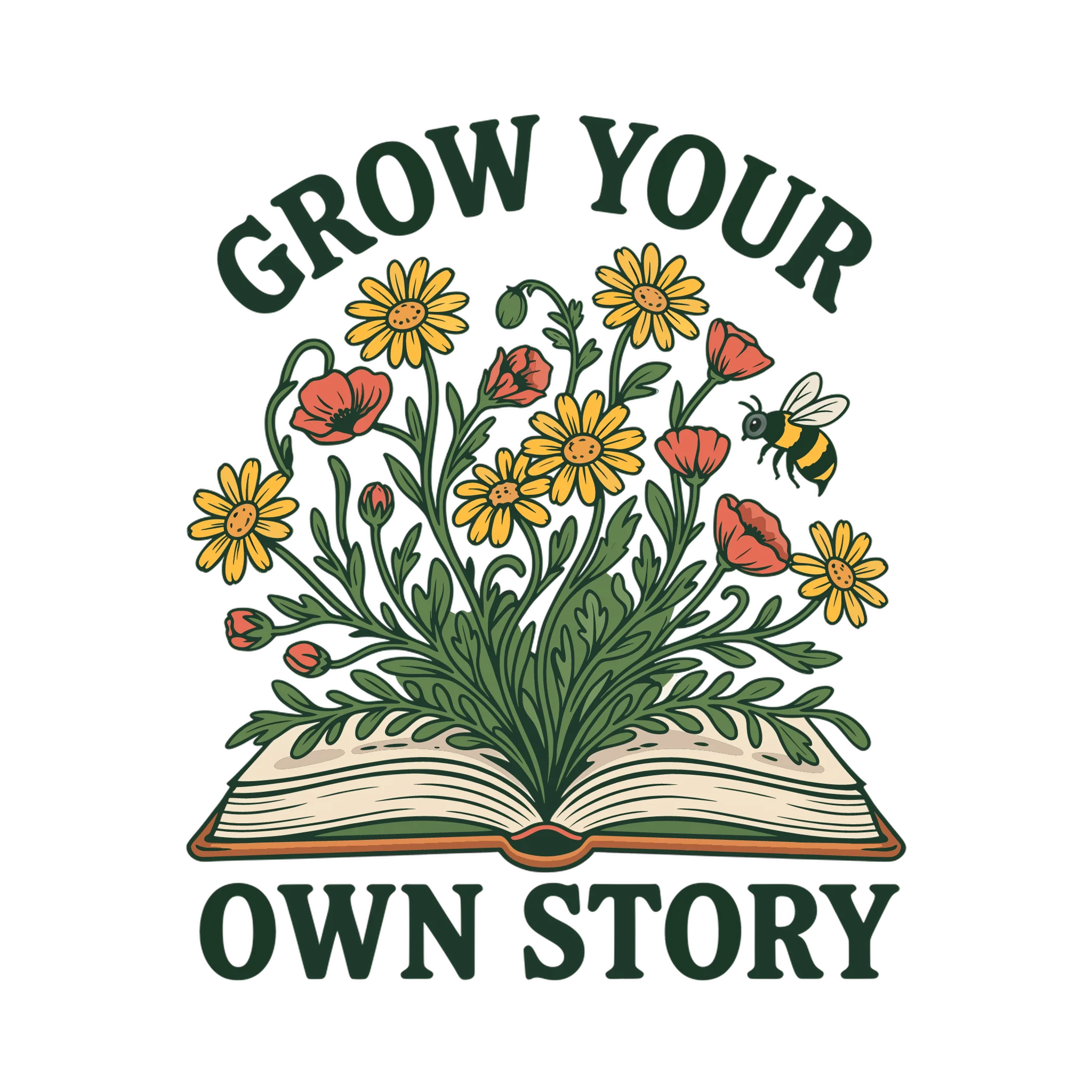
Transparent PNG, 2048 × 2048
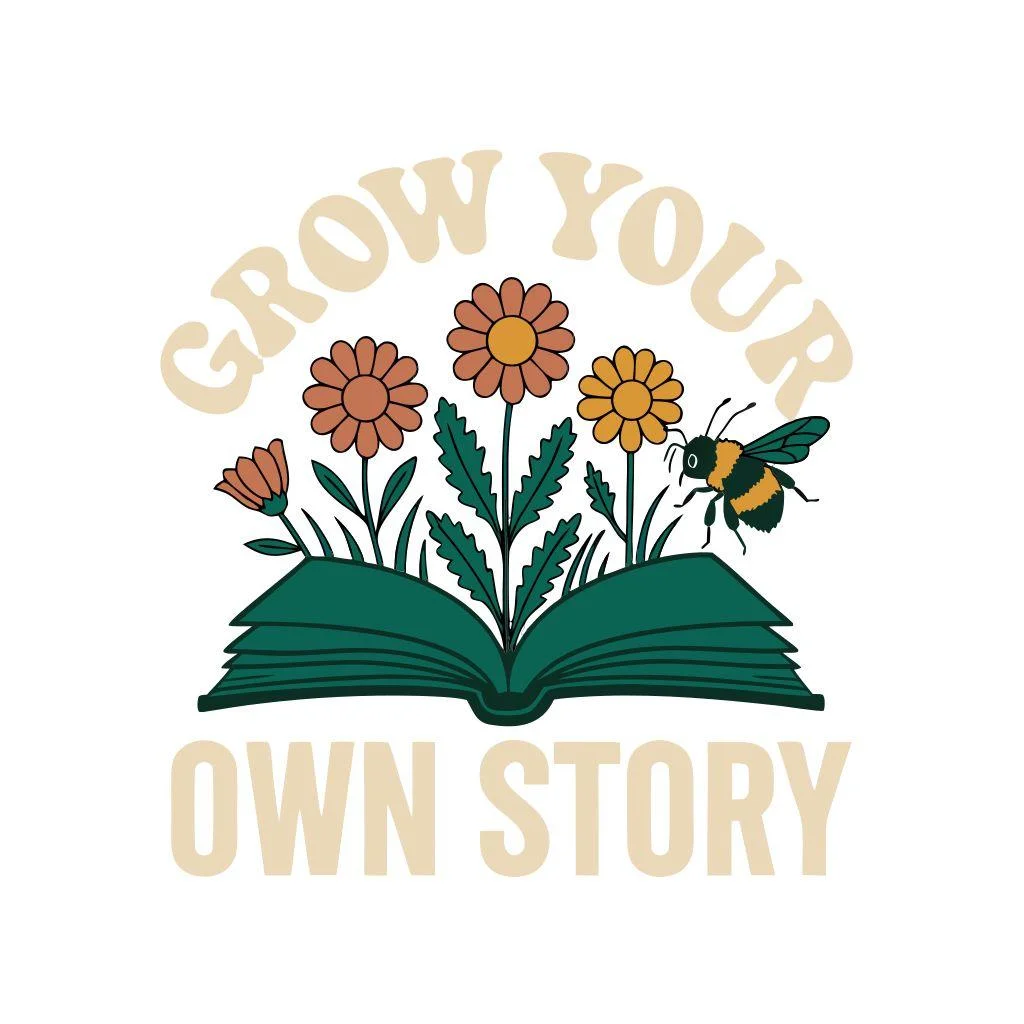
JPEG, 1024 × 1024

Transparent PNG, 1024 × 1024
For a shop selling personalized gifts, changing the wording matters as much as generating the illustration. For posters and stickers, the choice between a pixel-based image and scalable vector artwork can change how you prepare the file. Sellers building collections also need a way to carry a style across several designs.
We used the same botanical book prompt in Ideogram, Kittl, and Recraft, then inspected the files we could download. That gave us something concrete to compare: the lettering, the artwork, transparency, and whether an SVG contained actual vector shapes.
Best AI tools for print-on-demand designs: quick comparison
| Tool | Where it fits | How we assessed it |
|---|---|---|
| 1 Ideogram | Original illustrations, integrated lettering, vector generation, and artwork cleanup | Hands-on test |
| 2 Kittl | Merchandise layouts with templates, separate text, and vector editing | Hands-on test |
| 3 Recraft | Generated vector artwork, color changes, and reusable visual styles | Hands-on test |
| 4 Leonardo.Ai | Illustration variations and coordinated product collections | Documentation review |
| 5 Canva | Personalized layouts and matching listing or marketing graphics | Documentation review |
| 6 Adobe Firefly | Image generation and editing alongside Photoshop and Illustrator | Documentation review |
| 7 ChatGPT Images | Creating and revising artwork through a conversation | Documentation review |
| 8 Midjourney | Exploring visual styles and illustration concepts | Documentation review |
Method: How we compared the tools
We tested artwork generation and available downloads in Ideogram, Kittl, and Recraft using one shared prompt. All three tests used free accounts; the Ideogram and Recraft tests used the free credits included with those accounts. In Ideogram, we also used Background Remover. The remaining sections draw on official product documentation, rather than a hands-on comparison of their outputs. Research and testing were completed on October 23, 2026.
The prompt we used
Each of the three tested tools received this prompt and produced one result.
A standalone merchandise illustration of an open book with a small wildflower garden growing from its pages: daisies, poppies, leafy stems, and one bumblebee. Above the illustration, the exact words “GROW YOUR” in bold curved lettering; below it, “OWN STORY” in larger lettering. Balanced, compact composition with generous outer margins. Four flat colors: forest green, terracotta, golden yellow, and warm cream. Bold outlines, clearly separated shapes, minimal fine detail. No gradients, shadows, distressed texture, mockup, or additional text. Transparent background. Vintage botanical vector style.
What we checked
- Spelling
- Requested elements
- Background transparency
- Export dimensions
- SVG contents
We did not order physical samples. One output shows what happened in that attempt; it does not establish a tool’s average success rate.
Tool 1: Ideogram: Illustrations, lettering, and vector artwork
Ideogram for print on demand brings together image generation, prompt-based editing, transparent artwork, upscaling, and product mockups. It also has vector generation and tools for turning lettering inside an image into editable text layers. That makes it relevant to illustration-led products as well as slogan merchandise.
Creating the artwork and lettering together
Our test asked for an open book with wildflowers growing from its pages, one bumblebee, and the phrases “GROW YOUR” and “OWN STORY.” We used Generate Vector and generated one result.
Both phrases were spelled correctly. The illustration included the book, flowers, and bee, with the wording arranged above and below the artwork. This is a useful starting point for a bookshop tote, reading-themed shirt, or sticker because the illustration and lettering were composed together.
What the downloads contained
- SVG contents
- Vector paths, with no embedded pixel-based image
- SVG background
- Checkerboard included as artwork
- SVG lettering
- Paths, not live text
- SVG fills
- Gradient definitions, despite the prompt
- PNG from Background Remover
- 2048 × 2048, with transparent pixels around the design
What we received in the SVG
The file from Ideogram Vector contained vector paths and no embedded pixel-based image. The checkerboard was also present in the SVG as artwork, so that file would need background shapes removed in a vector editor before use as an isolated design. The lettering was also made of paths. You can work with those shapes in a compatible vector editor, but they are not live text that you can replace by typing a different phrase.
That distinction matters for personalized orders. Scaling a finished slogan and changing a customer’s name are different tasks.
Although the prompt requested “no gradients,” our SVG contained gradient definitions. We didn’t confirm which visible shapes use them. For a printer that requires separate ink colors, review the visible fills and simplify the palette before production.
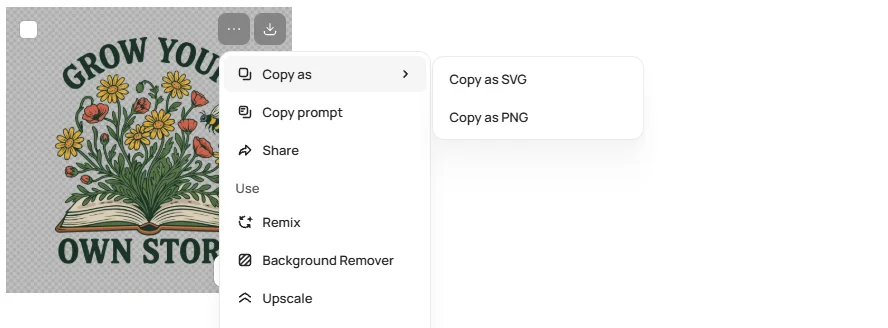
Removing the background
The first result included a checkerboard pattern as part of the artwork. We used Background Remover and inspected the resulting PNG. It measured 2048 × 2048 pixels and contained actual transparent pixels around the design.
This is why we inspected the downloaded files rather than treating the preview as proof of transparency. Background Remover produced the transparent PNG; it did not clean the original SVG. That SVG still contained the checkerboard artwork.
Changing wording and building a collection
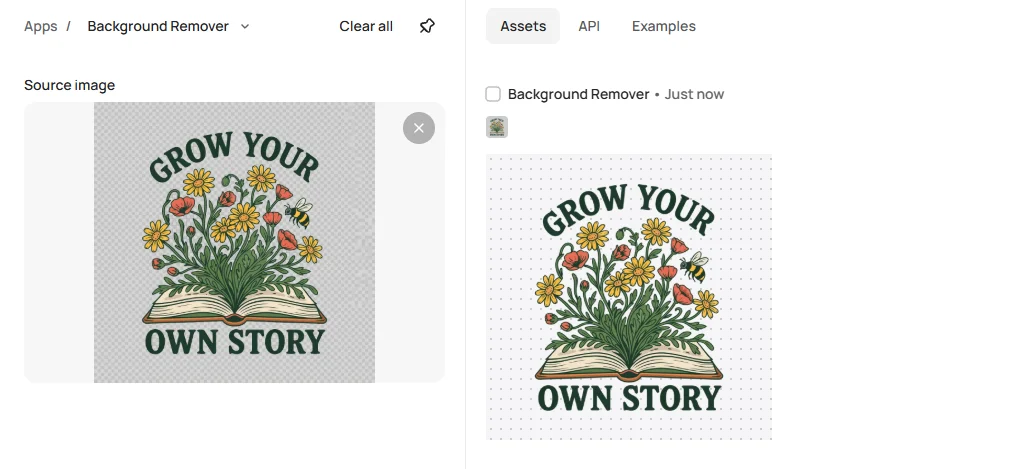
For designs that need new names, dates, or slogans, editable text layers offer a different route from editing vector outlines. Layerize Text detects lettering, reconstructs the background beneath it, and creates text layers you can edit in Studio. Review the reconstructed lettering and background when preserving a particular type treatment matters.
Ideogram also supports reference-led image workflows and upscaling for developing related designs and preparing larger pixel-based exports. Its product mockup workflow can help you preview a concept on merchandise. For product photos, Colorways changes a selected garment’s color so you can explore how the design looks against different shades. It edits the product image, not the printable artwork’s color separations.
For a complete worked production example, see our print-on-demand design workflow.
Create print-on-demand artwork in Ideogram
Generate artwork with its lettering, then download a vector or a transparent PNG.
Tool 2: Kittl: Merchandise layouts and editable typography
Kittl combines AI generation with a merchandise design editor, templates, typography controls, vector tools, and mockups. You can arrange generated artwork alongside separate text and template elements in its editor.
Our result using Recraft inside Kittl
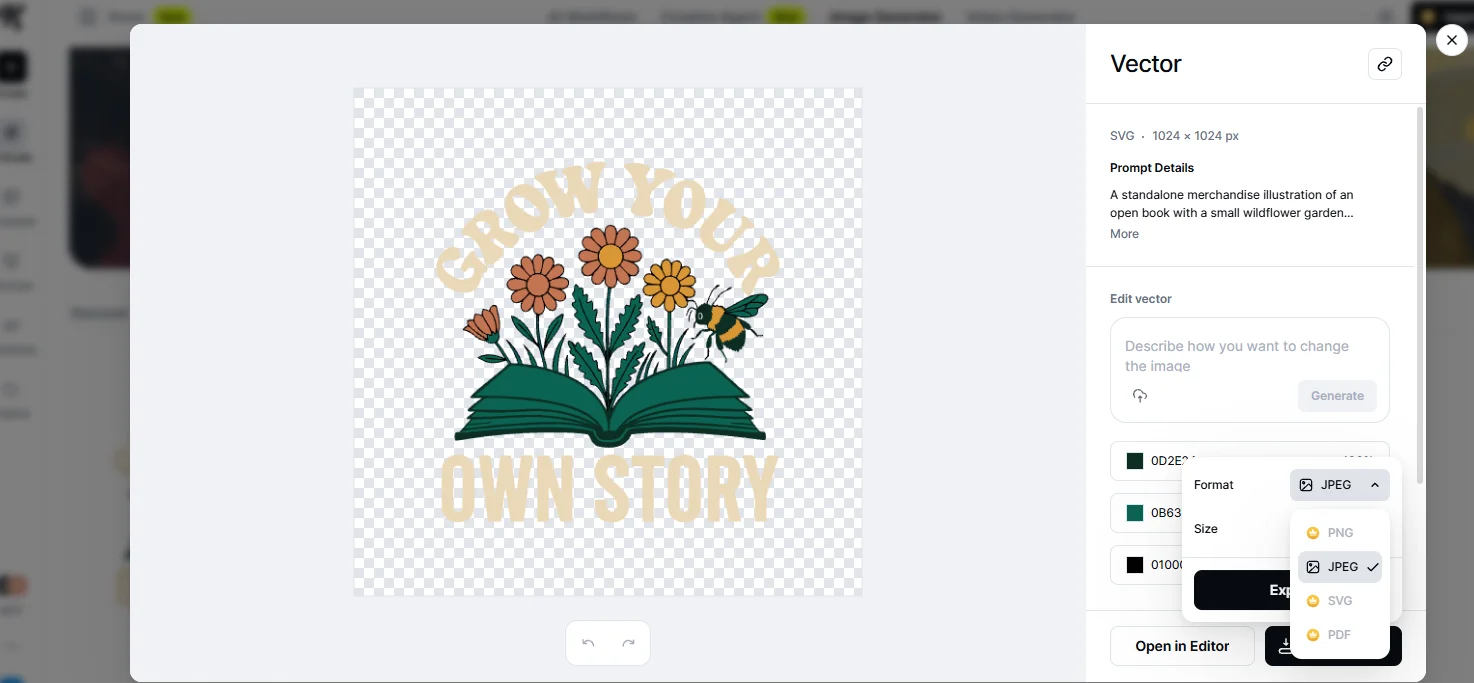
We selected Recraft V4.1 Vector in Kittl’s AI Studio and used the same botanical book prompt, a square format, and one output. Both phrases were spelled correctly. The result included a book, flowers, and a bee, with a simpler arrangement than the other tested outputs.
The cream lettering had low contrast against the white background of our downloaded JPEG. A different background or lettering color would make this version easier to read.
What the download contained
- Asset label
- Vector
- Download on our free account
- JPEG at 1024 × 1024
- JPEG transparency
- None
- PNG, SVG, and PDF
- Upgrade indicators
What the free workflow let us download
Kittl labeled the generated asset as a vector, but our free AI Studio account offered JPEG downloading while PNG, SVG, and PDF options displayed upgrade indicators. The JPEG we downloaded measured 1024 × 1024 pixels and had no transparency.
This finding applies to the workflow we tested. It also shows why generating a vector and being able to export that vector are separate questions.
Where the editor adds value
For repeat personalized orders, keeping names and dates in separate text boxes is practical. Kittl’s editor lets you build that kind of layout around generated artwork instead of asking the image model to recreate the entire design for each order. Its templates and mockups are also relevant when you want to finish the layout and product presentation in the same workspace.
According to Kittl’s licensing page, free-plan use of Kittl Content is restricted to personal, noncommercial projects. Commercial permissions depend on the plan and content involved. Treat a free generation test as an evaluation step before choosing a selling workflow.
Tool 3: Recraft: Vector generation and color control
Recraft offers vector generation, vectorization, color controls, and reusable styles. For sellers who expect to adjust shapes or prepare several color versions, those capabilities are worth comparing alongside image quality.
Our vector generation test
We used a free Recraft account with Recraft V4.1 Vector, the shared prompt, a square format, and one result. The design included the book, flowers, bee, and both phrases spelled correctly. The dark green lettering was prominent above and below the illustration.
Although Kittl hosted a model with the same name, these were separate generations in separate products. Their different outputs do not prove that one platform consistently produces better results.
What the downloads contained
- PNG
- 1024 × 1024, with actual transparency
- JPG
- 1024 × 1024, without transparency
- SVG contents
- 304 vector paths, with no embedded pixel-based image
- SVG lettering
- Shapes, not editable text
- SVG fills
- Gradient definitions, despite the prompt
Inspecting the exports
We downloaded PNG, JPG, and SVG from the account used for this test. The PNG measured 1024 × 1024 pixels and had actual transparency. The JPG had the same dimensions without transparency.
The SVG contained 304 vector paths and no embedded pixel-based image. Its lettering consisted of shapes rather than editable text. Like Ideogram’s, the SVG also contained gradient definitions despite the “no gradients” instruction. Review the visible fills before treating the design as artwork prepared for separate ink colors.
Download access and selling rights
Being able to download the SVG did not settle whether we could sell it. Recraft’s pricing documentation states that Free-plan images are public, owned by Recraft, and not licensed for commercial use. Our test images therefore fall under those Free-plan restrictions. Paid plans grant ownership and commercial rights to images generated while subscribed.
For a POD shop, choose the plan that covers commercial creation before producing the artwork you intend to sell.
Tool 4: Leonardo.Ai: Illustration variations and collections
An illustration collection needs more than several individually attractive images. The subjects, colors, and drawing style need enough consistency to look related on a storefront.
Leonardo.Ai’s POD offering focuses on generating variations, using style controls, refining artwork, and upscaling. Its Blueprints include merchandise mockup and Style Applier workflows. Those are relevant to sellers building a coordinated range of posters, mugs, or apparel graphics.
Developing related designs
References and style controls give you something more specific to work from than repeating “same style” in every prompt. You can compare variations against an existing design and decide which belong in the collection.
Leonardo also documents tools for adjusting colors, elements, and composition after generation. That makes it a candidate when your main job is developing and refining illustrations across a product range.
Tool 5: Canva: Personalized layouts and listing graphics
Canva is useful when the recurring work is arranging artwork, changing text, and producing the graphics that surround a product listing. A personalized family shirt and its matching shop banner involve layout decisions that an image generator alone does not resolve.
Keeping customer details separate
Build names, dates, and other changing details as text boxes around the illustration. Longer names may need smaller lettering or a different position, but you can make that adjustment without regenerating the underlying artwork.
Canva combines this layout workflow with AI image tools, templates, and mockups.
Exporting the design itself
A shirt mockup and a print file serve different purposes. Export the artwork from the design page rather than sending the printer a photograph of the mockup. Canva’s transparent-background download setting requires an eligible plan, so include that in your evaluation if transparent PNGs are central to your products.
Canva’s content license also distinguishes original uploads from library assets. A template or stock element should not be treated as an exclusive design simply because you changed the wording.
Tool 6: Adobe Firefly: Generation and editing for Adobe users
Firefly fits an Adobe-based workflow: generate or revise artwork, then continue detailed image work in Photoshop or vector work in Illustrator. Its value depends partly on whether those are already the tools you use to finish designs.
Choosing the model behind the image
The Firefly interface includes Adobe models and partner models. Adobe’s statements about the training data for its own Firefly models should not automatically be applied to every model available in that interface.
Adobe says its own Firefly models are trained on licensed content and public-domain material. Its FAQ permits commercial use of outputs from features without a beta label, and generally allows beta outputs too unless the product explicitly states otherwise. This is a statement about permitted use, not a guarantee that any generated design is free of third-party rights issues.
Tool 7: ChatGPT Images: Conversational design revisions
ChatGPT Images lets you describe an idea and keep revising it in the same conversation. That can suit sellers who find it easier to explain changes in sentences than to navigate a full design editor.
Revising a specific part of the design
OpenAI lists ChatGPT Images as available on all tiers. Its image documentation describes both conversational edits and a selection tool for marking an area to change. It also supports instructions for lettering and transparent backgrounds.
That gives you a way to request a revised flower arrangement, different wording, or a change to one part of a concept. However, generated lettering is not automatically a separate text layer. For frequent personalization, keep the variable wording in a layout editor or use a workflow that creates editable text.
Tool 8: Midjourney: Illustration styles and visual concepts
Midjourney belongs on the shortlist when you want to explore illustration styles, compositions, and visual directions before settling on a product design. For wall art or illustrated apparel, that exploration can be a substantial part of the work.
From a visual concept to merchandise
A detailed composition may suit a poster but lose its smaller elements on a mug. If a design needs regular name changes or exact layout adjustments, account for the editor you will use to finish it.
Privacy also affects subscription choice. Midjourney’s plan comparison lists Stealth Mode on Pro and Mega. Generating in a private Discord server or direct message does not make images private on Midjourney’s website; that requires Stealth Mode. Images posted in public Discord channels remain visible there even with Stealth enabled.
Reference: What our three hands-on tests showed
All three tested generations spelled both requested phrases correctly. The more useful differences appeared when we inspected the downloads.
Transparent PNG, 2048 × 2048
JPEG, 1024 × 1024
Transparent PNG, 1024 × 1024
The grid shows through the transparent pixels in the Ideogram and Recraft PNGs. Kittl’s JPEG covers it with a white square.
On white, the three files look alike at their edges. Kittl’s cream lettering has the low contrast we noted in our test.
On black, the two transparent PNGs sit directly on the color, while Kittl’s JPEG still shows its white square.
| Tested workflow | Files we inspected |
|---|---|
| Ideogram Free: Generate Vector, then Background Remover | SVG with vector paths and checkerboard artwork requiring cleanup; separate transparent PNG at 2048 × 2048 |
| Kittl Free: AI Studio, Recraft V4.1 Vector | JPEG at 1024 × 1024; other export formats showed upgrade indicators |
| Recraft Free: V4.1 Vector | Transparent PNG and JPG at 1024 × 1024; SVG with vector paths |
These are the dimensions we downloaded. Other settings or plans may offer larger files. Kittl hosted Recraft’s model, so this was also a comparison of platform workflows rather than three unrelated image models.
Credit counts aren’t directly comparable across tools. Compare what you spend to finish and export a usable design, including generation, editing, cleanup, and export access.
Reference: Choose around the product you sell
-
Personalized shirts and gifts
Prioritize text you can change without rebuilding the illustration. Names, dates, and longer phrases need room to expand. Ideogram’s text-layer workflow, Kittl’s editor, and Canva’s layout tools address different parts of that job.
-
Stickers and small graphics
A compact outline and readable lettering matter at the finished size. Inspect the gaps between leaves, letters, and other small shapes. Transparent artwork also needs enough room around it for the supplier’s cut line and border requirements.
-
Mugs and wrap designs
Use the supplier’s template to position the artwork. A centered square graphic does not automatically become a full wrap. Keep important wording away from areas where the handle or a template boundary will interrupt it.
-
Posters and larger prints
Compare the actual pixel dimensions with the intended print size, or work from suitable vector artwork. Crop and proportion matter too: extending a square design into a tall poster is a composition decision, not just a larger download.
Reference: Prepare the file your printer needs
Match pixels to the finished size
For pixel-based artwork, pixels per inch depends on how large you print it. Divide the file’s width in pixels by the print width in inches. A 2048-pixel image printed 10 inches wide provides about 205 pixels per inch.
The table below is a calculation at 300 PPI, not a universal requirement. Printful’s DTG guide specifies at least 150 DPI for most products and 300 DPI for products such as stickers and phone cases.
Check your file
| Intended width | Pixels needed at 300 PPI |
|---|---|
| 3 inches | 900 |
| 4 inches | 1,200 |
| 8 inches | 2,400 |
| 10 inches | 3,000 |
| 12 inches | 3,600 |
Use your supplier’s product specifications to choose the target. Changing a resolution label to “300 DPI” does not add missing pixels. If a pixel-based file is too small, Ideogram’s upscaling options can enlarge it. The Upscale app requires a paid plan or purchased credits; Studio upscaling and Upscale & download require a paid plan. Inspect the lettering and fine details afterward, since enhancement can change them.
Choose the right format and background
PNG supports transparency; JPEG does not. SVG can preserve vector shapes, but the printer may still require a PNG or another format for upload. Export to the required dimensions from the vector master when needed.
Printful’s file guidance recommends PNG or JPEG according to the product and printing method, with PNG usually preferred for transparent DTG artwork. Its product-specific requirements are more useful than a blanket instruction to export every design the same way.
Inspect at the size people will see
Look for small lettering, thin lines, unwanted background pixels, and details that merge when reduced. Printful advises avoiding semi-transparent edges and fades for DTG and DTF printing. Shadows, glows, and low-opacity textures may print differently from the screen preview, especially on colored or dark garments.
For screen printing, a limited palette and separated colors can simplify preparation, but an SVG alone does not supply finished color separations. Follow the printer’s specifications and order a sample before committing to a product launch.
Reference: Do you need more than one AI design subscription?
Start by identifying the step your current tool cannot finish. If you already have usable artwork but need to change names, a layout editor may solve the problem. If the missing piece is a transparent export or vector master, compare access to that feature before buying another generator.
Evaluate the cost of a completed design: generation, revisions, background cleanup, the required export, and any separate editor. A low starting price is less useful if the file you need requires another subscription. Our Kittl test illustrated this distinction: vector generation was available, while downloading the SVG required an upgrade.
Reference: Free tools, commercial use, and privacy
A free account can help you evaluate generation quality and the interface. It may not cover the exports, privacy, or commercial rights you need for a shop.
Read the plan terms for the content you are actually using. Recraft explicitly distinguishes Free-plan generations from paid-plan commercial creations. Kittl distinguishes free personal use of Kittl Content from paid commercial permissions. Ideogram’s Free-plan generations are public. Plus, Pro, Team, and Enterprise keep new images private until you publish them, according to its plan documentation.
Library assets and generated artwork can also have different terms within the same platform. None of these permissions authorizes the use of someone else’s protected characters, branding, or other material.
Before subscribing, take one design through to the download your printer needs. That reveals the export restrictions, cleanup steps, and additional tools that affect the real workload.
Reference: Frequently asked questions
What is the best AI art generator for print on demand?
Ideogram is a strong starting choice for sellers who want original illustrations, lettering, vector generation, and cleanup tools together. Kittl is relevant for template-led merchandise layouts, while Recraft is worth evaluating for vector generation and color work. Our tests showed that export access and file contents deserve as much attention as the generated preview.
Can you legally sell AI-generated art on print-on-demand products?
You need commercial-use permission under the tool’s terms and must respect third-party rights and the marketplace’s rules. Free download access does not establish that permission. Recraft, for example, says its Free-plan generations are not licensed for commercial use.
Permission to sell also differs from copyright protection. The U.S. Copyright Office says protection requires sufficient human authorship; prompting alone does not establish it. Original human contributions, such as creative modifications or arrangements, may qualify, assessed case by case.
Do print-on-demand designs need to be SVG files?
No, many suppliers accept pixel-based formats such as PNG and JPEG. SVG is useful as a scalable master when the design consists of vector shapes, but the upload format should follow the product’s requirements. A transparent PNG is often the relevant final file for isolated apparel graphics.
Can I change the wording in an AI-generated design?
It depends on how the wording is stored. Text drawn into a PNG is part of the image, and lettering converted into SVG paths is a set of shapes. Use separate text boxes or a text-layer workflow when you need to type replacement wording rather than redraw it.
Try the test prompt in Ideogram
Copy the botanical book prompt from this comparison, generate the artwork with its lettering, and inspect the file you download before you choose a workflow for your shop.