
8 Best AI Product Photography Tools for Large Ecommerce Catalogs

A new product launch rarely needs just one image. Your team might need a clean marketplace photo, a lifestyle scene for the product page, and several campaign variations for each color and size. Multiply that work across thousands of SKUs, and the challenge becomes much bigger than generating an attractive image.
You need a way to keep products accurate, maintain a consistent look, review results, and get approved files into the right channels. You also need to know whether the tool can work with your existing product photos or whether your team will have to build an automation around an API.
The best AI product photography tool depends on where production gets stuck. Ideogram is a strong option for product scenes, creative variations, and brand-led campaigns. Photoroom and Claid are worth a close look when your priority is processing and standardizing large numbers of existing product photos. Fashion teams may need a specialist such as Botika.
As the team behind Ideogram, we built this comparison from each vendor’s documentation and pricing pages, plus product images we generated and edited ourselves.
Overview : Best AI product photography tools at a glance
| Tool | Best fit | How it handles volume |
|---|---|---|
| Ideogram | Product scenes and brand-led creative variations | Prompt-based batch generation, API, custom enterprise integrations |
| Photoroom | Cleaning and standardizing existing product photos | App batch editing and API |
| Claid.ai | Automated ecommerce image preparation | Image processing and generation APIs |
| Adobe Firefly | Product composites in Adobe apps | Creative Production and Firefly Services APIs |
| Nightjar | Repeating a photography look across products | Shared library, Shopify app, and API |
| Flair | Staging product scenes with visual controls | Bulk content generation and enterprise API |
| Bria | Product shots in enterprise systems | APIs and tailored deployment options |
| Botika | On-model imagery for apparel | On-model image generation, with bulk upload for on-model photos |
We checked each vendor’s pricing page when writing this guide, but rates change often. Self-service subscriptions, API usage, and enterprise contracts can also be billed differently, so request a quote based on your expected volume and the operations you need.
Tool 1 : Ideogram: Create product scenes and variations for campaigns
Ideogram is a strong choice for creating product scenes and variations from images you already have. A product team might have a hero image it likes but need a new background for a seasonal campaign, a different color concept, and versions for several channels. With Ideogram, you can create and edit those images in one place. You can also use our API to connect image creation to your systems.
Create product scenes
Start from a prompt or edit an existing image with an instruction. You can explore product settings, change backgrounds, and create visual directions for product pages, ads, or social content. Our product photo editing guide shows example prompts and the details to review after editing. You can also see how to turn one product image into a complete campaign.
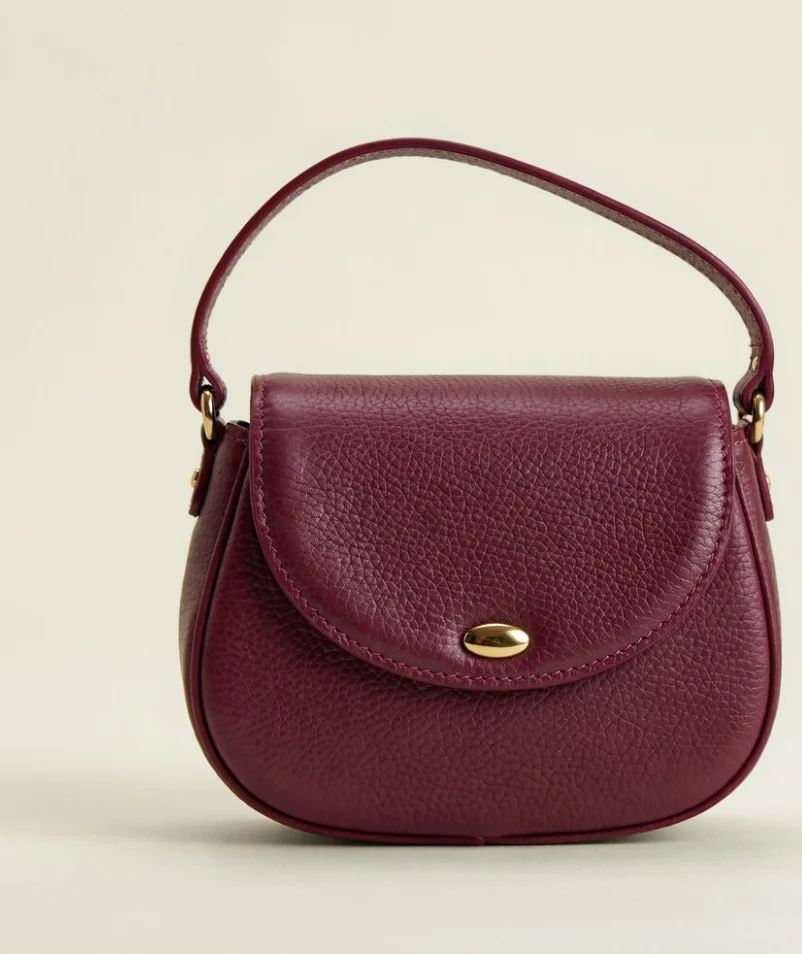
We generated a green handbag in Ideogram, then used text prompts to place it in a sunlit apartment and a terracotta studio. We also created a burgundy version. The bag’s shape and clasp remained recognizable, though the green appeared lighter in one lifestyle edit.
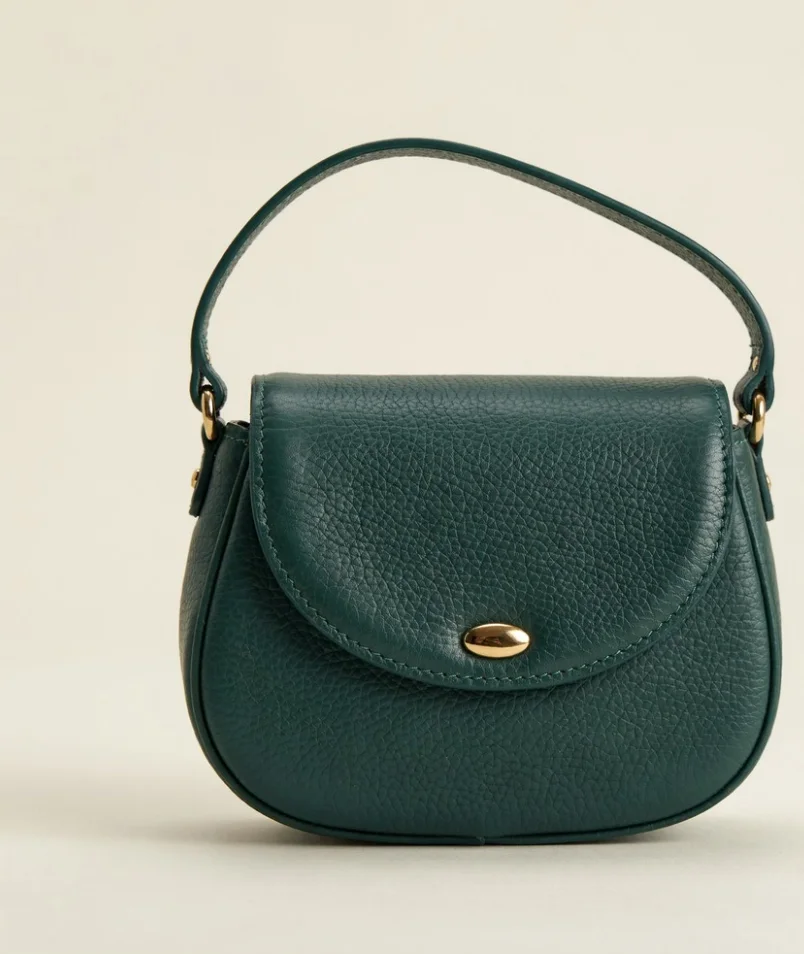
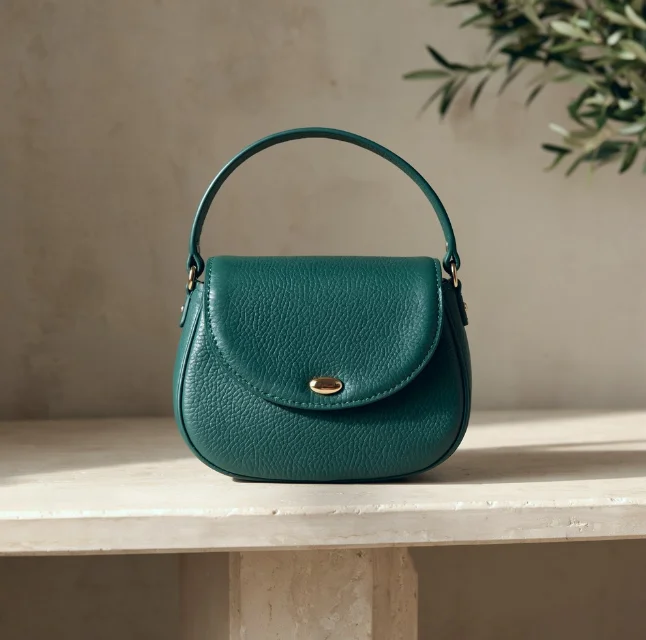
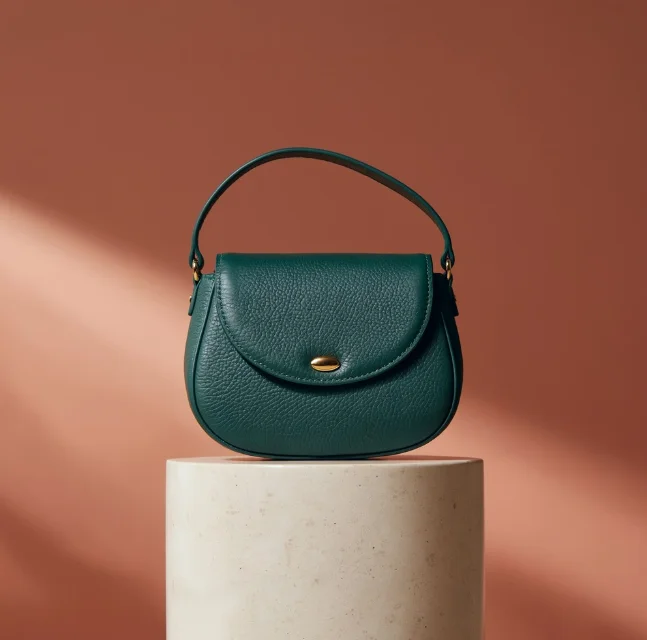
Try this product background edit
Upload your product image in Ideogram’s editor and describe the setting you want. For our apartment version, we used this prompt without a mask:
Place this handbag on a pale limestone console in a sunlit apartment. Add a warm plaster wall behind it and a softly blurred olive branch in the distance. Natural morning light enters from the left, casting a gentle shadow across the console.
Keep the handbag in the same position and preserve its dark green color, shape, strap, gold clasp, stitching, and leather texture. Keep the entire bag visible and sharply focused. Refined editorial product photography, warm neutral tones, no additional products or text.
Compare the result with your source image, paying close attention to color.
Explore color and material variations
Our Colorways tool is designed for product recoloring. Material Swap applies a reference material to selected areas, while Product Swap can help teams adapt creatives around a different featured product. Our burgundy example used a text prompt, not Colorways. For a closer look at the tool, see how to change product colors with Ideogram.
For recurring brand work, custom models offer another way to work from approved visual assets. In our Skechers case study, Skechers describes using custom branded models across product divisions and Product Swap for marketing visuals.
Ideogram batch generation, custom models, and API
Ideogram Batch Generation accepts a spreadsheet of up to 500 prompt rows, with up to four images per row. It’s available on Pro, Team, and Enterprise plans. Batch works from prompts, not from a folder of existing product photos. Batch currently supports models through Ideogram 4.0 and compatible custom models, but not Ideogram 4.5.
Our API supports generation, editing, background removal, and custom model workflows. Our enterprise team can help scope integrations with your DAM, PIM, or storefront.
Review product details before publishing
Check the final image against the real item, especially color, labels, logos, stitching, proportions, and materials. A creative variation can look convincing while changing a detail that matters to a customer.
If your main job is cleaning up a large backlog of supplier photos, Photoroom or Claid may be the better fit.
Pricing and governance: Pro is $42 per month when billed annually; Enterprise pricing is custom. API usage is billed separately. Ideogram Enterprise offers SOC 2-audited controls, Microsoft and Google SSO, and configurable retention. A data processing agreement is available for enterprise customers with EU data handling needs.
Tool 2 : Photoroom: Process product photos across a catalog
Photoroom is built around product image editing, making it a practical choice when you already have a large collection of supplier or seller photos. Its tools cover background removal, image editing, product scenes, and output preparation.
Clean up and format images in bulk
Batch editing in the app lets teams work on multiple images, while the API connects processing to their catalog systems. That helps when supplier photos arrive in different sizes, backgrounds, and lighting.
In a case study, Photoroom reports that Decathlon edited 35,000 images during a three-month project.
Photoroom API pricing
API operations have their own rates and allowances. Photoroom lists $0.02 per image for its Remove Background API and $0.10 per image for its Image Editing API. Some paid app plans include an API credit wallet; enterprise pricing is custom. Check which operations are included and how revisions are billed.
Review each result against the source product and category-specific marketplace requirements, including the edges of difficult cutouts.
Tool 3 : Claid.ai: Automate ecommerce image preparation
Claid is worth evaluating when product image preparation needs to fit into an automated pipeline. Its tools cover background removal, image enhancement, framing, resizing, and generated product scenes.
Standardize backgrounds, framing, and product scenes
For a mixed catalog, consistent padding and positioning can matter as much as the background itself. Claid’s Smart Frame API is designed to position and frame products on a canvas. Other API operations can generate backgrounds or enhance source images.
Your developers can connect these tools to your catalog. An API doesn’t necessarily provide a ready-made connection to your storefront or product information management (PIM) system. Find out who will build the connection, handle failed jobs, and send images for approval.
Claid API credits and integration
Claid’s web subscription credits and API credits are separate. Operations consume different amounts, so estimate costs using the tasks you need for each image rather than a single headline subscription price. Its published material lists Essentials from $9 per month with annual billing and custom business options.
Enterprise options can include data isolation, regional processing, and service-level agreements; availability depends on the proposed contract.
Tool 4 : Adobe Firefly: Work with product images across Adobe
Firefly makes sense to shortlist when your creative team already works in Adobe and needs product imagery alongside campaign design and asset production.
Firefly Object Composites for product images
Firefly’s Object Composites feature lets eligible enterprise users place a product image into a generated scene. That gives teams a way to work from an existing product shot while exploring backgrounds and visual settings.
Adobe also offers Creative Production and Firefly Services for larger production needs. Check which features are included in your organization’s plan, particularly if the people creating images and the people integrating them use different Adobe products.
Use custom models for brand-led creative
Custom models can be trained on representative images to guide a brand’s visual style. They can help with recurring campaign work, but a consistent brand look doesn’t guarantee the product matches the source photo exactly.
Enterprise pricing depends on the products and contract. Ask Adobe about user access, custom-model permissions, data handling, indemnity terms, and API usage for the specific models and processes your team will use.
Tool 5 : Nightjar: Keep a photography look consistent across SKUs
Nightjar focuses on building a repeatable look around product photos. Teams can save photography styles and setups, then use a shared library to carry that direction into later work.
Reuse styles and photography setups
A team refreshing a homeware catalog, for example, can define a photography style and use it as a starting point across related products. Nightjar calls saved setups Recipes and provides a team library for shared assets and settings.
Connect Nightjar to Shopify or an API
Nightjar is available through a Shopify app and an API. As of November 2026, its API documentation lists no way to pass a saved Recipe. Check how your team will pass styles and product details into the API before relying on a saved setup.
Paid plans start at $25 per month for 150 credits; the API uses the same credit balance. Nightjar’s terms say customer inputs and outputs aren’t used to train shared underlying models unless the customer opts in. Ask about SSO, retention, and any additional enterprise controls your organization requires.
Tool 6 : Flair: Compose product scenes on a visual canvas
Flair gives creative teams a canvas for arranging products and props. That hands-on approach can be useful when a designer wants to develop a campaign scene rather than work only from a written prompt.
Stage product scenes on Flair’s canvas
Before committing your catalog, test whether the controls give your team enough consistency across different product shapes and source-image quality. A scene that works for a bottle may need a different approach for a reflective accessory or a garment.
Flair bulk generation and enterprise plan
Flair documents bulk content generation using uploaded product images. The custom-priced Enterprise plan includes custom model training, SAML-based SSO, and integration support. Confirm API access, data retention, and training practices for your expected volume.
Tool 7 : Bria: Build product imagery into enterprise systems
Bria is worth considering if your developers want to add product image editing to your existing systems.
Create packshots and lifestyle scenes
Bria offers separate operations for product cutouts, packshots, shadows, and lifestyle scenes. Its API documentation describes how selected operations can be combined, such as adding a shadow to a cutout before creating a packshot.
Consider who will build the interface, connect product data, and manage reviews. You’ll also need a way to send approved images to your digital asset management (DAM) system or storefront.
Bria pricing, deployment, and rights
Bria describes pay-as-you-go and tailored enterprise options. Request pricing for the actual operations and volume you need. Legal and security teams should review the applicable data-handling, deployment, licensing, and indemnity terms since coverage can vary by model and contract.
Tool 8 : Botika: Create on-model images for apparel catalogs
Botika specializes in fashion imagery. It turns flat-lay and mannequin garment photos into on-model images, and can also work with existing on-model photos.
Turn garment photos into on-model images with Botika
For a fashion retailer, the finished image must show the garment in a way that helps customers understand what they’re buying. Test different cuts, patterns, fabrics, and sizes from your catalog. Botika’s FAQ says bulk upload is available for on-model photos; flat-lay and mannequin looks are created one at a time.
Check fit and product details before approval
Review drape, seams, prints, colors, and garment construction against the source item. An appealing model image is not enough if the garment appears materially different from the product being sold.
Botika uses credits and offers options for larger needs. If your catalog also contains furniture, electronics, or packaged goods, evaluate a separate tool for those categories.
Reference : How to choose AI product photography software for a large catalog
Protect product details and represent the item accurately
Start with the images you already have. A tool may generate an entirely new product, edit the source photo, or place a cutout into a generated scene. Those processes offer different levels of control, and none removes the need to inspect the result.
Look closely at fine print, logos, seams, transparent packaging, reflective surfaces, proportions, and the color customers will receive. A Reddit discussion about packaging labels illustrates the problem: one creator found that text and details changed while generating a serum bottle image. It’s a reminder to check small packaging text when testing product images.
Baymard’s product image research also shows why scale matters to shoppers. An attractive lifestyle scene should help customers understand the product, not suggest a misleading size or set of included accessories.
Check marketplace requirements before exporting
Your marketplace main image may have different requirements from a campaign image. For example, Amazon’s product image guidance requires a pure white background and a photograph of the actual product for main images, with restrictions on confusing props and added graphics. Check the current rules and any category-specific exceptions before publishing.
A lifestyle image may be useful elsewhere in the listing or on your own site, but don’t assume it qualifies as a marketplace main image.
Understand batch processing and API automation
Ask vendors to demonstrate the process using your inputs:
- Can a user select many existing product images and apply the same edit in the app?
- Is batch limited to generating multiple prompts, or can it process uploaded photos?
- Does the API require your team to submit and track individual jobs?
- How are failed jobs retried, and can reviewers see results before export?
These differences affect the people and engineering time you’ll need, even when every vendor says its product works at scale.
Keep the look consistent across SKUs
Decide what needs to stay constant: framing, lighting, background, camera angle, or an overall brand style. Then test that direction across several categories, not just your easiest product.
Templates, reference images, saved styles, and custom models can help teams repeat a look. Ask how those settings are shared, updated, and applied by different users or through an integration.
Connect approvals to your PIM, DAM, and storefront
Trace the path from the source image to the published file. Identify who checks product details, who can approve or reject an image, where revisions happen, and how the approved file is matched to the correct SKU.
Ask whether a connection to your product information management system, digital asset manager, or storefront is native, built through an API, or provided as part of a custom engagement. Confirm how files are named and how approved versions are handed back.
Review security, rights, and commercial terms
Before uploading unreleased products, ask how the vendor handles your inputs and outputs. Review SSO and user permissions, retention and deletion, use of customer data for training, subcontractors, commercial use, and any indemnity or service-level commitments.
Features and terms can differ by plan, model, and contract. Ask for the documentation that applies to the exact setup you intend to use.
Calculate the cost per approved image
The price of a generation isn’t the full cost if a team needs several attempts and manual review to produce one usable file.
Cost per approved image = total generation, editing, integration, and review costs ÷ number of approved images.
Include subscription seats, API charges, retries, upscaling, human review, and the time spent connecting the software to your systems. Use the same calculation for each finalist.
Reference : Run a pilot before scaling
A pilot doesn’t need to cover your entire catalog. Start with 50 to 100 products. Include difficult cases such as small label text, shiny packaging, transparent containers, textured materials, and detailed apparel prints.
Give two or three shortlisted vendors the same source images and comparable requirements. Then track:
- Product accuracy: Are color, text, shape, materials, and key details right?
- Consistency: Do backgrounds, lighting, and framing work together across the set?
- First-pass approval: How many images can your team approve without another edit?
- Process: How long does it take to generate, review, correct, and deliver the files?
- Cost: What did the approved images cost after credits, retries, review, and integration?
The goal is to find the process your team can repeat reliably, not just the tool that produces the most attractive single image.
Reference : Frequently asked questions
What is the best AI product photography tool for large catalogs?
It depends on the job. Ideogram is a strong choice for product scenes, creative variations, and brand-led campaigns, while Photoroom and Claid suit bulk cleanup of existing product photos. For apparel, Botika specializes in on-model imagery.
Can AI product photography tools preserve the exact product?
Some tools work from an existing product photo or composite it into a generated scene; others regenerate more of the image. Compare the output with the actual product, especially labels, colors, proportions, and fine details, before approval.
Can AI product photography tools process images in bulk?
Yes, but bulk can mean different things. Some tools apply edits to multiple uploaded product photos in an app. Others generate from spreadsheet prompts or use an API that your team connects to its catalog system. Ask for a demonstration using your own image types and volume.
Can we use AI-generated images on product pages?
Yes, as long as they accurately represent what customers will receive and meet your platform’s rules. Review the product, accessories, color, size, and materials. Marketplace main images can have stricter requirements than secondary or lifestyle images, so check the applicable category guidance.
How much does AI product photography cost for enterprise teams?
Pricing may combine subscriptions, seats, credits, per-image API charges, and custom contracts. Ask for a quote based on the number of source images, operations per image, expected revisions, and approval process. Compare the cost per approved image rather than the price of one generation.
Find the right tool for your catalog
If your team needs to clean and standardize a large backlog of existing photos, start by comparing bulk editing and API integrations. If you also need campaign scenes, creative variations, and brand-led product imagery, decide whether one tool can handle both jobs or whether you’ll pair a catalog tool with a creative one. For a broader look at enterprise creative tools, see our guide to the best AI image generators for business.
Ready to create product images for your catalog? Try Ideogram to explore product scenes and variations, or book an enterprise demo to discuss your catalog, brand requirements, and integration needs.