
7 Best AI Cartoon Generators in 2026
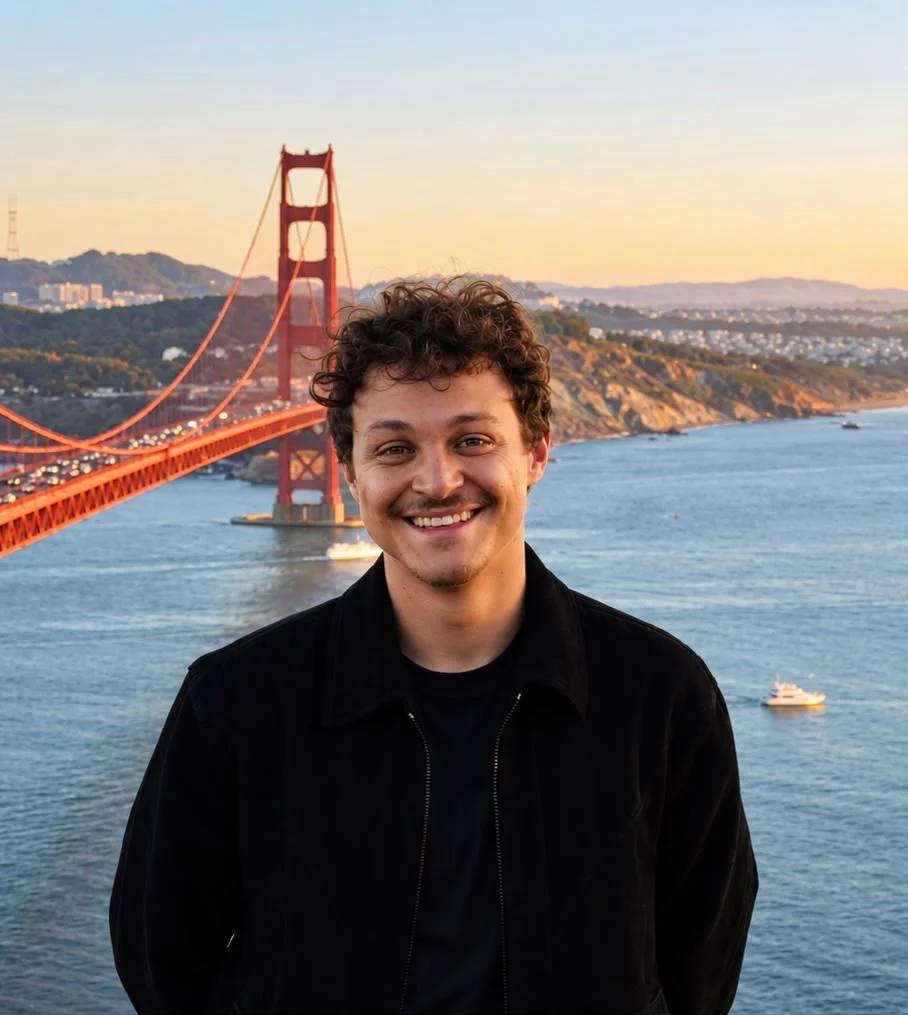
Ideogram is our pick if you need an AI cartoon generator for an original character with readable text, such as a branded mascot or campaign illustration. In our tests, “FOXY BREW” stayed readable on a fox mascot’s apron through a scene change and a color edit, and the fox stayed recognizable across both.
Your choice depends on what comes after the first image. A profile picture needs a style you like. A recurring mascot needs recognizable features, editable details, and lettering that survives revisions. A storybook adds poses, expressions, and scenes with more than one character.
We ran the same generated portrait through Ideogram, Canva, and Firefly, then tested scene and color changes with a coffee-shop mascot in Ideogram. The portrait instructions differed, so the images compare styles, not models. For Neolemon, Leonardo.Ai, Fotor, and Midjourney, we used official product guides and pricing.
Overview : Which cartoon generator fits your project?
| Tool | Best fit | Free access / starting price |
|---|---|---|
| Ideogram | Mascots with readable text | Free; Plus $15/mo, billed annually |
| Canva | Portraits and social layouts | Free PNG in our test |
| Adobe Firefly | Expressive portrait styles | Free allowance; Standard $9.99/mo |
| Neolemon | Illustrated stories | 20 trial credits; $29/mo |
| Leonardo.Ai | Character references | 150 tokens/day; paid from $12/mo |
| Fotor | Preset cartoon styles | Limited free credits; paid price varies |
| Midjourney | Original art direction | Basic $10/mo |
Paid prices above are in US dollars; billing and access details appear in each section.
Overview : What makes a good AI cartoon generator?
A good AI cartoon generator gives you the style you need, keeps important features recognizable, supports revisions, and exports a file you can use. For a recurring mascot, test the same character in another scene. For branded artwork, try the exact name or caption you need. For client work, make sure the tool allows commercial use.
Think about where the image will go. A profile picture may only need a PNG; a design you need to edit as vector shapes calls for a true vector file, such as SVG. An illustration that looks like vector art may still be a raster image.
Overview : Photo to cartoon: one portrait, three styles
We started with a fictional adult portrait generated in Ideogram: dark curls, tortoiseshell glasses, a mustard sweater, and a pale-blue background. The same source went into all three tools. Canva and Adobe Firefly gave us free PNG downloads without visible watermarks, making both worth considering for a quick portrait conversion.
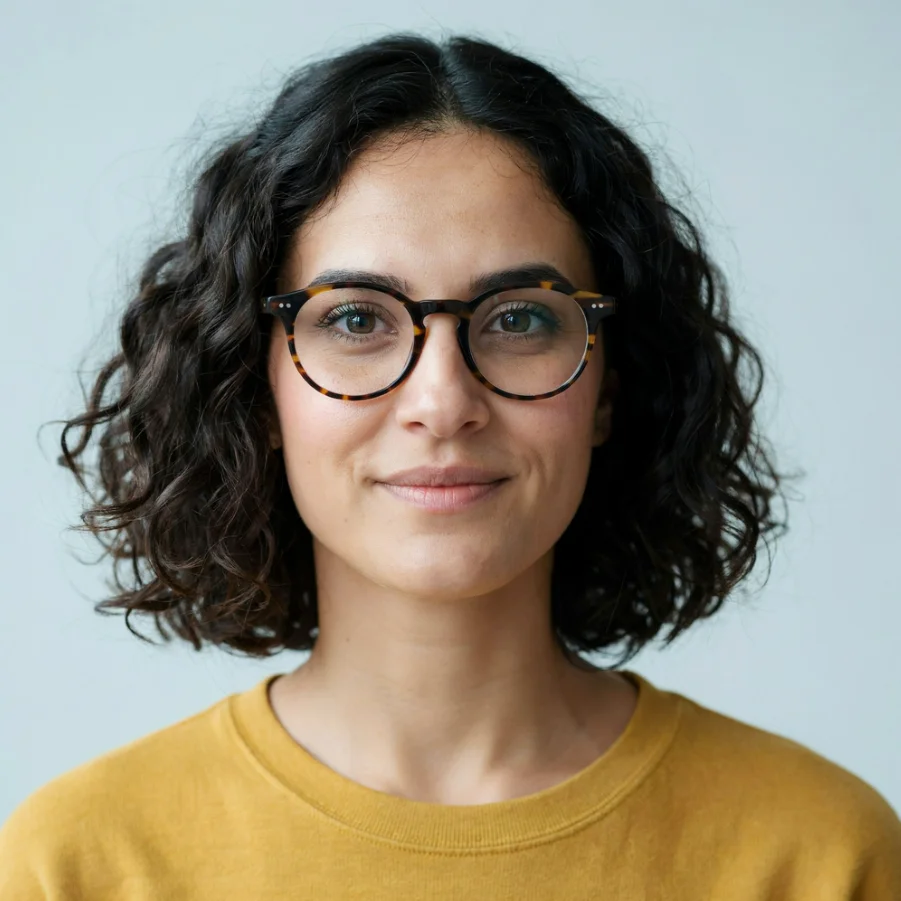
Original portrait
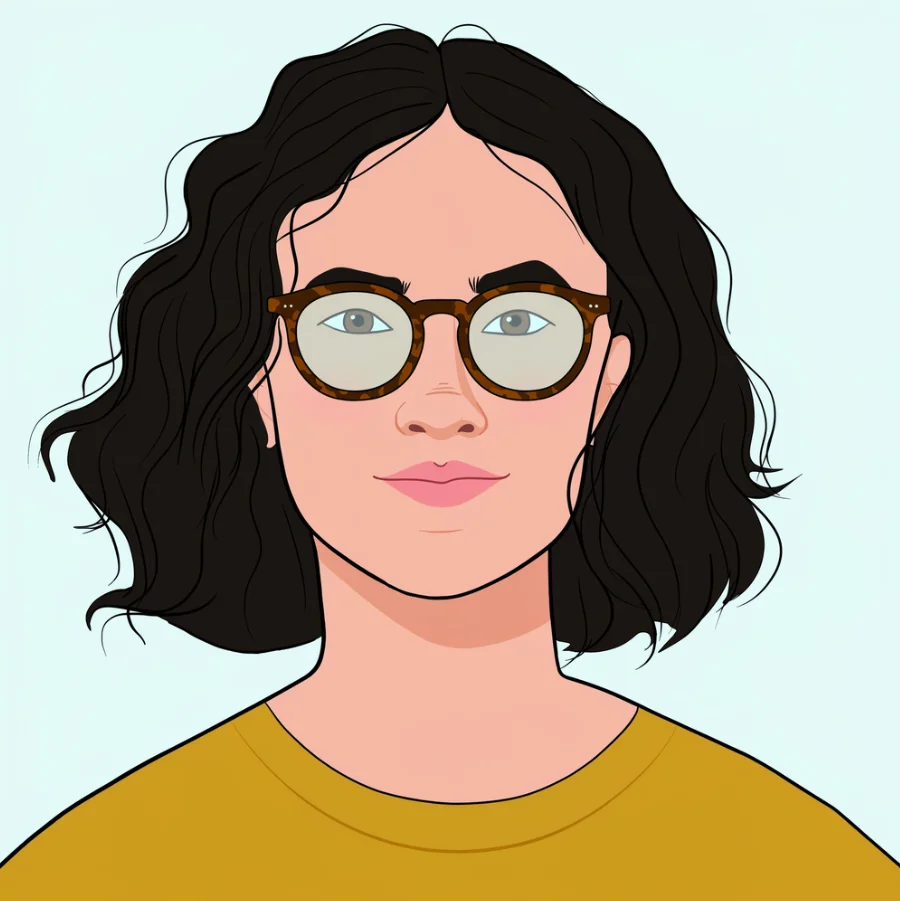
Ideogram

Canva
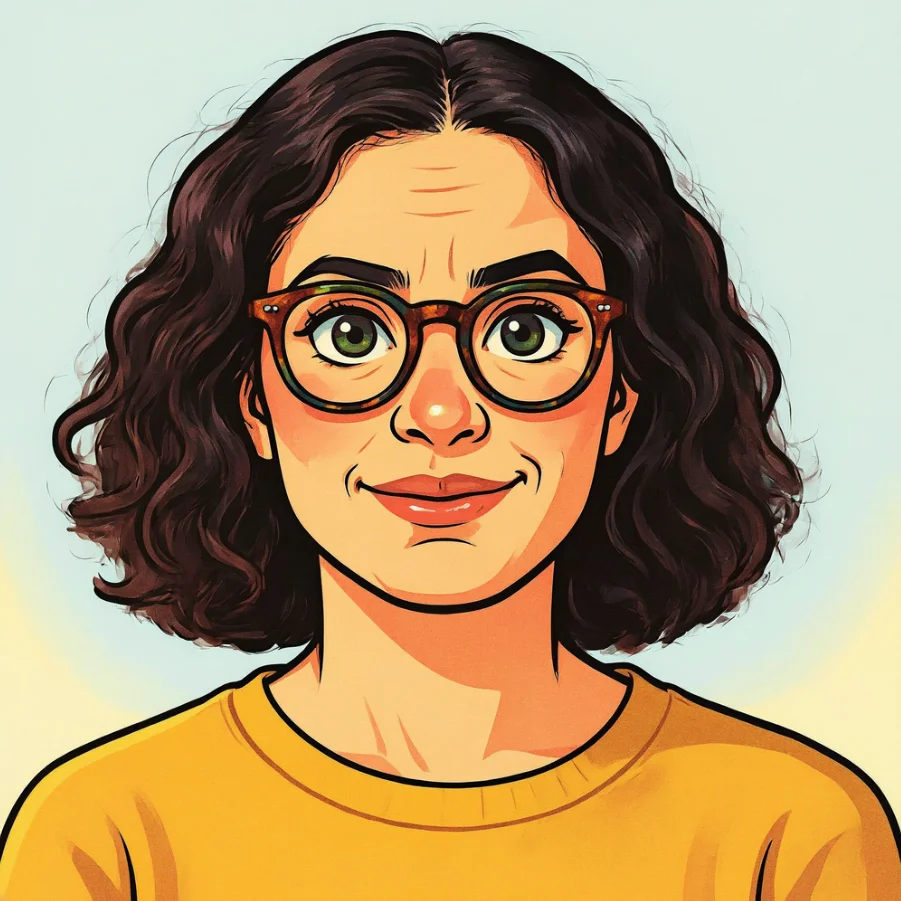
Adobe Firefly
Look at the curls, glasses, and expression
Ideogram followed our flat 2D instruction: simplified waves, flat fills, and clean contours, with the tortoiseshell frames intact. Canva produced more detailed curls and shading; Firefly supplied an expressive Saturday-morning-cartoon direction.
| Detail | Ideogram result | Canva result | Firefly result |
|---|---|---|---|
| Hair | Simplified dark waves | Dense curls with detailed shading | Curly silhouette with textured highlights |
| Glasses | Tortoiseshell frames with stylized lenses | Tortoiseshell pattern and visible eyes | Round frames surrounding enlarged eyes |
| Face | Flat fills and simplified contours | More shading; orange skin shift | Stronger smile and additional facial lines |
| Clothing | Simplified mustard top | Shaded sweater and ribbed neckline | Bold outlines and textured mustard fabric |
For an avatar, you might welcome an exaggerated expression. For a stylized staff portrait, changed eyes or a different smile could be a reason to revise. Look closely at the eyes, glasses, and expression before choosing a favorite.
Check the download, not just the preview
Canva Free gave us a 1264 × 1264 PNG. Firefly’s free daily allowance gave us a 2048 × 2048 PNG. Neither download had a visible watermark.
For a small profile image, the face and expression are the first things to judge. If it’s going on a banner or in print, view the downloaded file at the intended size. More pixels alone won’t fix a changed face or blurry edges.
Tool 1 : Ideogram: Create cartoon characters, add text, and refine your artwork
Ideogram is best for creators and marketers who want to develop original cartoon artwork and keep editing it. You can start with words, work from an existing image, or turn a character you like into another scene.
From a fox with a mug to a coffee-shop greeter
We gave our coffee-shop mascot an orange-and-cream coat, a forest-green apron, a white mug, and the name “FOXY BREW”. The name had to appear on the apron, not in a caption added afterward.
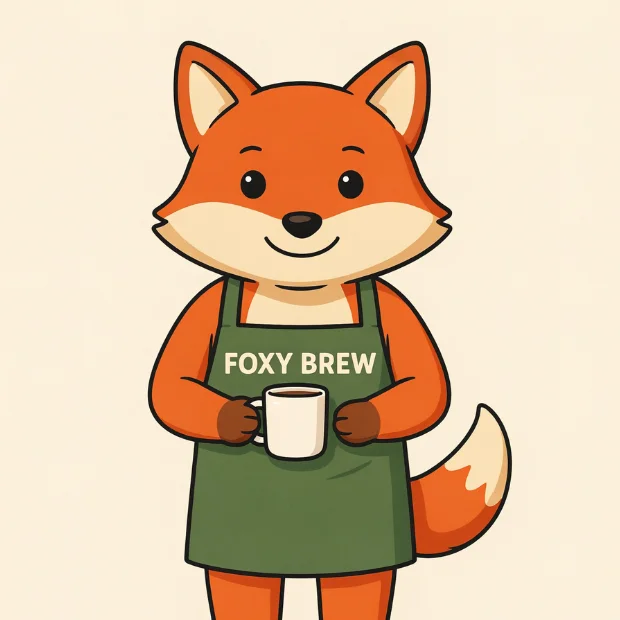
Create
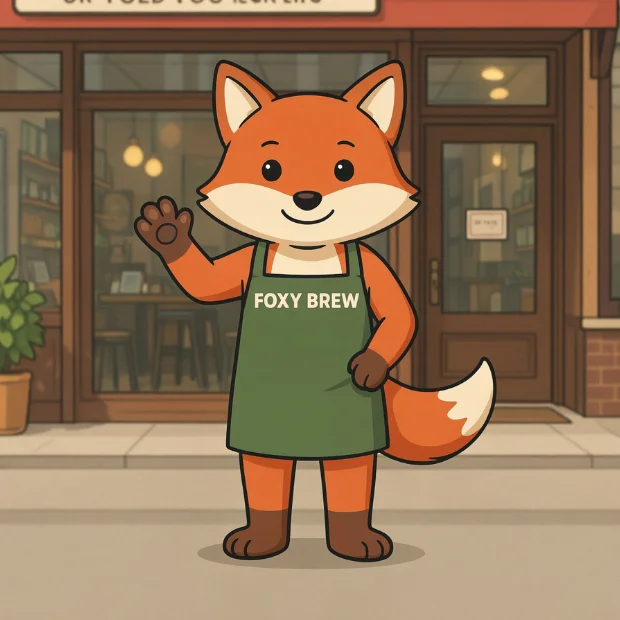
Change the scene
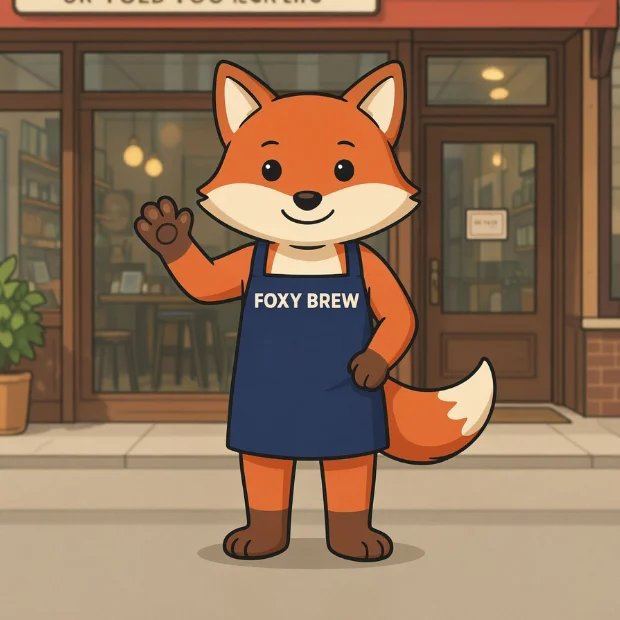
Revise the outfit
Our mascot downloads were 2048 × 2048, with no visible watermark.
First generation: The name was spelled correctly, and the orange-and-cream fox stood clearly against the plain background. The first image cropped the feet; our next edit included them. For a standing cutout, ask for “both feet visible, with empty space below them.”
In Contra Labs’ blind evaluation, 10 designers assessed 240 images across three categories. Contra Labs is part of Contra, which partners with Ideogram on a creator network. The study reported Ideogram 4.0 first in 47.9% of typography comparisons, against 30.0% for Nano Banana 2, with a 3.55 out of 5 rating for use in client work.
Short names are a practical starting point for text inside artwork. Put the exact wording in quotation marks and specify its location. If you need a poster, illustrated promotion, or shirt design, our AI tools for T-shirt design comparison covers the related lettering and export decisions. The same applies to comic panels, where speech bubbles and captions need to be spelled correctly.
What survived the edits?
Next, we opened the mascot in Precise Edit and requested a waving pose outside a coffee shop, with no mug and both feet visible.
The fox remained recognizable through its pointed ears, cream muzzle, orange fur, and green apron. The name stayed readable, the mug disappeared, and the new framing included the feet. Some proportions changed, with longer legs and new brown feet, and the storefront sign contained garbled lettering we hadn’t requested. “FOXY BREW” remained readable on the apron, but the sign text wasn’t usable. For a blank sign, ask Precise Edit to remove the garbled text while keeping the sign and facade unchanged.
We then requested one change: turn the green apron navy blue. The apron and straps changed color while the name, waving pose, face, and shop setting looked the same at normal viewing size.
Imagine the client has approved the coffee-shop scene, then asks for an apron that matches a new campaign palette. That’s what we tried. The navy result gave us that variation without needing to start the mascot again.
Plans and editing credits: Free generation is available, but Image Reference and AI editing require priority credits. Our Plus plan costs $180 billed annually, equivalent to $15 a month. Credit costs vary by model and settings.
Commercial work and privacy: We allow commercial use of generated images under our terms. Plus and Pro support unpublished images; use private generation for a mascot or campaign you’re not ready to share.
For copy changes after generation, editable text layers offer another route in Studio. They let you change the lettering directly without generating the whole image again.
A character across several scenes: In the Image app, choose Ideogram 4.5 and attach one to five clear reference images. Select the image tag from the reference menu and describe the new pose or setting. Reuse the same references for subsequent scenes. JPEG, PNG, and WebP files up to 25 MB each are supported. Our Character page also summarizes a creator comparison against Midjourney, Leonardo, and Nano Banana across six tasks, reporting that Ideogram retained identity throughout.
Actual SVG output: For a cartoon mark that needs editable vector shapes, Ideogram Vector generates SVG artwork from prompts or vectorizes an existing image. Downloading a cartoon as PNG doesn’t create an SVG. Before sending it to a printer, open the SVG in a vector editor and look for broken shapes or altered lettering.
Tool 2 : Canva: Take the cartoon into a finished social design
Canva is best for a cartoon portrait that needs a surrounding layout: a post, thumbnail, presentation, or profile graphic. Once you have the conversion, the next task is often adding a headline, arranging a frame, or fitting it into an existing design.
What worked well: After generation, we could download the image, open it in the editor, or save it to Canva. A text field also offered follow-up changes, though we stopped at the first download.
If the next step is adding a headline and placing the portrait in a social template, you can finish the post without leaving Canva.
Limitation in our test: The conversion retained detailed curls and the sweater’s neckline, but warmed the skin substantially. Correct the color before building the rest of the graphic around it.
Canva’s native Photo to Cartoon tool is separate from third-party cartoon apps in its marketplace. Each app has its own credits and rules. Our example used the native tool.
Free download and paid plans: Our Canva Free account downloaded the 1264 × 1264 PNG without a visible watermark. Our download didn’t require Pro. For additional design features, Canva lists US Pro pricing at $18 month-to-month or $144 billed yearly. Paid AI access still has allowances, so a subscription doesn’t mean unlimited cartoon conversions.
For client designs: Generated artwork and added library assets have different terms. Any premium templates, photos, or graphics you add come with their own license. For client uploads, the AI tool’s data settings matter too.
Tool 3 : Adobe Firefly: Give a portrait an expressive cartoon style
Firefly makes sense when you want a stylized portrait and expect to continue in Adobe’s editing tools.
Style and controls: In our run, the tool supplied the art direction. Its prompt requested a Saturday-morning cartoon with a playful personality, saturated colors, warm highlights, and cel shading. The selected model was Firefly Image 5, with Auto · 2K displayed in the interface.
Likeness trade-off: The enlarged eyes and stronger smile fit that expressive direction, but changed the source’s restrained expression. If you’re making a staff portrait, zoom in on the eyes and smile before using the result.

Free allowance and Standard plan: The free daily allowance covered our generation and 2048 × 2048 PNG download, with no visible watermark. Firefly Standard starts at $9.99 monthly. It includes unlimited standard image features and a monthly credit allowance for premium features; partner-model use can draw on those credits.
Commercial use and uploaded images: Firefly output can be used commercially under Adobe’s terms. Adobe says it doesn’t train Firefly on customer content. Partner models available within Firefly can have different terms.
Our Firefly alternatives guide covers other options when you need a different combination of generation and editing.
Tool 4 : Neolemon: Build a recurring character for an illustrated story
Neolemon suits a story that needs the same character in different poses and settings. It accepts a written description or photo and offers nine illustration styles, including modern Western cartoon, anime, chibi, and watercolor.
For a children’s book, define the lead character before laying out pages. Neolemon’s character editors and multi-character scene creator support that progression from a single character to scenes with a cast.
Inputs and styles: The photo tool accepts PNG, JPG, and WebP files up to 10 MB. The nine presets include flat Western cartoons, anime, and watercolor styles.
Trial credits and Creator plan: You start with 20 free credits. Creator costs $29 billed monthly, with 600 credits for up to 150 generations. The plan includes character editors, a multi-character scene creator, and upscaling.
Privacy and commercial use: Creator includes private generations and commercial use. That matters if your book isn’t out yet or you’re making illustrations for a client.
Before a full book: Try the character in several poses and expressions first, before you commit to a page count.
Budget for revisions as well as pages. An awkward pose or changed expression can use another generation even when the scene itself is already decided.
Tool 5 : Leonardo.Ai: Develop a character from references
Leonardo.Ai fits creators who want to develop a character, refine its appearance, and build scenes through reference-led generation. Its character tools include image editing, a Consistent Character blueprint, and a Multi-Character Scene Builder supporting up to five characters.
Settle on each character, adjust its clothing or features, then assemble the cast. For an illustrated series, prepare references that clearly show each character’s distinguishing details before attempting a group scene.
Free plan: You get 150 daily tokens, Auto-only model access, basic quality settings, and public creations. Tokens aren’t a fixed image count: model and generation choices affect usage.
Paid access: Essential is listed at $12 per month before tax, with 8,500 monthly tokens, private creations, broader model access, enhanced quality settings, and personal AI models. The final price depends on the billing option you pick.
Commercial rights: Free users receive a non-exclusive, royalty-free license for commercial use; paid subscribers receive different ownership rights. For unreleased client characters, the free plan’s public output is a good reason to pay for private access.
Model limitations: Reference controls differ by model. Leonardo’s newer Omni workflow uses images with written instructions, while other models have separate guidance options. Tutorials need to match the model you’re using, because the reference controls differ.
Tool 6 : Fotor: Try preset looks for a photo or create from a prompt
Fotor offers preset cartoon looks when you want to try different styles without writing a detailed art brief. Its cartoon tools include preset looks such as bold-line, simple-line, chibi, and 3D cartoon.
You can also start from a written description through its image generator. Those are different jobs: use photo conversion when you have a subject to restyle, or generation when you’re inventing a character or scene.
Finish the graphic: Its photo editor supports additions such as text and stickers, along with background changes. That can be enough for a one-off avatar or social graphic without developing a recurring cast.
Free access and exports: Basic includes limited free credits. Check the download size and watermark before you pay for a result you’ve only previewed.
Paid plans and credits: Fotor offers Pro, Pro+, and Max. Its support guide lists 100 monthly credits for Pro and 300 for Pro+; Max allowances depend on the selected tier. The pricing page didn’t display a readable dollar amount when checked. You’ll see the actual price and billing period at checkout. A paid subscription can still run out of credits.
Selling the output: Fotor permits personal and commercial use of AI-generated images and distinguishes that output from its stock materials. Library assets you add to a cartoon have their own usage rules.
Tool 7 : Midjourney: Explore an original cartoon aesthetic
Midjourney suits illustrators and creative teams exploring the look of a character or scene. Prompts, image references, and style controls let you develop an aesthetic beyond a list of cartoon filters.
Editing and references: Its web editor works with uploaded and generated images. Reference support depends on the version: V7 uses Omni Reference, while the V8 editing approach supports up to four reference images. Match tutorials to the selected version; older instructions may describe different controls.
You might explore several styles for a mascot or illustrated campaign, then use editing to develop the selected direction. Keep the approved image available as a reference instead of relying only on the same written description.
Pricing and free access: The listed subscriptions start with Basic at $10 monthly or $96 billed annually. Standard is $30 monthly; Pro is $60. Standard and higher include relaxed image generation, which trades speed for continued access without consuming the plan’s faster-processing allowance, called Fast GPU time.
Privacy limitation: Stealth Mode is available on Pro and Mega. If your images need to stay private, Basic won’t cover it.
Company-use requirement: Businesses grossing more than $1 million annually need Pro or Mega to use their Midjourney images commercially for the company. Upscaling someone else’s image doesn’t transfer their ownership to you.
Reference : From cartoon image to social post, merchandise, or animation
For social content: Think about what happens after you download it. Templates, editable captions, cropping, and layout tools may matter more than another style preset. If you’re choosing a broader platform, our AI image generator comparison covers additional creation tasks.
For stickers and merchandise: Open the downloaded file before sending it to a printer. A PNG can still contain a solid background, and a vector-looking illustration isn’t necessarily an SVG. Match the file to your printer’s dimensions and production requirements. Our print-on-demand guide explains the checks between generated artwork and a production file.
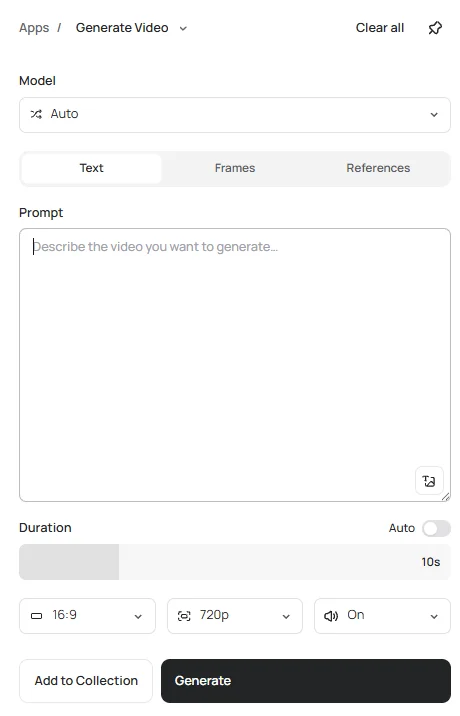
For animation: You can animate a cartoon in our Video app. In Frames mode, your image becomes the first frame. Add the fox as the start frame and describe one clear action, such as “the fox waves at the camera, camera locked.” The app offers Seedance 2.5, Seedance 2.0, Kling v3 Standard, and MiniMax H3. Seedance 2.5 supports clips up to 30 seconds; available settings vary by model. Downloads are MP4 files. Video requires a paid plan or purchased credits.
Reference : Frequently asked questions
Which AI cartoon generators offer free downloads without watermarks?
Ideogram offers free generation, with weekly credits for eligible accounts, and our mascot exports had no visible watermark. Image Reference and AI editing require priority credits. Canva and Firefly also gave us watermark-free PNG downloads using free access.
Can ChatGPT or Gemini turn a photo into a cartoon?
Yes. Upload the photo and describe the cartoon style, along with the features you want to keep. Ask for specific traits, such as round glasses or tight curls, instead of only saying “make it a cartoon.”
How do you keep a cartoon character consistent across images?
In Ideogram 4.5, add one to five reference images of the approved character, then describe the new scene using its image tag. Reuse those references for each new pose. For a change to an existing composition, open the image in Precise Edit and specify the detail to change.
Can you use AI-generated cartoons commercially?
Yes. We allow commercial use of images generated in Ideogram under our terms. Other platforms set their own plan and asset conditions: for example, Midjourney requires Pro or Mega for company use by businesses grossing more than $1 million annually. You also need the rights to any stock graphics or source photographs you use.
Can you turn a pet photo into a cartoon?
Yes. In Ideogram 4.5, add the pet photo as a reference image and describe the cartoon style you want, such as flat 2D or a 3D cartoon. Include distinctive details, such as coat markings and ear shape, in the prompt. Canva’s photo-to-cartoon tool also supports pet photos.
Start with one character and one clear brief
Create your cartoon in Ideogram, then use the result to develop the next pose, scene, or revision.